Releases

Your app, released on your own accounts.

The AI app builder for Shopify brands. We build, sign and submit your app on your own Apple and Google accounts.

Studio’s Manage App Builds on a sample store: an Android release build at its Build step, then the latest iOS release build and an Android test build
Each release build, step by step, in Studio’s Manage App Builds.

Shopify brands running their app on Appbrew

  • SwimOutlet
  • Kut from the Kloth
  • SUGAR
  • Mixology
  • Anatomie
  • Pixi
  • Sukoshi
  • perfectwhitetee
  • littlebox
  • Beastlife
  • Minimalist

Before your first release

We submit. You own it.

Two developer accounts in your business’s name and one invite. The listing, the reviews and the app analytics stay yours.

Your first release
  1. YouApple Developer ProgramAs an organization, with a D-U-N-S number
    $99 a year
  2. YouGoogle Play ConsoleAs an organization
    $25 once
  3. YouInvite apps@appbrew.techAs Admin on both accounts
    One invite
  4. AppbrewListings, build, sign, submitBoth listings filled in for you to check
    Our part
  5. Apple · GoogleReviewIf a store asks for changes, we fix and resubmit
    1–2 weeks

What needs a release

Most changes don’t.

Only native changes go through store review. The rest reach shoppers when you say yes.

Store reviewNot needed

Config changes

Screens, banners, collections, theme.

  1. Draft
  2. Preview on your phone
  3. Publish

Live when you publish

Store reviewNot needed

Instant code blocks

New blocks, written in code.

  1. Written by Milo or your team
  2. Preview on your phone
  3. Over the air

Live after your yes

Store reviewNeeded

Native changes

A new app icon, or an integration that needs a native build.

  1. Build and sign
  2. Submit on your accounts
  3. Apple and Google review

Live after review

Your shoppers’ appUnchanged until you say yes.
Salty’s app: bats fly across the Halloween collection, built with Instant code
SaltySalty’s own team built Halloween bats for their app and put them live the same day, with no App Store release.See Instant code 

A store release

Step by step, on your accounts.

Studio’s Manage App Builds on a sample store: an Android release build moving from Prepare to Build to Sanity, then the latest iOS release build and an Android test build with its APK
Manage App Builds in Studio. The ring follows the step.

Already on Appbrew? Log in to Studio Renew Apple every year, accept its updated agreements and keep apps@appbrew.tech on both accounts to stay live.

Publish history

Every publish, on the record.

  • 01

    Who and when

    Each publish carries a name and a time.

  • 02

    Reschedule or cancel

    Before a scheduled publish goes out.

  • 03

    Restore an earlier theme

    Back as a draft, ready to publish again.

  • 04

    Who may release

    On Enterprise, roles and permissions, including app releases.
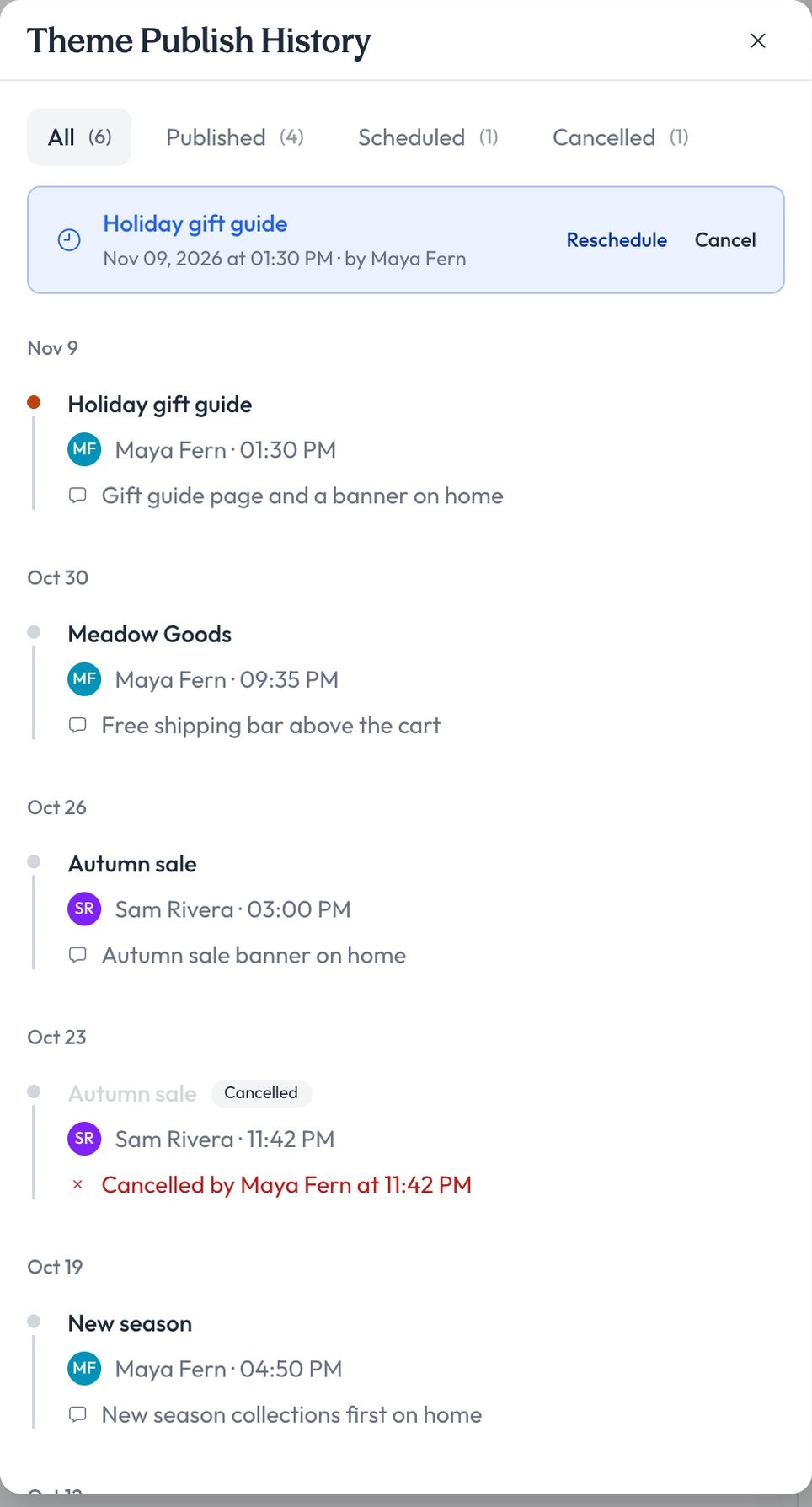
Studio’s Theme Publish History: a scheduled holiday gift guide with Reschedule and Cancel, then earlier publishes by person and date, and a canceled schedule
Each publish keeps a name and a time.

Milo’s part

Publish or schedule, after your yes.

Milo works on a draft. It never submits to the stores.

Schedule the winter theme for Friday at 9 AM.

Ready to preview on your phone. Publish now, or schedule it?Publish the winter themePublish nowSchedule for Friday, 9 AMSkipSubmitMilo · waiting on your yes

Scheduled for Friday at 9 AM. Your live app is unchanged until then.Milo · after your yes

Milo can

  • Publish a theme when you say yes
  • Schedule a publish, and unschedule it
  • Keep every edit on a draft

Milo can’t

  • Build, sign or submit your app
  • Publish without your yes
  • Ship native code over the air

Littlebox

“It really gives us the best of both worlds. …the speed and reliability of a platform like Appbrew with the freedom of having our own development team innovate.”
Founding member and CTOLittlebox

For your engineers

Your repo. Our pipeline. Your accounts.

Nobody installs fastlane or signing certificates. Every platform version says whether it needs a store release.

default branch
Your repoCode access, on every plan
buildsignversion
Appbrew’s pipelineBuilds, signs, bumps the version
App Store ConnectPlay Console
Your store accountsSubmitted on your own consoles
  1. 0.37

    Faster start-up, AppsFlyer deep links

    ReleaseNative: GoKwik only

  2. 0.36

    Start-up back to 0.34 speed

    ReleaseNo store release

  3. 0.35

    iOS 26 Liquid Glass bottom bar, B2B prices

    ReleaseStore release

  4. 0.34

    Shopify APIs pinned to 2026-07

    ReleaseStore release

  5. 0.33

    Instant code for every app

    ReleaseNo store release

  6. 0.32

    BOGOS bundles, Videowise live shopping

    ReleaseNative: Clarity, in-app update

App releases guide Taking platform updates Platform changelog Run on a physical device See the developer platform 

FAQ

Questions brands ask about releases

Do I need my own Apple and Google developer accounts?

Yes, two developer accounts in your business’s name: the Apple Developer Program, $99 a year, and Google Play Console, $25 once. A company account needs a D-U-N-S number, which is free: Apple says it takes up to 5 business days, and Google suggests allowing 30 days or more. Then you invite apps@appbrew.tech as Admin on both.

Who submits the app to the stores?

The Appbrew team submits your app on your own accounts, with delegated access. We fill in both store listings for you to check, submit, and fix and resubmit if a store asks for changes. Plan one to two weeks for review on a first submission. Milo never submits to the stores.

What can change without a store release?

Screens, blocks, banners, collections and theme changes ship when you publish the theme from Studio. Instant code blocks ship over the air after your yes. A new build goes through review when the app itself changes, such as a new icon or an integration that needs a native build.

I already have an app in the stores. Do I keep the listing?

Yes. Your listing and reviews stay yours, on your own accounts. What else carries over depends on your current builder; we go through it with you.

Can my engineers release from our own repo?

Yes. Code access comes with every plan: your team works in the app’s React Native repo, and Appbrew’s pipeline builds from its default branch, signs, and submits on your own App Store Connect and Play Console. Nobody installs fastlane or signing certificates locally, and debug builds run on real devices from your own machine.

What is a test build?

A build of your app that doesn’t go to the stores. Start one from Studio, install the APK on an Android phone, and get an email when it’s ready.

Who on our team can publish or release?

Every plan keeps a publish history with who published and when, and lets you restore an earlier theme. On Enterprise, team roles and permissions decide who can manage app releases, app themes, push notifications and integrations, with audit logs and 24/7 priority support.

What happens to our code when the platform updates?

Platform upgrades are deliberate: your team moves the whole package set to one version, verifies it, and releases. Each version in the changelog says whether it carries native changes, so you know when a store release is needed.

What do I need to do to keep the app live?

Renew your Apple Developer membership every year, accept Apple’s updated agreements when Studio reminds you, and keep apps@appbrew.tech on both accounts.

Release on your own accounts. Change the rest by asking.

30-day free trial on Starter.