Appbrew Studio

Ask for a change.
Try it on your phone.
Say yes.

Milo builds your app here. You run it.

Studio’s Design page on the sample store Meadow Goods: Milo’s chat on the left (“Your app is ready”), the app on a phone in the middle, and View on device and Publish at the top right
A real Studio screen. Sample store, invented data.

Shopify brands running their app on Appbrew

  • SwimOutlet
  • Kut from the Kloth
  • SUGAR
  • Mixology
  • Anatomie
  • Pixi
  • Sukoshi
  • perfectwhitetee
  • littlebox
  • Beastlife
  • Minimalist

01 · Change

Ask in plain words.
Milo drafts it.

Milo reads first and asks before it acts.

Draft theme

Every change starts
on a draft.

Milo shows its plan, works on a draft and tells you when it’s done. Shoppers see nothing yet.
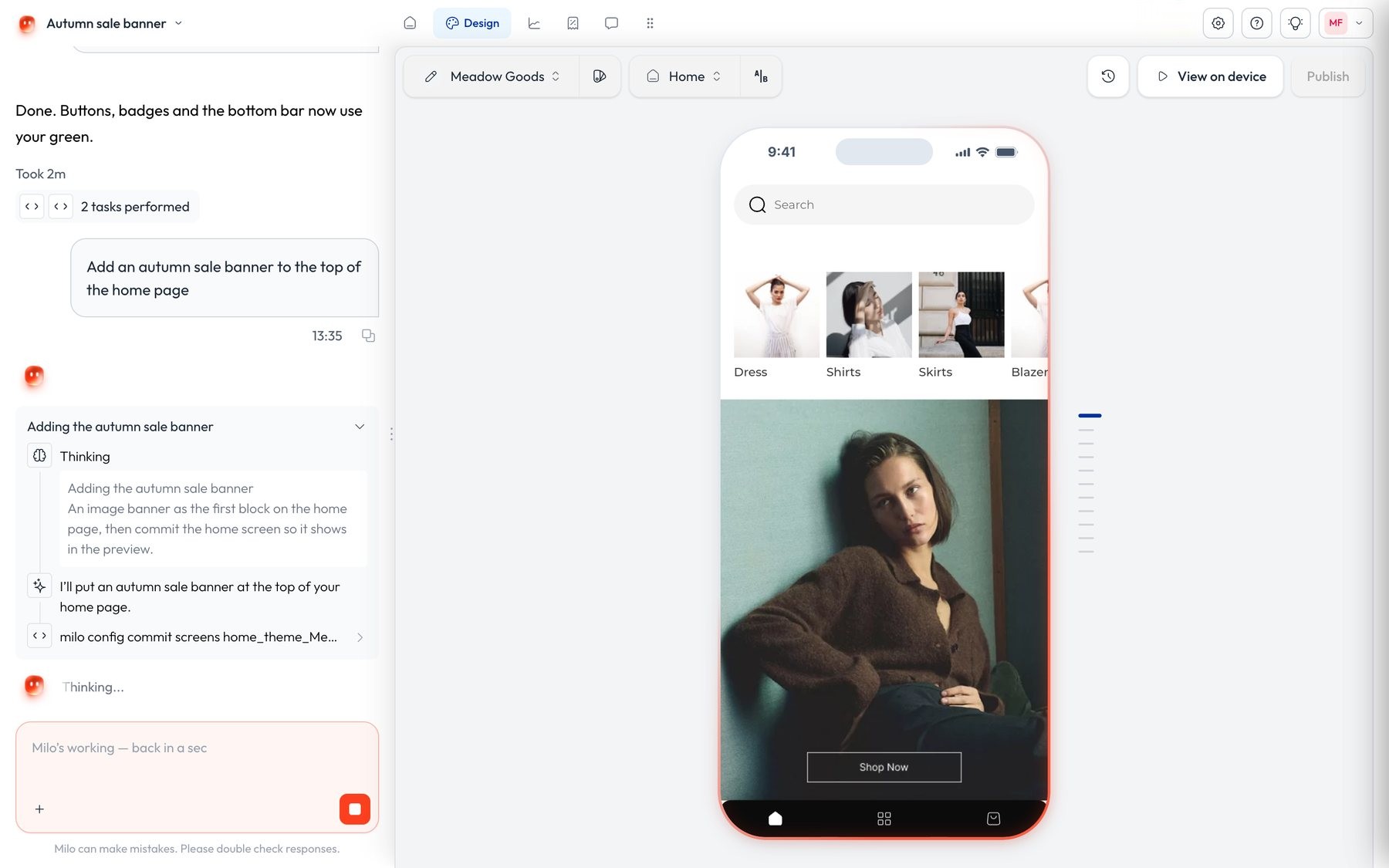
Studio while Milo works on a draft: its plan and the command it runs in the chat, the composer paused, and the app on a phone beside it
Milo says what it will change, then works on a draft.

Preview

Try the draft
on your own phone.

Scan the code and the draft opens on your phone, page by page.

Studio’s Try it on your phone panel: a QR code, “Scan the code to preview the app on your phone”, and a link to copy
The draft opens on your phone, page by page.

02 · Approve

Nothing goes live
without a yes.

Milo never submits to the App Store or Google Play. The Appbrew team does, on your own accounts.

Publish

Publish now,
or pick a time.

The theme goes live only when someone says yes.

Studio’s Ready to publish dialog for Meadow Goods: optional notes, Schedule, and Publish
Publish now, or schedule it for later.

Publish history

Every publish,
on record.

Who published what, and when. Restore an earlier theme as a draft.
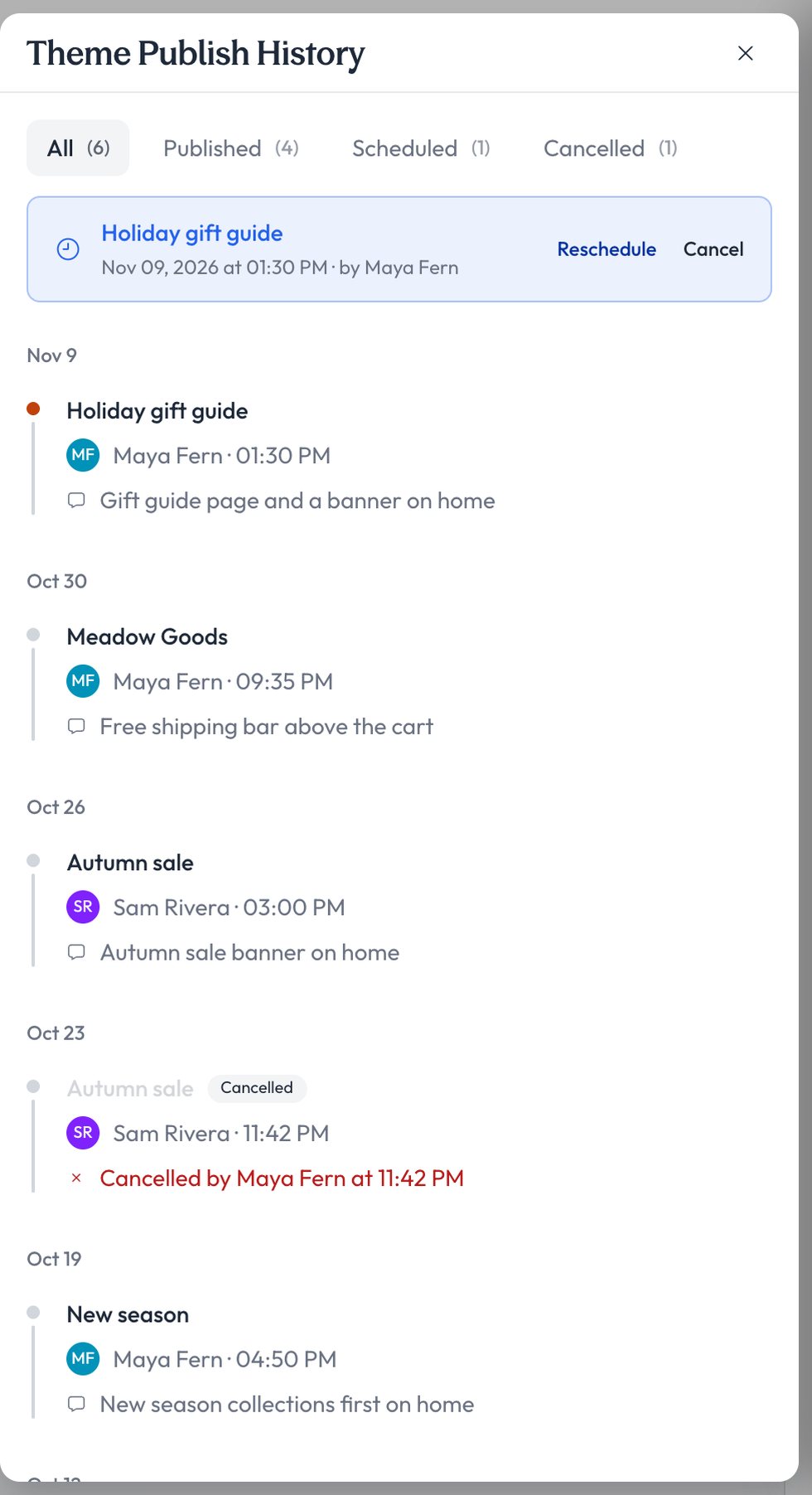
Studio’s Theme Publish History: a scheduled holiday gift guide with Reschedule and Cancel, then earlier publishes by person, date and time
Each publish keeps a name and a time.

Roles · Enterprise

Decide who
can change what.

Owners give each person a role, Owner, Editor or Viewer, and switch permissions one by one.

SOC 2 and ISO/IEC 27001:2022 compliant. trust.appbrew.com 

Studio’s Edit user dialog for Sam Rivera: role Editor, and permission switches for push notifications, app releases, app themes and integrations
Owner, Editor or Viewer, with permissions per person.

03 · Grow

Push, discounts and numbers,
one tab each.

Ask Milo, or do it yourself in the tab.

Push

Pushes, drafted
and scheduled.

Milo drafts the push, sends you a test and schedules it after your yes. Push comes with every plan.
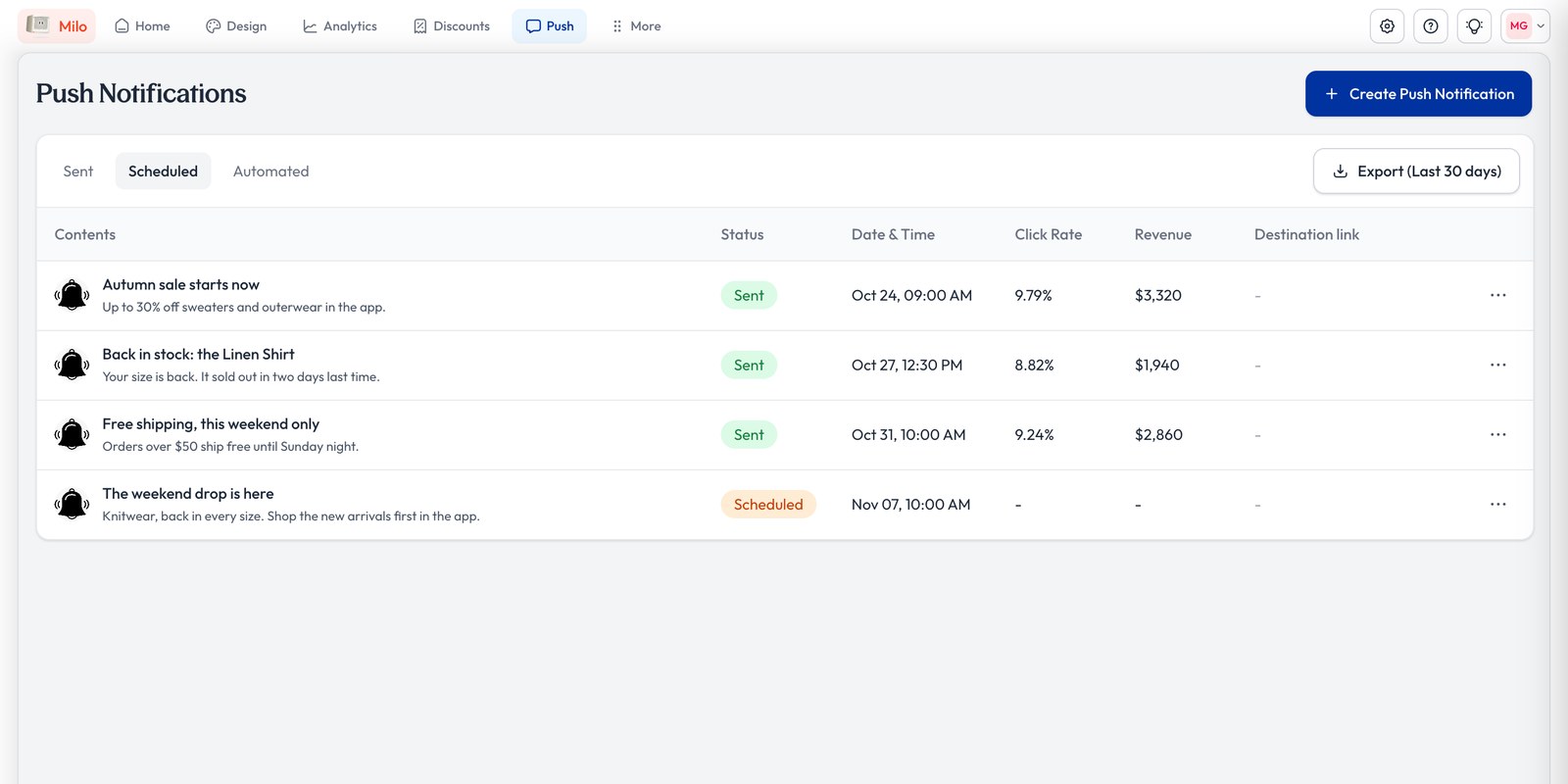
Studio’s Push page: three sent pushes with click rate and revenue, then the scheduled push “The weekend drop is here”
Every push in one list, with its click rate and revenue.

Discounts

Milo fills it in.
You save it.

Milo suggests a discount from your numbers and sets it up in Studio. It goes live when you say yes.
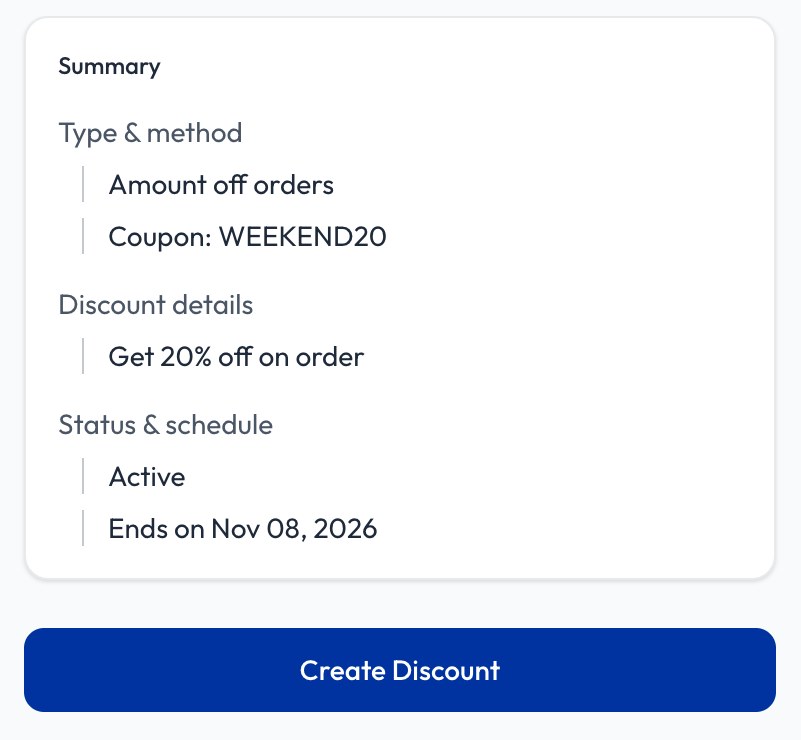
Studio’s discount summary on the sample store: amount off orders, coupon WEEKEND20, 20% off, active, ends Nov 8, with Create Discount
Milo fills in the discount. It goes live when you save it.

Analytics

Ask how
sales went.

Milo answers from your app and Shopify numbers, with a chart or a report. Nothing in the app changes.
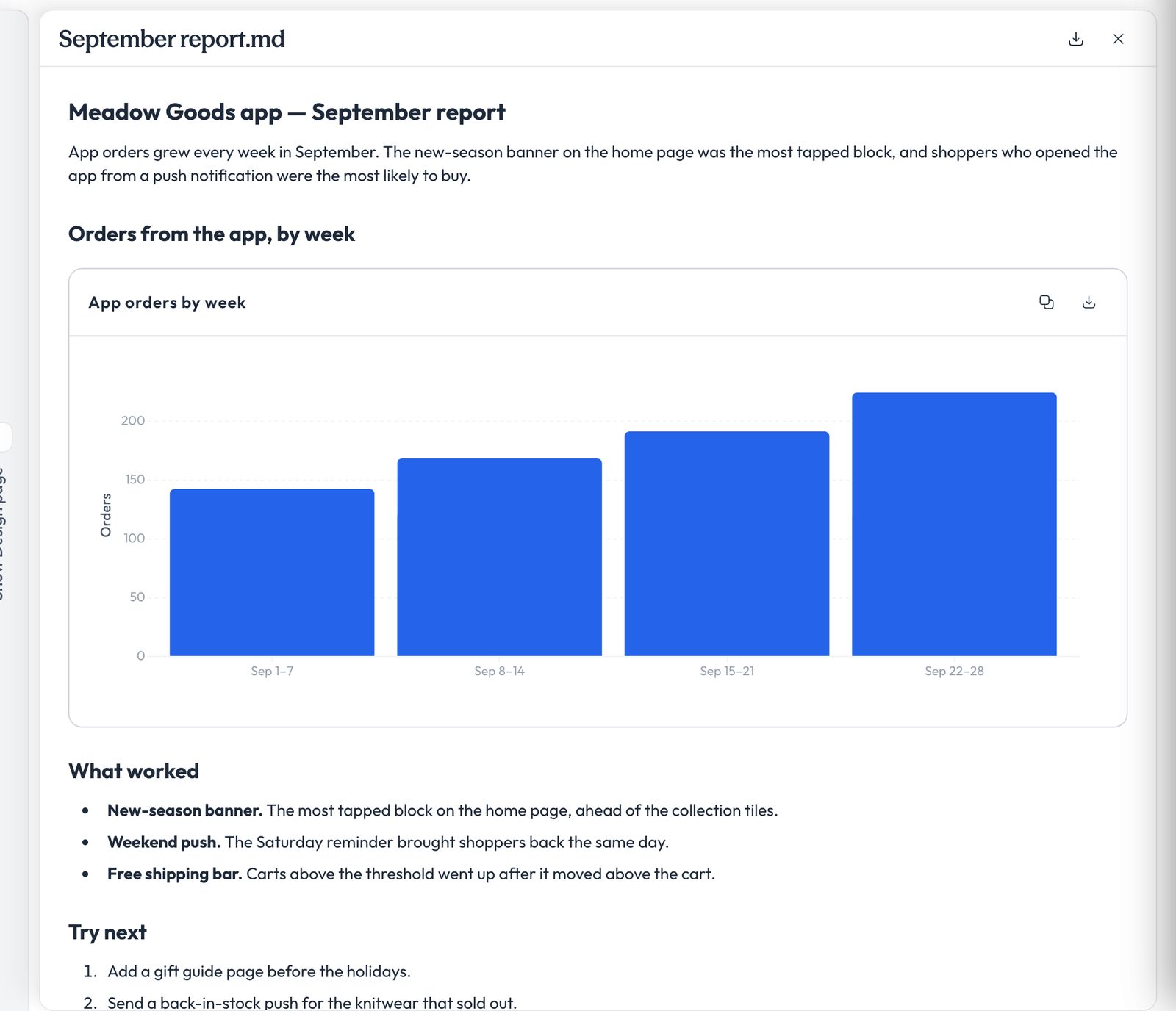
A report Milo wrote in Studio: app orders by week as a bar chart, what worked, and what to try next
Milo answers from your app and Shopify numbers.

Plans and what’s new

In every plan, and still growing.

Studio comes with every plan

  • Starter$199/month
  • Pro$599/month
  • EnterpriseCustom
Compare plans 
Coming soon

Appbrew app

Studio on your phone. Approve a publish, schedule tonight’s push, ask how sales are.

  • A home page with today’s numbers
  • Publish history in plain words
  • Alerts when sales drop or checkout breaks

FAQ

Short answers about Studio.

Compare plans Log in to Studio 

What is Studio?

Studio is the dashboard of Appbrew, the AI app builder for Shopify brands. You preview, approve and publish your app, send pushes, set up discounts and read analytics there, with Milo, Appbrew’s AI agent, on every page.

Is Studio a second product I pay for?

No. Studio comes with every Appbrew plan: Starter at $199 a month with a 30-day free trial, Pro at $599 a month, and Enterprise, priced for your team. There is no Studio tier and no Studio fee.

Do I have to design the app myself?

No. Milo builds the app from your Shopify store and changes it when you ask in plain words. The Design page is there to preview, approve, and change things by hand if you want to.

Can Milo change what my shoppers see without asking?

No. Milo works on a draft theme and asks first before it edits a live one. The theme goes live only after you say yes, and the check is in the code. Milo schedules its pushes for a time you approve, sets up discounts in Studio for your yes, and never submits your app to the App Store or Google Play; the Appbrew team does that, on your own Apple and Google accounts.

Can I control what each person on my team can change?

Yes, on Enterprise. Owners add people from Manage users, give each one an Owner, Editor or Viewer role, and switch permissions per person: push notifications, app releases, signing keys, themes, integrations, discounts, users and analytics.

Can I undo a publish?

Yes. The Design page keeps a release history of every publish, with who published it and when. Restore brings an earlier theme back as a draft, ready to publish.

Is there a Studio app for my phone?

Not yet. The Appbrew app, Studio on your phone, is coming. Today you preview drafts on your phone by scanning the code on the Design page.

Where do I log in?

At studio.appbrew.tech, or from the Log in to Studio link at the top of this page.
Your app starts with one sentence.

Install Appbrew, tell Milo what you want, and run it all from Studio.