

.webp)



Learn how to convert your Shopify store into a mobile app with our step-by-step guide. Boost sales and customer engagement using the best store app creator tools.
Mobile commerce is projected to hit $6.88 trillion by 2026, accounting for nearly 60–62% of global e-commerce sales, yet most Shopify brands still rely on mobile websites that struggle with engagement and conversions.
While mobile traffic is abundant, mobile intent often leaks. Apps change that. They convert up to 3× better, with users viewing 4.2× more products per session.
In this guide, you’ll learn how to turn your Shopify store into a high-performing mobile app using a Shopify app creator. Let’s dive right in!
Understanding Your Options: Choosing the Right Approach
When converting a Shopify store into a mobile app, brands typically face three paths. Each with very different implications for speed, cost, and scalability.
1. Custom Development
Custom development offers complete control, but it demands hiring iOS and Android developers, working with tools like Xcode, Android Studio, React Native, or Flutter, and committing to timelines that stretch 3-6 months or more, often with budgets ranging from $50K to $200K+. It’s good, but only practical for large enterprises with complex, custom requirements.
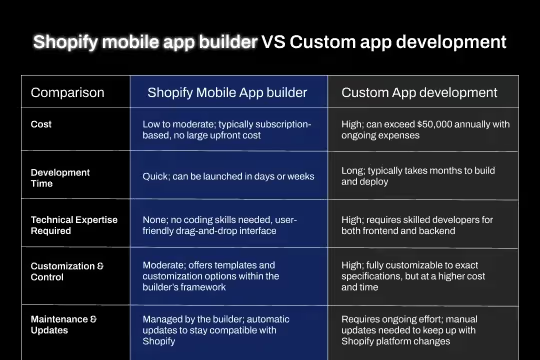
Also Read: Shopify Mobile App Builder vs Custom Development: What Should You Choose?
2. Progressive Web Apps
Progressive Web Apps (PWAs) appear simpler and cheaper, which might have drawn your attention. But they come with trade-offs. Very limited native features, no app store presence, and lower engagement compared to true mobile apps. They feel like apps, but behave like websites.
3. Shopify Mobile App Creator
This is where Shopify store to mobile app creators stand out. Platforms like Appbrew offer drag-and-drop customization, industry-optimized templates, and automatic Shopify product sync, without you having to deal with any code at all. Most brands can go live in 1–3 weeks, making it the most cost-effective and scalable route. For most Shopify store owners, a Shopify app creator like Appbrew offers the ideal balance of functionality, speed-to-market, and long-term ROI.
Step-by-Step Guide: Converting Your Shopify Store to a Mobile App
One thing that you should be very positive about is that if you’re building an eCommerce app, going with the Shopify mobile app creator route is the best option out there. That said, let’s look at the process of how you can launch your app with it:
Step 1: Choose Your Mobile App Creator
The success of your eCommerce mobile app starts with the Shopify app creator you choose. Look for a creator that supports native iOS and Android apps, ideally on a React Native framework, while seamlessly syncing products, collections, and inventory from Shopify.
Advanced app creators also offer drag-and-drop design, multiple themes, unlimited push notifications, built-in analytics, abandoned cart recovery, and easy integrations with your existing Shopify apps. As you evaluate options, review pricing, customer case studies, onboarding support, and app store approval assistance.
Appbrew checks all these boxes, with a dedicated customer success team to guide you from launch to ongoing optimization.
Step 2: Install Appbrew in Your Shopify Store
Once you’ve chosen Appbrew as your app creation (which, not to toot one’s own horn, is an ideal choice from every angle), getting started is quick and intuitive.
Head to the Appbrew listing, click Install, and you’ll be redirected to your Shopify admin to approve the required permissions. This connects your store and kicks off the setup flow.
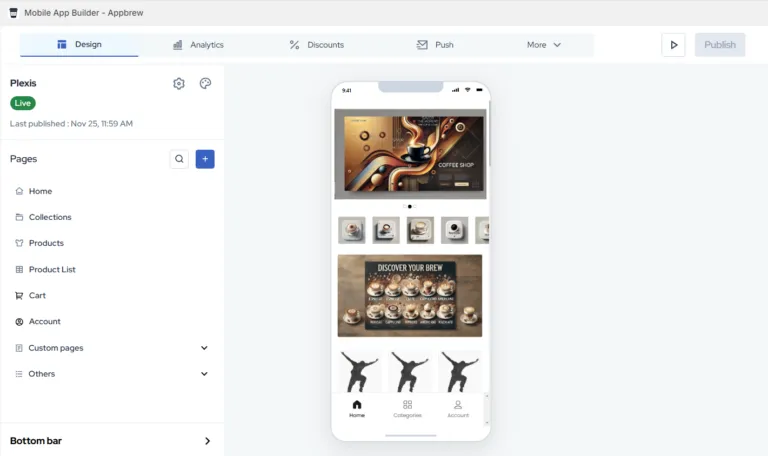
Inside the Appbrew dashboard, you can immediately start shaping your app by customizing screens with a drag-and-drop editor, monitoring performance with built-in analytics, creating app-only discounts, configuring push notifications, and connecting third-party tools to extend functionality.
The interface is clean, well-structured, and easy to explore. Spend a few minutes navigating the dashboard, and you’ll quickly get comfortable, setting the stage for design, optimization, and launch.
Step 3: Customize Your App Design
With the foundation in place, it’s time to shape the app experience. Start by selecting an industry-specific template that aligns with your brand and customer expectations.
Then layer in your identity - logo, colors, typography - and design your home screen with banners, featured products, and collections. Thoughtful navigation, optimized product pages, and mobile-first elements like thumb-friendly layouts and bottom navigation are key.
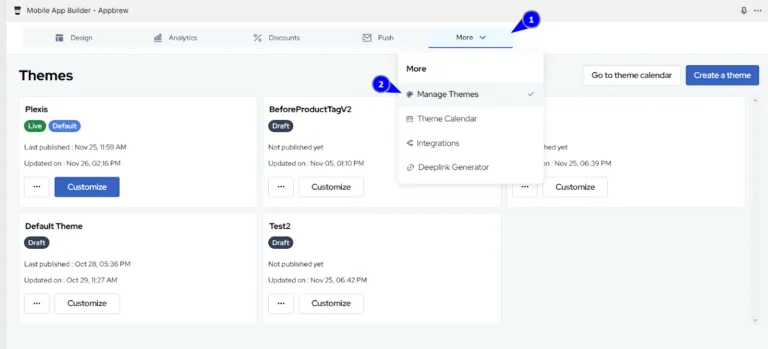
Appbrew’s design editor, which is quite similar to Shopify's online store editor, simplifies this process, offering real-time previews so you know exactly how your app will look before publishing.
Step 4: Configure Essential App Features
Now comes the engine room of your app. Start by enabling core eCommerce features - product discovery, search, cart, wishlist, secure Shopify Checkout, multiple payment options, order tracking, and customer account management.
Then unlock app-exclusive capabilities that truly move the needle. Push notifications are critical here, powering abandoned cart recovery, restock alerts, flash sales, and personalized recommendations, often increasing retention by up to 300%.

Layer in enhancements like live chat, social logins, reviews, loyalty programs, referrals, and even AR try-ons where relevant. And finally, connect your existing stack like Klaviyo, Google Analytics, Gorgias, Yotpo, and more to ensure data flows seamlessly across channels.
Step 5: Set Up App-Specific Content & Campaigns
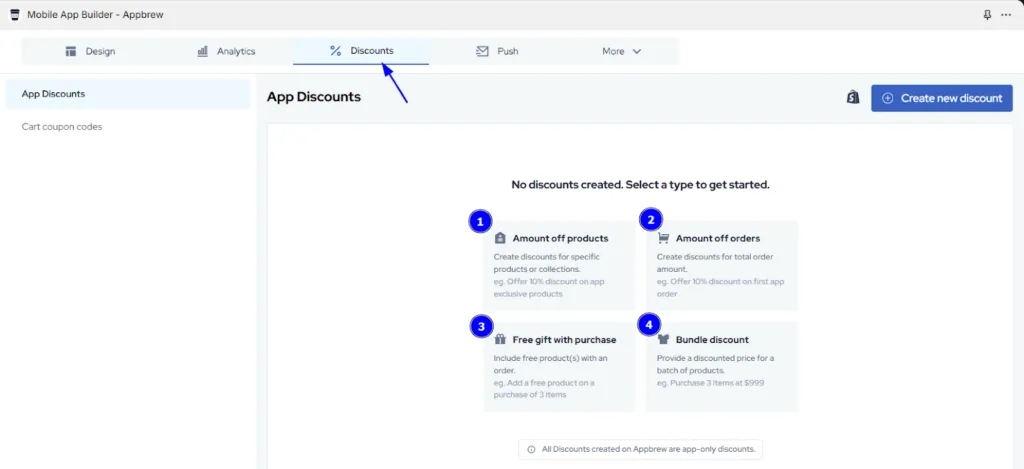
With features in place, shift focus to conversion and retention. Create clear reasons to download and stay - app-only discounts, early sale access, free shipping, or exclusive bundles.
Pair these incentives with a thoughtful push notification strategy, from welcome flows and abandoned cart sequences to restock alerts and win-back campaigns.

The best-performing apps personalize messages, optimize timing by time zone, A/B test creatives, and segment audiences. When done right, 40% of users engage with push notifications within an hour, turning your app into a high-impact growth channel.
Step 6: Test Your App Thoroughly
Before launch, testing is non-negotiable. Install the app on both iOS and Android devices and walk through every user flow - from browsing and search to checkout and order confirmation.
Payments, push notifications, account creation, deep links, and loading speeds all need close attention, across multiple screen sizes and OS versions.
Share the test build with internal teams and, if possible, a small beta group. Capture feedback, log bugs, and prioritize fixes based on user impact. A smooth first experience sets the tone for retention.
Step 7: Prepare for App Store Submission
App store readiness goes beyond uploading a build. You’ll need developer accounts, compliant privacy policies, polished screenshots, icons, and clear, keyword-optimized descriptions for both Apple and Google.
Each store has its own review criteria and asset requirements, so accuracy matters. Many app creators, including Appbrew, provide submission assistance or even publish on your behalf, significantly reducing friction and approval delays.
Step 8: Submit and Launch Your App
Once submitted, reviews typically take a few days. Address any feedback quickly and prepare for launch in parallel. Finalize designs, lock in push campaigns, brief your support team, and line up marketing announcements. A coordinated launch ensures your app makes a strong first impression.
Conclusion: Your Mobile App Journey Starts Now With Appbrew
Mobile commerce is no longer a future trend; it’s the growth lever Shopify brands can’t afford to ignore. Mobile apps convert 3× better than mobile websites, and with app creators, launching one no longer requires months of development or massive budgets.
In just 2-4 weeks, you can go from store to app, with push notifications boosting engagement by up to 88%. The real advantage, however, comes from continuous optimization, testing campaigns, refining experiences, and doubling down on what converts.
If you’re ready to take the next step, start by evaluating your store’s readiness, choosing the right app creator, and testing with a free trial. Follow this guide, track performance closely, and iterate often.
Appbrew makes the entire journey seamless, from setup to app store submission and beyond.