

.webp)


Add Apple Pay, Google Pay, BNPL and UPI to your Shopify app. A practical guide to setting up mobile payments, choosing gateways, and fixing checkout errors.
Your customer is one tap from buying. Then the payment screen makes them dig for their card, or Apple Pay isn't there, or it stalls while the spinner turns. That's the moment you lose them, and on mobile it happens all the time.
And yet most Shopify brands still treat mobile payments as something to tidy up after the app launches. That's backwards. On a phone, your payment experience is your conversion rate. Get it right and checkout feels like nothing. Get it wrong and you're paying for traffic that bails at the last step.
This guide covers what mobile payments actually are, which methods matter for your customers, how to set up Apple Pay and Google Pay on Shopify, how to integrate payments into a Shopify app without a six-week build, and how to fix the failures that quietly cost you sales.
TL;DR
- Mobile payments cover any transaction completed on a phone, tablet, or smartwatch: cards, wallets, UPI, and BNPL.
- Digital wallet transactions hit $12 trillion globally in 2025 (Capgemini World Payments Report, 2025), and Apple Pay plus Google Pay are now table stakes rather than extras.
- The right payment stack depends on where your customers are. A US brand and an India-first brand have almost opposite priorities.
- Enabling Apple Pay and Google Pay on Shopify takes minutes inside Settings, but the wallets often fail to appear because of device, domain, or region issues you have to check for.
What are mobile payments for a shopify app?
A mobile payment is any transaction completed through an app or browser on a phone, tablet, or smartwatch. The method varies. The device is what defines it.
Three technologies carry most of the volume:
- NFC (Near Field Communication) powers tap-to-pay. Apple Pay and Google Pay both run on it, with two devices exchanging data when held close and no typing required.
- QR codes flip that flow. Instead of tapping a terminal, the customer scans a code and pays through a wallet app.
- Payment gateways like Stripe, PayPal, and Razorpay sit in the middle of every transaction, moving the money between the customer's bank and your Shopify store.
For a mobile app built from your Shopify store, this is about in-app and online checkout, not in-person Tap to Pay at a physical counter. If you run a retail location and want to accept contactless payments on a card reader, that is a separate Shopify POS setup.
Why mobile payments decide whether your app converts
The shift toward mobile shopping is already priced in. Digital wallet transactions reached $12 trillion globally in 2025 (Capgemini World Payments Report, 2025), and Statista projects that more than a third of US retail sales will run through a digital wallet by 2027, up from roughly 10% in 2020 (Statista, 2025).
The driver is friction. Shoppers will not type a 16-digit card number on a phone keyboard when the alternative is one tap and a Face ID scan. Once someone gets used to that, they notice the second a brand's app makes them do more work.
Speed compounds. A checkout that takes 45 seconds loses customers a 15-second checkout keeps, and that gap multiplies across thousands of sessions. On a store doing 60% of its orders on mobile, a clumsy payment flow is not a minor UX issue. It is a direct tax on revenue.
Types of mobile payments for ecommerce businesses
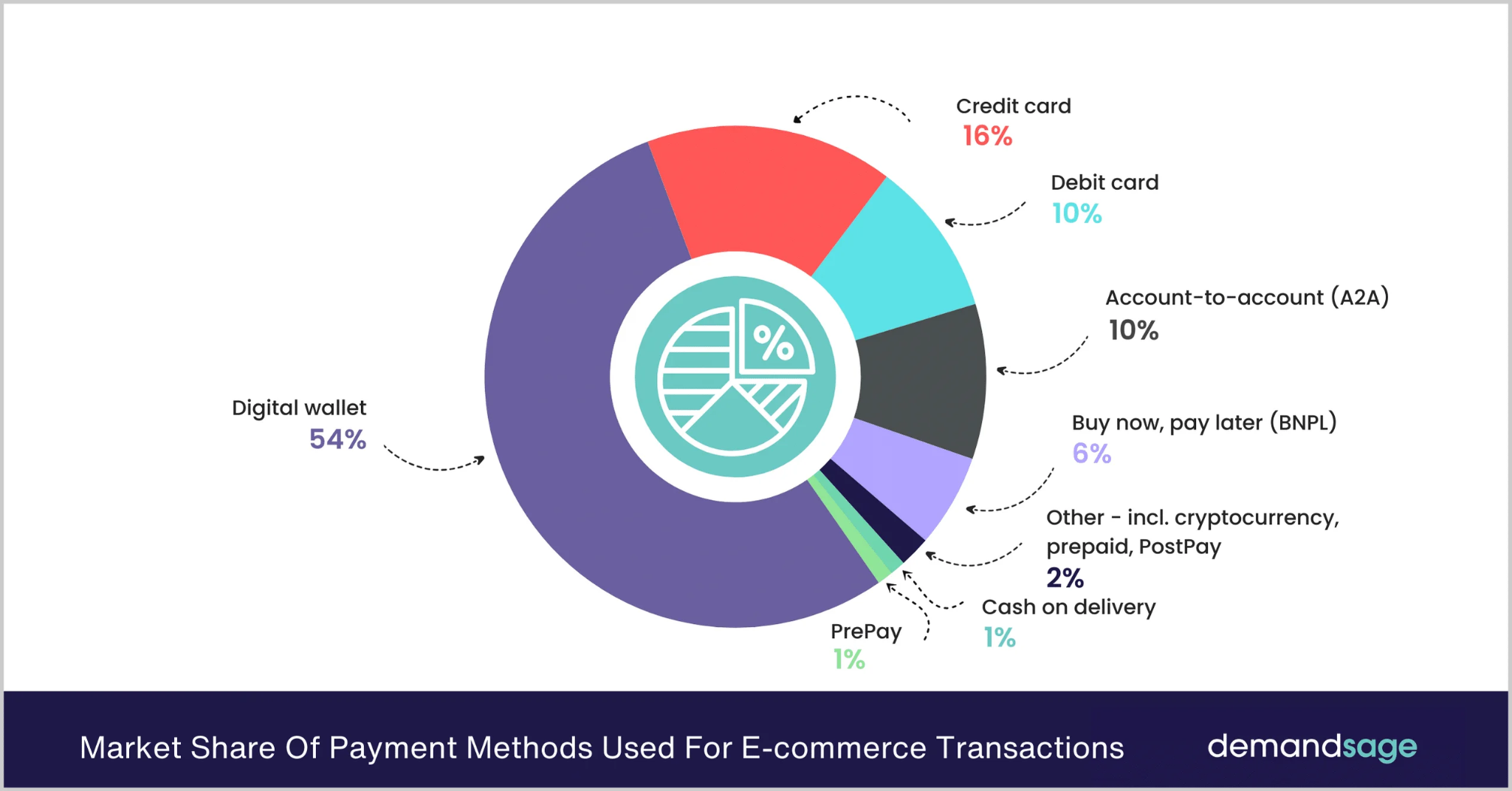
Not every method fits every market. The mistake is building for a hypothetical global customer instead of the ones you actually have. Here is what each method is good for and where it matters.
1. Credit and debit cards
The oldest form of digital payment and still the most widely used. Cards work across age groups and geographies. They're especially dominant in North America and Western Europe.
The key feature for mobile is card saving. When a customer can store their card securely and reuse it with a tap, checkout friction drops sharply. Without saved cards, you're asking them to retype details every time, which many won't.
2. Digital wallets
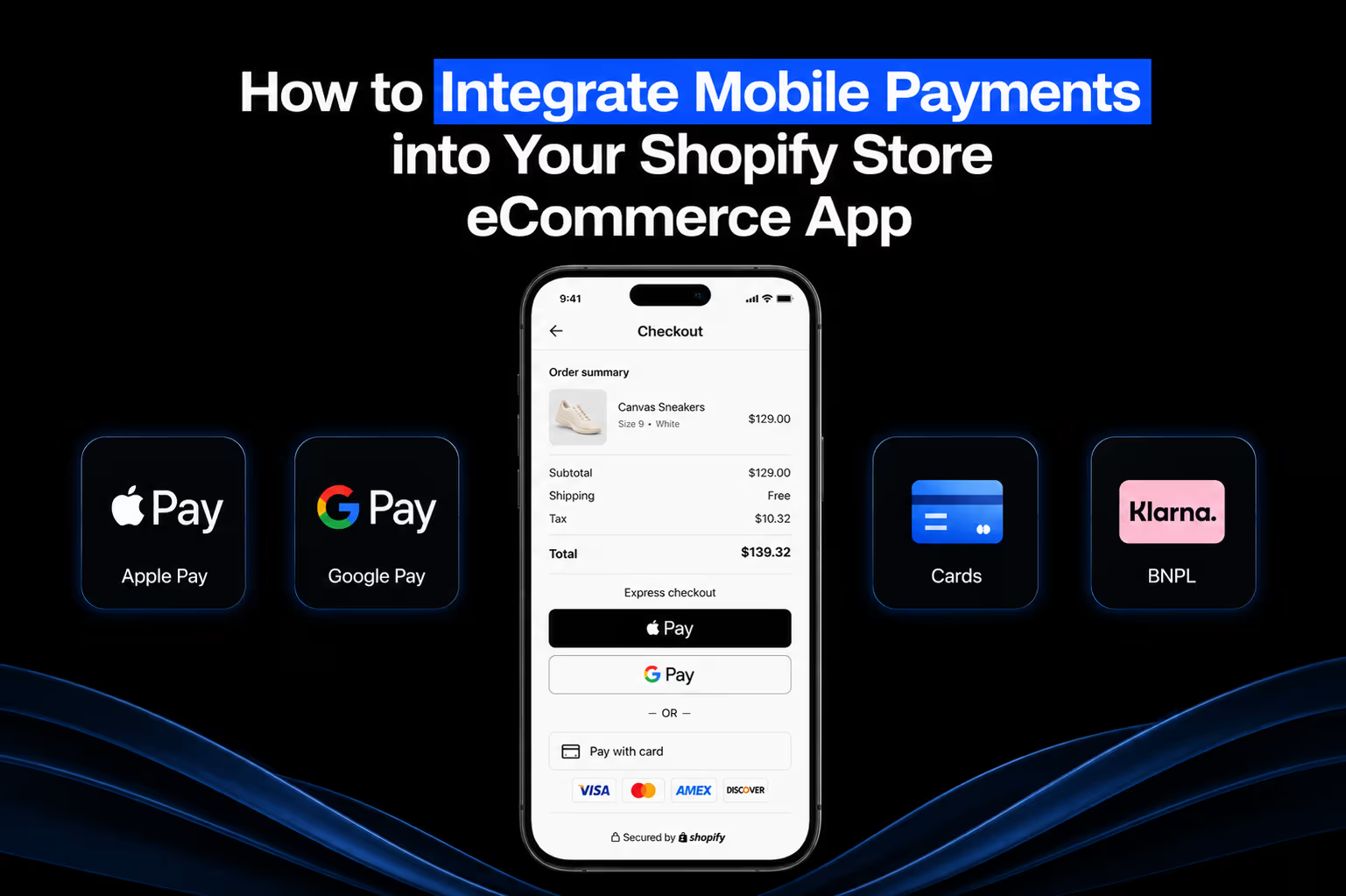
Apple Pay, Google Pay, and regional equivalents like Paytm have changed what shoppers expect from checkout. Wallets store payment details behind biometric authentication, so the customer never has to type anything. One fingerprint, one face scan, purchase complete.
For brands with a US or European customer base, not supporting Apple Pay and Google Pay is leaving money on the table. Full stop.
3. Buy now, pay later (BNPL)
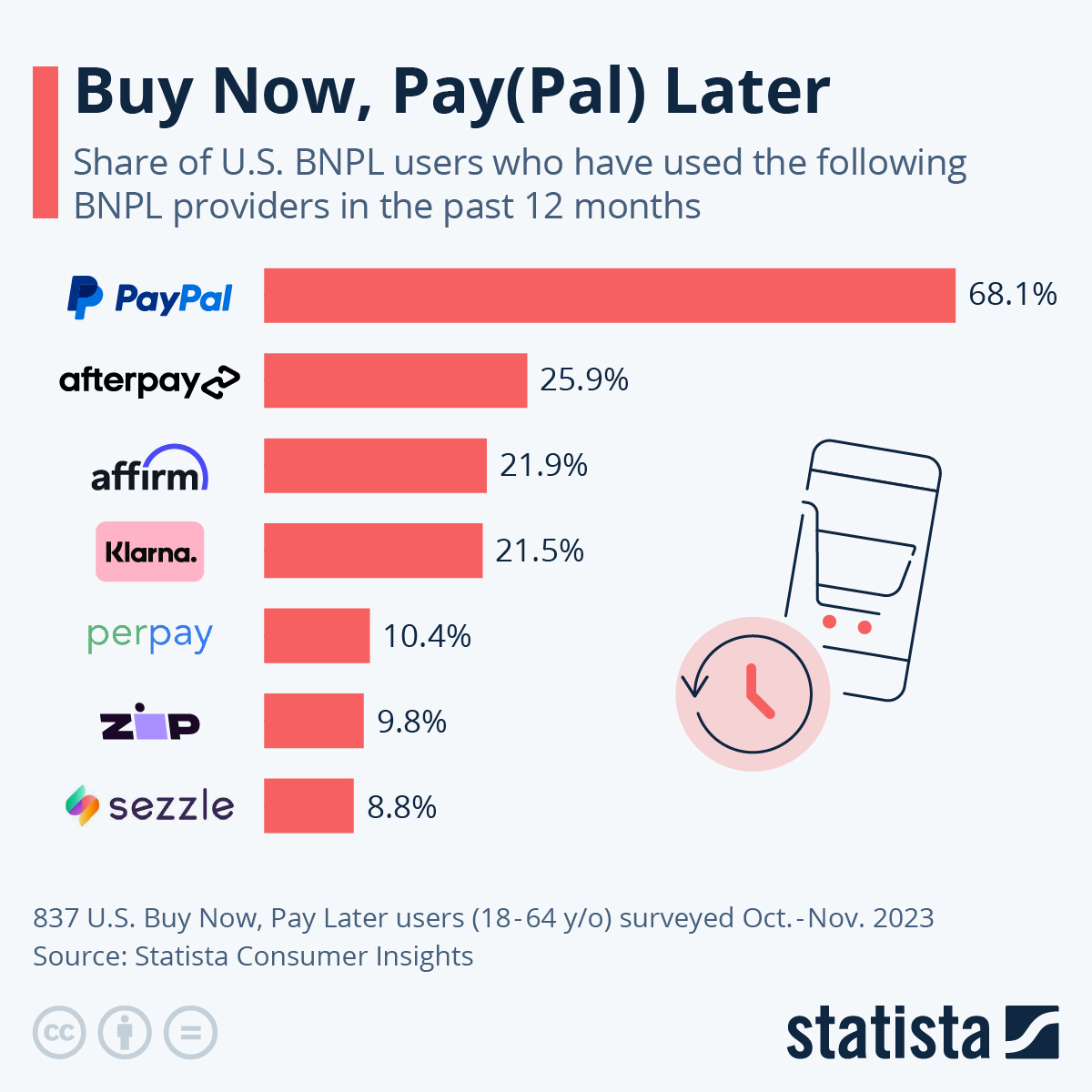
Klarna, Afterpay, and Affirm let customers split purchases into installments, usually with no interest for short terms. BNPL has a documented effect on average order value because it reduces the perceived cost of a purchase. A $200 item feels more approachable when it's four payments of $50.
It's particularly effective for fashion, beauty, and home goods brands where cart sizes tend to be higher.
4. Bank transfers and UPI
Direct bank transfers and UPI apps like PhonePe and Google Pay (different from the wallet) are the dominant payment methods in India. Transaction fees are lower than card payments, and smartphone penetration is high even in markets where credit card adoption isn't.
If you're building for Indian consumers, UPI isn't optional. It's where the volume is.
5. QR code payments
QR payments remove the need for a physical card terminal. The customer scans, confirms, done. They're most common in Southeast Asia and parts of South Asia, and they work well for brands that also have offline retail because the same infrastructure handles both.
6. Cryptocurrency
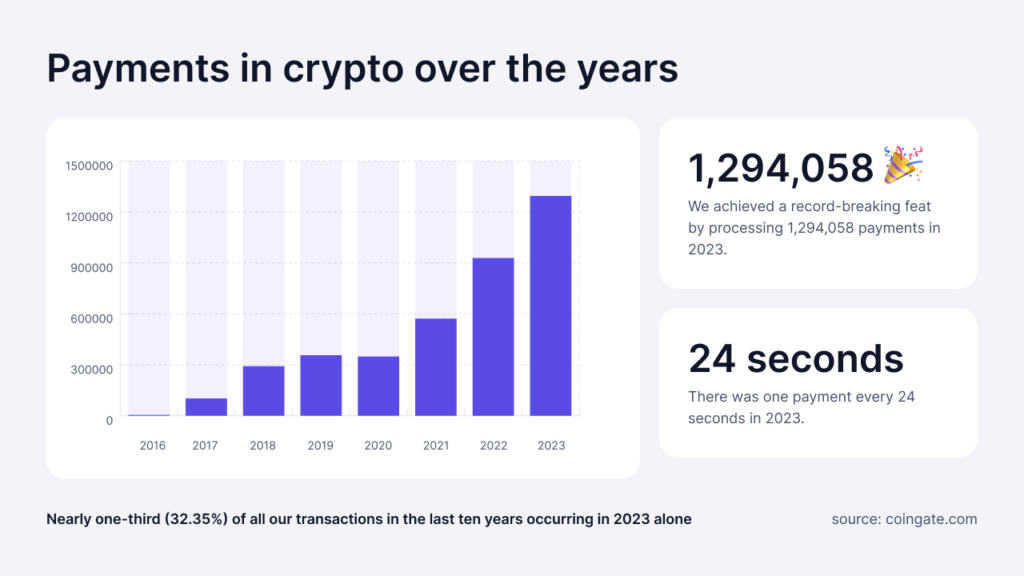
A small but growing segment. Some brands accept Bitcoin and Ethereum to serve customers who prefer decentralized, private transactions. It's not mainstream ecommerce yet, but it's worth tracking if your audience skews toward tech-forward demographics.
How to integrate mobile payments into your Shopify app
Most guides on this topic hand you a numbered list and call it a day. The reality is messier. Payment integration touches your tech stack, your legal setup, your customer data, and your launch timeline all at once. Here's what each step actually involves.
1. Start with your order data
Before you open a single gateway dashboard, pull your Shopify order data and look at where revenue comes from by geography, device, and customer age. A brand doing 60% of its sales outside US has almost nothing in common with one doing 60% in the US when it comes to payments:
- American customers under 35 expect Apple Pay and some form of BNPL.
- European customers want cards plus local options like iDEAL or Bancontact.
- Indian customers expect UPI.
Check cart abandonment by device while you are in there. If mobile abandonment sits well above desktop, payment friction is usually the cause, and that tells you how urgently to act, not just what to add.
2. Understand Shopify's gateway restrictions before you commit
Shopify supports a long list of gateways, but not all of them work in every region, currency, or plan. Some are Shopify Plus only. Some skip certain currencies. Some restrict product categories, which matters if you sell supplements, CBD, or adult products.
Start with Shopify's official payment gateway documentation, filtered by your store's country, and read the restrictions column, not just the features column.
Verify four things before you build around a gateway:
- Whether it supports your primary currency
- Whether it works with Shopify's native checkout
- What the fees are on top of your plan
- Whether it operates in the countries your customers actually pay from
Finding a restriction before you commit costs an afternoon. Finding it after costs weeks.
3. Choose payment providers based on your markets and volume
None of the major gateways is universally right.
- Stripe is the default for most US and European brands, with the broadest currency support and clean Shopify integration.
- Razorpay handles UPI, net banking, and local card networks that Stripe covers less well, so it wins for real volume in India.
- PayPal still matters for older buyers and international shoppers who trust it over a brand's native checkout.
For a full breakdown of which gateway fits which store, see our guide to the best payment gateways for ecommerce mobile apps. One practical rule: do not launch with every gateway at once. Pick the two or three that cover 80% of your customer base, get those right, then add the rest.
4. Decide between Shopify's APIs and a mobile app builder
There are two ways to connect payments to a Shopify app. You build custom flows on Shopify's APIs, or you use a Shopify mobile app builder that handles the integration layer.
The custom route gives you control over the exact checkout experience, the order of payment methods, and the error handling. The cost is time. A custom payment integration typically runs weeks of developer work, and every Shopify API update or gateway change becomes your team's problem to manage.
The builder route pre-builds and maintains those integrations for you. You configure the methods, set your preferences, and the connection to Shopify's payment infrastructure is already there.
For most D2C brands, the builder route is the right call. Custom development makes sense only when you have genuinely unusual requirements no existing tool supports.
5. Set up merchant accounts well before launch
Every provider you offer needs a merchant account, and approval is not instant:
- Stripe verification runs one to three business days for standard accounts, longer if your category triggers manual review.
- Razorpay KYC in India takes three to five business days.
- Klarna and Afterpay run their own onboarding, including a review of your catalog and return policy, which can take a week or more.
Start merchant setup at least three weeks before launch, and earlier if you are aiming at a peak like BFCM, when provider support slows down. Confirm your account is approved for the exact product types you sell. Categories like supplements or high-value jewelry often need extra documentation or carry higher reserve requirements, and you want to know that before a live transaction gets flagged.
6. Test on real devices, not browser simulators
This is the step most teams shortcut and the one that causes the most launch-day incidents. Simulators do not replicate how Apple Pay or Google Pay behave on a real phone. They skip the permission prompts, the biometric flow, and the error states an actual device produces.
Test on at least one iPhone running iOS 16 or later and one Android device on Android 12 or later, plus a throttled network connection. Run every payment method through a complete transaction and confirm the order lands in Shopify admin.
Then break it on purpose. Use a decline-triggering test card and check whether the error message tells the customer what to do next. A payment failure during a promotion is not just a lost sale. It is a trust problem, and the testing phase is the cheapest time to catch it.
How to add Apple Pay and Google Pay to your Shopify store
Apple Pay and Google Pay run through Shopify Payments, so enabling them is fast once Shopify Payments is active. Here is the exact path.
- From your Shopify admin, go to Settings, then Payments.
- In the Shopify Payments section, click Manage.
- Scroll to the Wallets section.
- Check the boxes for Apple Pay and Google Pay.
- Save. Both wallets now appear at checkout for customers on compatible devices.
If you use a third-party gateway instead of Shopify Payments, the wallet options live under Third-party payment providers, filtered by supported payment methods.
Inside an Appbrew app, this step is even shorter. Apple Pay and Google Pay appear natively without extra configuration, because the app inherits the wallet settings you have already enabled in Shopify.
When Apple Pay or Google Pay isn't showing at checkout
You enabled the wallets and they still are not appearing. This is common, and it is almost always one of a handful of causes. Work through them in order.
- Device or browser support. Apple Pay needs a compatible Apple device, and on the web it shows in Safari, not other browsers. Google Pay needs the customer signed into a Google account on a supported device. Confirm the shopper's setup before assuming the integration is broken.
- Domain verification and SSL. Apple Pay requires your domain to be verified and served over a valid SSL certificate. A misconfigured domain is the most frequent reason the button silently disappears.
- Region rules. Shopify Payments supports Google Pay in every region except France. Some wallet and gateway combinations are region-locked, so a method available in the US may not surface elsewhere.
- Plan and provider requirements. The wallet needs a credit card provider that lists it as an available method. If your gateway does not support the wallet, the button will not render regardless of your settings.
If all four check out and the wallet still fails, run a test transaction on a real device rather than a simulator, since simulators do not reproduce the wallet handshake.
Mobile payment best practices
A few things that matter more than most guides acknowledge.
Encryption
- Use TLS protocols for all data in transit, no exceptions
- Tokenize sensitive data so raw card numbers never touch your servers
- End-to-end encryption is not a feature to enable later; build with it from day one
PCI DSS compliance
- Every payment gateway you work with must be PCI DSS compliant
- Verify this before signing a contract, not after a data incident forces the conversation
- Ask your provider for their compliance documentation if it isn't published openly
Authentication
- Add multi-factor authentication to protect customers from unauthorized account access
- Biometric auth, Face ID on iOS and fingerprint on Android, is the best implementation because it adds security without adding a step the customer notices
- Avoid SMS OTP as your only MFA option; it's better than nothing but easier to intercept than biometrics
App updates
- Payment security vulnerabilities get discovered regularly and patched through updates
- An app sitting on a six-month-old build is running on security protocols that may already have known weaknesses
- Build a release cadence that treats security patches as non-negotiable, not something to batch with feature releases
Fraud detection
- Most major gateways include machine learning-based fraud detection, but it is not always active by default
- Confirm with your provider that real-time transaction monitoring is turned on for your account
- Review flagged transaction reports periodically; patterns in false positives often reveal UX problems worth fixing, not just fraud attempts worth blocking
How to make sure your mobile payments actually work
Integration isn't a one-time task. It needs ongoing attention.
Monitor your payment APIs for latency and errors. Slow API responses at checkout cause customers to abandon. A spike in API errors often predicts a drop in conversion before you see it in the sales numbers.
Track failed payments and look for patterns. One payment failure is a customer issue. Twenty in an hour is your issue. Common causes include network timeouts, incorrect card details, and security flags triggered by unusual behavior.
Build a clear, useful FAQ for payment issues. Customers who can't complete a payment often go looking for answers before they contact support. If they find a clear explanation and a solution, some of them will come back and try again.
Simplify checkout relentlessly. Fewer fields, guest checkout, autofill support, saved payment details. Every field you remove is a reason for a customer not to leave.
When a payment fails, tell the customer why and what to do next. "Your payment was declined" is useless. "Your card was declined. Please check your card details or try a different payment method" is actionable.
Use analytics to find where customers drop off in the checkout flow. Every brand has a specific step where they lose more people than they should. Find yours and fix it.
How Appbrew handles payments for your Shopify app
Appbrew is built specifically for Shopify and Shopify Plus brands, and payment integration is one of the areas where that focus shows up most clearly.
Rather than building payment flows from scratch or wrestling with generic app builders that weren't designed for ecommerce, Appbrew gives you a native payment experience.
Here's what that looks like in practice.
Native support for apple pay and google pay
Appbrew's apps support Apple Pay and Google Pay natively, without any additional configuration or third-party plugins. Both appear automatically at checkout for customers whose devices support them. The checkout screen loads in under a second, and biometric authentication works exactly as customers expect it to because the implementation follows platform-specific guidelines, not a workaround.
Deep integration with shopify's payment ecosystem
Appbrew sits on top of Shopify's infrastructure, which means it inherits Shopify's payment gateway relationships. Stripe, Razorpay, PayPal, and every other Shopify-supported gateway work inside Appbrew apps without custom code. Your merchant accounts carry over, your existing payment settings apply, and your finance team doesn't have to touch anything new.
BNPL support through shopify's native integrations
Buy Now, Pay Later options that work on your Shopify store work inside your Appbrew app too. Klarna, Afterpay, and Affirm appear at checkout for eligible customers based on the same rules you've already configured in your Shopify admin. There's no separate integration to manage.
App-only discount modules that work with payment flows
Appbrew includes a built-in promotion engine that connects directly to checkout. App-only discounts, bundle offers, and gift-with-purchase mechanics all apply before the customer reaches payment, so the price they see at checkout is the right one.
Basically you have access to every type of eCommerce discount you can think of. No confusion, no discount codes that don't work, no support tickets from customers who expected a lower total.
Checkout analytics built into the dashboard
Appbrew's analytics dashboard tracks where customers drop off in the checkout flow, which payment methods they select, and how payment-related abandonment compares to browsing abandonment.
You can see, by payment method, where you're losing people and use that to make decisions about which methods to promote or troubleshoot. Most mobile app builders don't give you this granularity. Appbrew does this because it was built for ecommerce teams who need to act on this data, not just see it.
Conclusion
Mobile payments are a core part of whether your app converts. Get them right and checkout becomes almost invisible, which is exactly what you want. Get them wrong and you're asking customers to work harder than they should at the moment they're most ready to buy.
If you're building a Shopify mobile app and want payment integration that works without a six-week development project, Appbrew is worth a look. The whole stack, payments, push notifications, personalization, and analytics, is built for Shopify brands specifically.
Book a demo with our team and see how it works for your store.
FAQs
1. What mobile payment methods should I prioritize for my Shopify app?
It depends on where your customers are. US and European brands should lead with Apple Pay and Google Pay, followed by cards and BNPL. India-focused brands need UPI as a primary option. Look at your existing order data by geography before making this decision.
2. Does Appbrew support Apple Pay and Google Pay?
Yes, both are supported natively in Appbrew apps. They appear automatically at checkout for customers on compatible devices with no additional setup required.
3. Is it safe to store customer payment details in a mobile app?
Modern payment platforms don't store raw card data. They use tokenization, replacing card numbers with encrypted tokens that are useless if intercepted. Combined with biometric authentication, this is generally more secure than traditional card-entry forms.
4. What is PCI DSS and why does it matter for my app?
PCI DSS (Payment Card Industry Data Security Standard) is a set of security requirements for any system that handles card payments. Any payment gateway you integrate with should be PCI DSS compliant. It's not optional and it's worth verifying before you go live.
5. How long does it take to set up payment integration on Appbrew?
Because Appbrew connects directly to Shopify's payment infrastructure, most of the setup carries over from your existing Shopify configuration. For brands already running on Shopify, payment setup is typically one of the faster parts of launching an Appbrew app.
6. Can I offer BNPL options like Klarna in my Appbrew app?
Yes. BNPL options that are already configured in your Shopify store will appear in your Appbrew app at checkout, following the same eligibility rules you've set up in Shopify admin.
7. What happens if a customer's payment fails?
Appbrew's checkout displays clear error messages that tell customers why a payment failed and what to do next. Your team can also monitor failed payment patterns through the analytics dashboard.
8. Do I need a separate merchant account for my mobile app?
No. Your existing Shopify merchant accounts and payment gateway configurations apply to your Appbrew app. You don't need to create new accounts or renegotiate terms with payment providers.
9. How do I know which payment methods my customers prefer?
Appbrew's analytics dashboard shows payment method selection data at checkout. Over time, you'll see which methods your customers actually use versus which ones are selected rarely. That data should drive your payment stack decisions.
10. Can I offer app-only discounts that apply before checkout?
Yes. Appbrew's promotion engine lets you create discounts, bundles, and gift-with-purchase offers that are exclusive to the app and apply automatically before the customer reaches the payment screen.