




.webp)

Compare the best payment gateways for mobile apps in 2026. Explore fees, SDKs, Apple Pay, Shopify support, and choose the right gateway for your app.
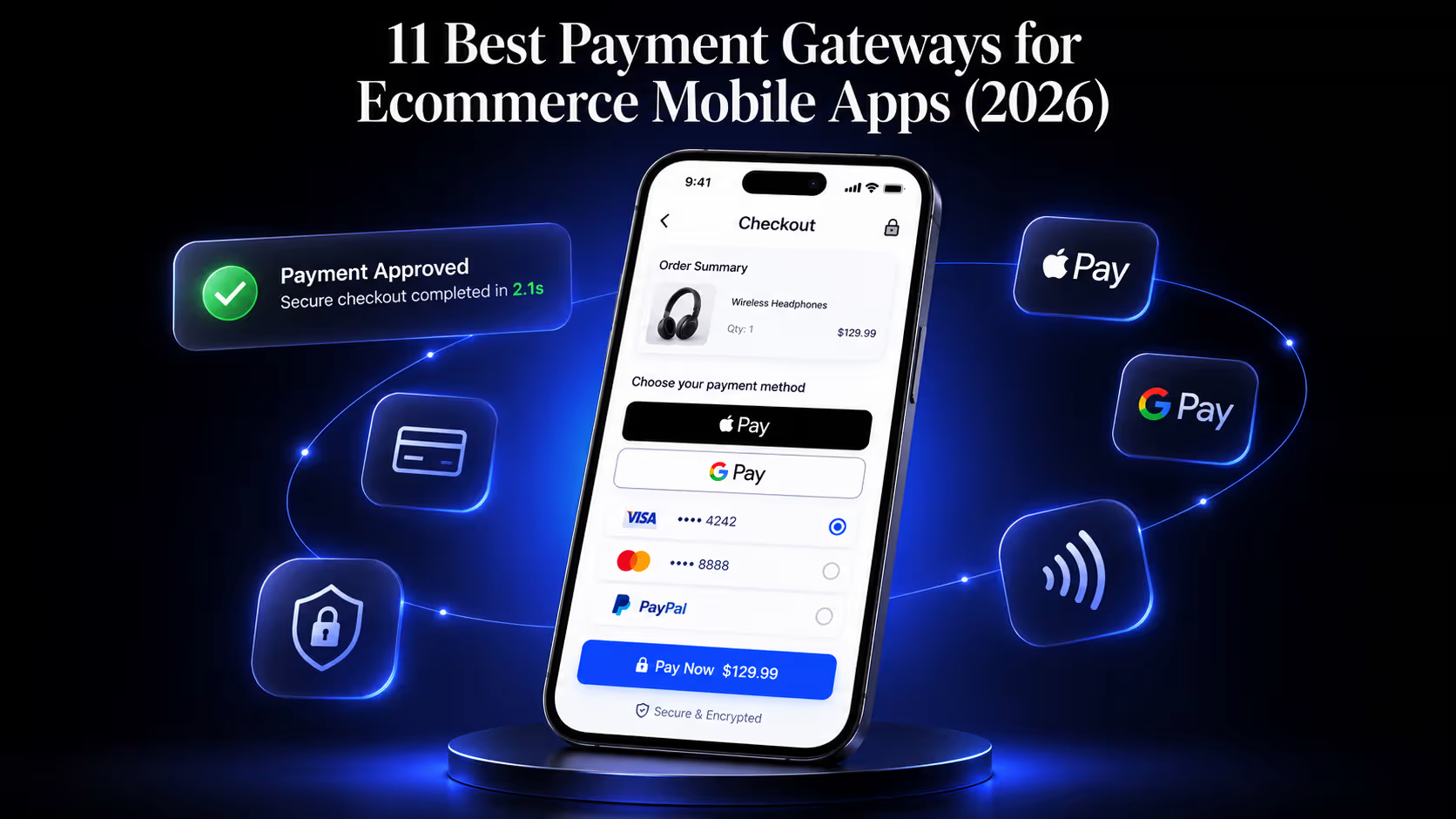
Your app is where your best customers already live. In the US, mobile now drives 44.6% of all ecommerce sales, and 85% of US mobile shoppers say they would rather buy through an app than a mobile website (Capital One Shopping, 2026). The traffic showed up. The revenue is following it.
Then a shopper taps "Buy," and the checkout stalls. Wrong currency, a clunky redirect to a browser, no Apple Pay button, a three-second lag while the payment sheet loads. As per Baymard Institute,Mobile cart abandonment sits at 80% versus 66% on desktop and a badly wired payment flow is one of the reasons that gap exists. The gateway you pick, and how you wire it in, decides whether that tap becomes an order.
This guide compares the payment gateways that actually work well inside a mobile app in 2026, the specific things to check before you commit to one, and how to integrate a gateway into your app without inheriting a PCI compliance headache.
TL;DR
- A payment gateway for a mobile app is not the same product as one for a website. Native SDK quality, in-app checkout, and one-tap wallet support are what separate a good in-app gateway from a bad one.
- Stripe is the default for most app-first brands: 2.9% + $0.30, no monthly fee, and the cleanest iOS, Android, and React Native SDKs in the market.
- Braintree wins if PayPal and Venmo drive your conversion. Adyen wins for global, high-volume brands. Shopify Payments wins if you are a Shopify brand, because it removes Shopify's third-party transaction fee.
- Roughly half of all ecommerce payments globally now run through digital wallets (Statista, 2026). If your app checkout does not offer Apple Pay and Google Pay, you are leaving conversions on the table.
- The integration decision that matters most is hosted SDK versus raw API. Hosted keeps card data off your servers and shrinks your PCI scope to the lightest tier.
How a payment gateway actually works
A payment gateway is the layer that captures a shopper's card or wallet details and moves the authorization request through the banking system in about two seconds. Here is the path a single in-app tap travels:
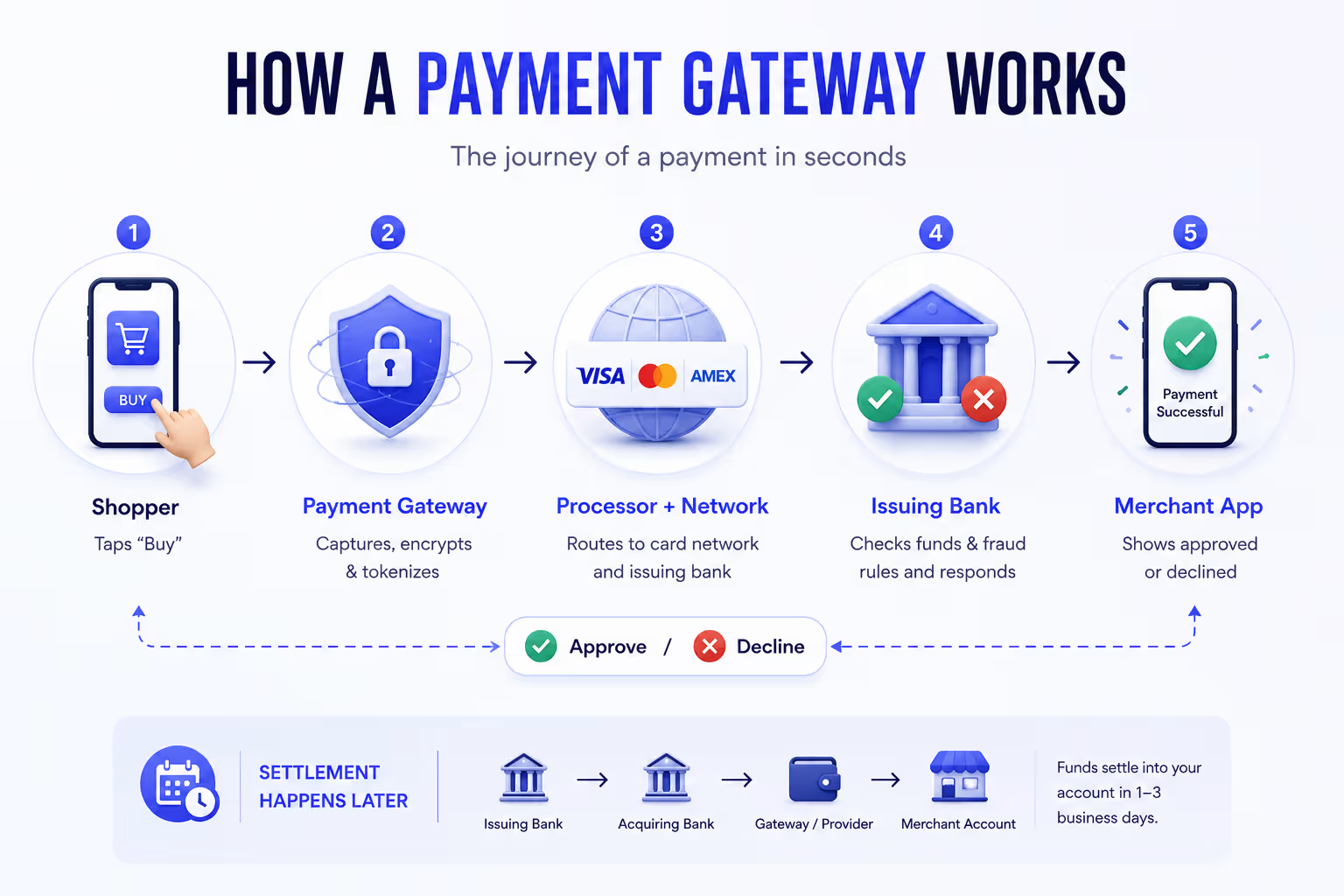
- The shopper taps "Buy." The gateway's SDK renders a payment sheet inside your app and captures the card or wallet credentials.
- The gateway encrypts and tokenizes those details, then passes the request to the payment processor.
- The processor routes it to the card network (Visa, Mastercard, Amex), which forwards it to the shopper's issuing bank.
- The issuing bank checks funds and runs fraud rules, then approves or declines and sends the answer back along the same path.
- Your app shows approved or declined. The money settles into your account a day or two later.
Every step in that chain adds milliseconds and a possible point of failure. On mobile, where a shopper's patience is measured in single seconds, the gateway that shortens and hardens this path is the one that converts.
Payment gateway vs. payment processor vs. PSP: what your app actually needs
A payment gateway captures the payment details. A processor moves the money between the card networks and the banks. A payment service provider (PSP) bundles both, plus the merchant account, into one account you can open in an afternoon.
Ten years ago you stitched these together yourself. Today you almost never should. Stripe, Braintree, Square, and Adyen all operate as PSPs: gateway, processing, and merchant account under one contract. For a mobile app, that consolidation matters more than it does on the web, because every extra vendor in the flow is another SDK to maintain, another point of latency, and another compliance surface.
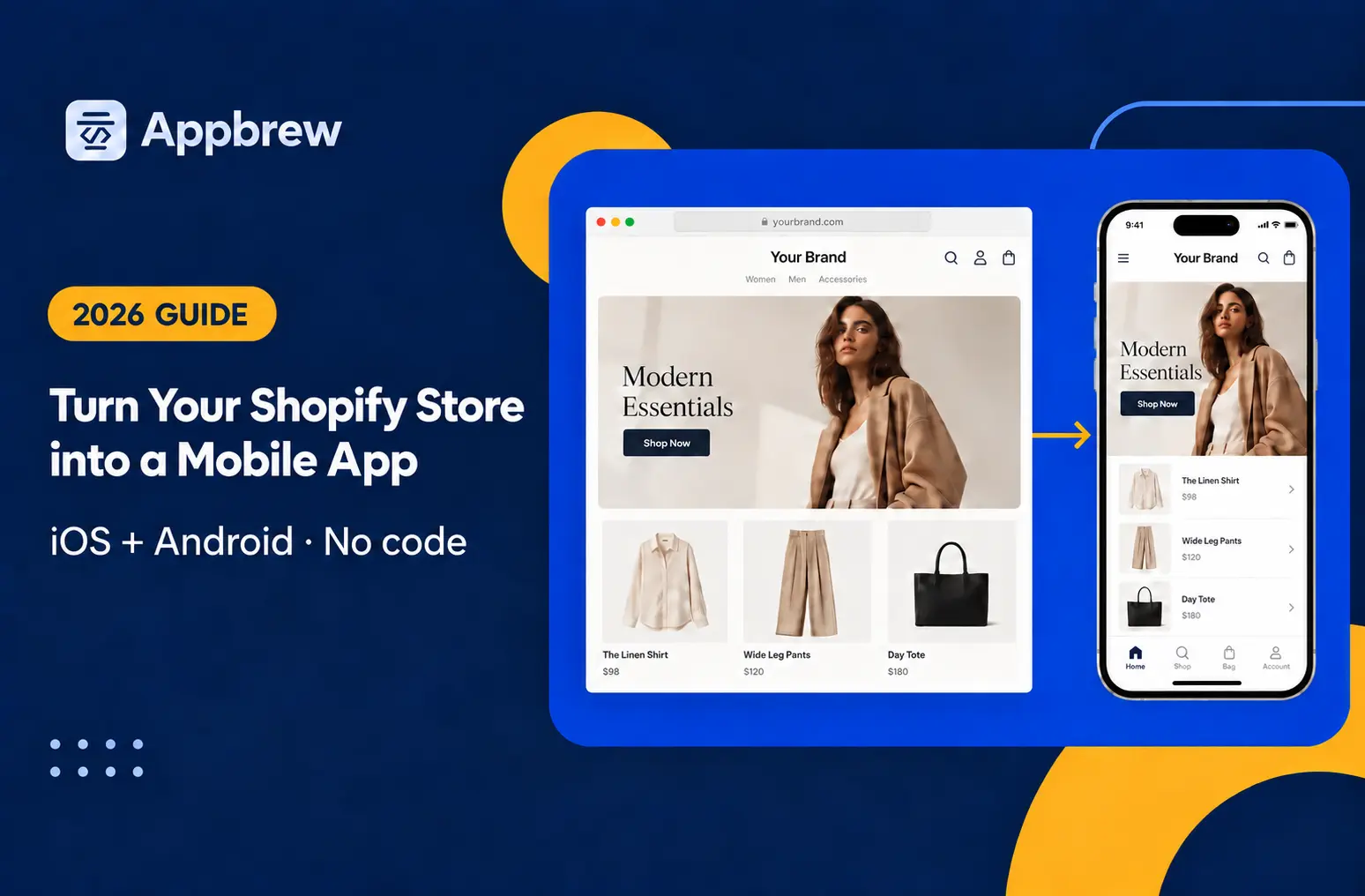
So when this guide says "gateway," it means the full stack you integrate once and forget. That is what your app needs. If you want the background first, here is how to turn a Shopify store into a mobile app without any coding experience.
The three types of payment gateways
Not every gateway connects to your app the same way, and the connection method decides how it feels to the shopper and how much compliance you inherit.
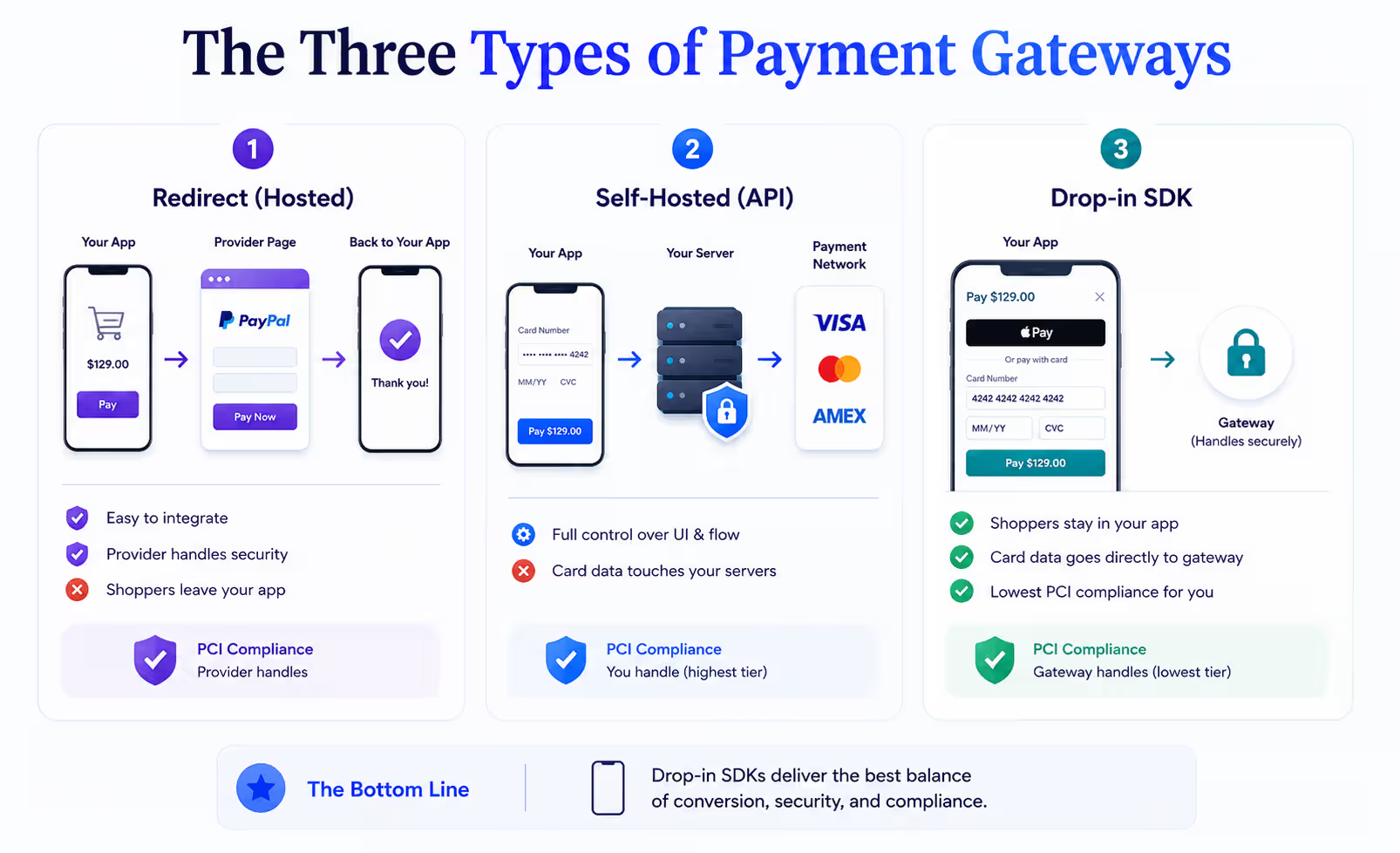
Redirect (hosted) gateways send the shopper out of your app to the provider's own payment page, then back again. Classic PayPal works this way. It is simple to add and the provider owns the security, but bouncing a shopper out of your app is where mobile carts die.
Self-hosted (API) gateways let you build the card form yourself, with card data flowing through your own servers. You get total control over the look and the flow. You also pull card data into your systems, which pushes you into the heaviest PCI compliance tier. Unless you have a dedicated security team, this is the wrong trade for an app.
Drop-in SDK gateways render a pre-built payment sheet inside your app while the card data goes straight to the gateway, never touching your servers. Stripe's PaymentSheet, Braintree's Drop-in, and Adyen's Drop-in all work this way. You keep the shopper in your app, keep the checkout fast, and stay in the lightest PCI tier. For a mobile app, this is the one that matters.
What makes a payment gateway good for a mobile app specifically
A gateway that works beautifully on your website can convert badly inside your app. Different checkout surfaces, different customer behavior, different failure points. Five things decide whether a gateway will actually perform in-app.
Native SDK coverage.
A real mobile gateway ships maintained SDKs for iOS, Android, and the cross-platform frameworks (React Native, Flutter). If a provider only offers a JavaScript library and tells you to load it in a webview, you are getting a website checkout wearing an app costume. It will feel slow and it will convert worse.
In-app checkout instead of a browser redirect.
The strongest gateways render the payment sheet inside your app. Bouncing the shopper out to Safari or Chrome to finish paying is where mobile carts die. Native payment sheets keep the shopper in context and cut the taps to purchase.
One-tap wallet support.
Apple Pay and Google Pay are not nice-to-haves on mobile. Digital wallets fund roughly half of ecommerce payments, and Gen Z adoption sits at 70% (Capital One Shopping, 2026). A gateway that makes Apple Pay a two-line addition is worth more than one where it is a two-week project.
Tokenization and stored cards.
Repeat buyers should never re-enter a card. The gateway should tokenize the card on first use and let returning shoppers check out in one tap. This is the single biggest lever on repeat-purchase conversion in an app.
Latency and authorization rates.
A gateway with servers and smart routing near your customers authorizes faster and declines less. Your authorization rate (approved transactions divided by attempts) should sit at 85% or higher (Fungies, 2026). Below that, you are losing real orders to false declines.
Hold these five up against any shortlist and the field narrows fast.
The 11 best payment gateways for mobile apps in 2026
The best payment gateway depends on where you sell, how your app is built, and the payment methods your customers expect. To make the decision easier, we've compared 11 leading payment gateways based on transaction fees, mobile SDK support, accepted payment methods, and the business types they serve best.
|
Gateway |
Transaction fee (US) |
Mobile SDKs |
Wallets / methods |
Best for |
|
Stripe |
2.9% + $0.30 |
iOS, Android, React Native, Flutter |
Apple Pay, Google Pay, Link |
Most app-first brands and startups |
|
Braintree |
2.59% + $0.49 |
iOS, Android, React Native |
Apple Pay, Google Pay, PayPal, Venmo |
Brands where PayPal/Venmo drives conversion |
|
Adyen |
Interchange + ~$0.11 (from ~0.6%) |
iOS, Android, React Native |
Apple Pay, Google Pay, 250+ methods |
Global, high-volume, omnichannel brands |
|
PayPal |
3.49% + $0.49 |
iOS, Android |
PayPal, Venmo, cards |
Reach and consumer trust in mixed markets |
|
Square |
2.6% + $0.10 (online varies) |
iOS, Android, React Native |
Apple Pay, Google Pay, Cash App |
Brands blending in-store and in-app |
|
Checkout.com |
Interchange-plus (custom) |
iOS, Android |
Apple Pay, Google Pay |
High-volume merchants chasing lower rates |
|
Mollie |
Per-transaction, no monthly fee |
iOS, Android (Components) |
iDEAL, Bancontact, cards, Apple Pay |
Brands selling across Europe |
|
Razorpay |
~2% (India) |
Android, iOS, React Native, Flutter |
UPI, cards, wallets |
Brands selling into India |
|
Shopify Payments |
Shopify plan card rate, no third-party fee |
Native in Shopify apps |
Shop Pay, Apple Pay, Google Pay |
Shopify brands, especially with a branded app |
|
Klarna |
BNPL merchant fee (varies by market) |
iOS, Android |
Buy now pay later |
Higher-AOV brands adding installments |
|
Authorize.Net |
2.9% + $0.30 + $25/mo |
iOS, Android |
Apple Pay |
US brands on legacy processor relationships |
1. Stripe
Best for: most app-first brands and startups. Fee: 2.9% + $0.30, no monthly fee.
Stripe is the gateway most teams evaluate first, and for good reason. It suits high-volume ecommerce brands, online retailers, and subscription businesses, and it works as well inside an app as it does on the web. Setup is quick, and the checkout feels native rather than bolted on.
If you're looking to integrate Stripe with Shopify, the process is straightforward and provides a seamless payment experience for your customers.
- Fees: 2.9% + $0.30 per transaction, no monthly fee. Add 1.5% for international cards and 1% for currency conversion.
- Payment methods: cards, Apple Pay, Google Pay, Link, bank transfers, and Buy Now Pay Later.
- Integrations: connects with Shopify, WooCommerce, WordPress, and Adobe Commerce out of the box.
- Mobile support: maintained SDKs for iOS, Android, React Native, and Flutter, with a pre-built payment screen.
- Worth knowing: Apple Pay needs a one-time account setup before it appears at checkout, so switch it on early rather than at launch.
2. Braintree
Best for: brands where PayPal and Venmo drive conversion. Fee: 2.59% + $0.49.
Braintree is owned by PayPal and is the cleanest way to accept PayPal and Venmo alongside cards in a single checkout. It is known for flexibility and low international fees, which makes it a strong fit for brands selling across borders.
- Fees: 2.59% + $0.49 per transaction, with a 1% currency conversion fee on international sales.
- Payment methods: cards, PayPal, Venmo, Apple Pay, and Google Pay in one integration.
- Best-fit baskets: the higher fixed fee suits larger order values more than low-ticket items.
- Mobile support: SDKs for iOS, Android, and React Native.
- Worth knowing: the PayPal step sends shoppers to the PayPal app and back, so confirm that return works on a real device before launch.
3. Adyen
Best for: global, high-volume, omnichannel brands. Fee: interchange-plus, starting near 0.6% plus a small fixed fee.
Adyen is built for enterprise scale and powers brands like Uber and Spotify. It handles online, in-app, and in-store payments on one platform with a single settlement, and its pricing gets cheaper as volume grows.
- Fees: interchange-plus, starting near 0.6% plus about $0.11 per transaction.
- Payment methods: 250+ local and global methods across 187 countries, including Apple Pay and Google Pay.
- Unified platform: one account for app, website, and physical store.
- Mobile support: SDKs for iOS, Android, and React Native.
- Worth knowing: setup is more involved than Stripe, so Adyen rewards brands with engineering time to invest.
4. PayPal
Best for: reach and consumer trust in mixed markets. Fee: 3.49% + $0.49 standard.
PayPal is one of the most recognized ways to pay online, with more than 400 million active accounts. It converts shoppers who would rather not type card details into a form, and it works across both stores and apps with a familiar interface.
- Fees: 3.49% + $0.49 per transaction on standard US rates.
- Payment methods: PayPal balance, Venmo, and cards.
- Reach: especially strong in markets like Germany and the Netherlands.
- Mobile support: SDKs for iOS and Android.
- Worth knowing: most brands run PayPal as an added option next to a card gateway rather than as the only rail.
{{cta2}}
5. Square
Best for: brands blending in-store and in-app. Fee: 2.6% + $0.10 online, varies by product.
Square suits small and mid-sized businesses with minimal fees and a genuinely easy setup. It shines when you sell both in a physical location and in an app, giving you one dashboard across the counter and the phone.
- Fees: 2.6% + $0.10 in person and 2.9% + $0.30 online, with no monthly fee at the entry tier.
- Payment methods: cards, Apple Pay, Google Pay, Cash App Pay, Afterpay, and Square gift cards.
- Built-in tools: inventory management, real-time stock tracking, low-stock alerts, and sales reporting.
- Mobile support: In-App Payments SDK for iOS, Android, and React Native.
- Worth knowing: wallets are not on by default, so enable Apple Pay and Google Pay rather than shipping a card-only screen.
6. Checkout.com
Best for: high-volume merchants chasing lower rates. Fee: interchange-plus, custom.
Checkout.com competes on price once flat-rate pricing stops making sense. It offers custom interchange-plus rates and genuinely global coverage, which makes it a strong option for established brands that already know their requirements.
- Fees: custom interchange-plus pricing, negotiated on volume.
- Payment methods: cards, Apple Pay, Google Pay, and a wide set of local methods.
- Coverage: broad international support across regions.
- Mobile support: SDKs for iOS and Android.
- Worth knowing: it suits teams that value control and lower rates over the fastest possible first setup.
7. Mollie
Best for: brands selling across Europe. Fee: per-transaction by method, no monthly fee.
Mollie is the European specialist, leading on the local methods that decide conversion in the region. Setup is fast, often live within an hour, and you only pay on successful transactions.
- Fees: charged per transaction by method, with no monthly fee.
- Payment methods: iDEAL, Bancontact, cards, and Apple Pay.
- Integrations: works with Shopify and WooCommerce.
- Mobile support: iOS and Android, with onsite card fields for an in-app feel.
- Worth knowing: the default flow can send shoppers out to a bank screen, so use its onsite fields to keep checkout inside the app.
8. Razorpay
Best for: brands selling into India. Fee: around 2% domestic.
Razorpay is close to essential for the Indian market. It leads on UPI, the method that dominates Indian mobile commerce, and fills the gap left by gateways that do not fully operate there.
- Fees: around 2% on domestic transactions.
- Payment methods: UPI, cards, wallets, and netbanking.
- Local strength: built for Indian payment behavior and compliance.
- Mobile support: SDKs for Android, iOS, React Native, and Flutter.
- Worth knowing: UPI opens a separate app to confirm payment, so your app needs to check the status when the shopper returns.
9. Shopify Payments (and Shop Pay)
Best for: Shopify brands, especially ones with a branded app. Fee: your Shopify plan's card rate, with no third-party transaction fee.
For a Shopify brand, this is often the right default before anything else. Shopify Payments is the native processor, so it removes the extra transaction fee Shopify charges when you use an outside gateway. Its Shop Pay checkout is one of the highest-converting flows in ecommerce.
- Fees: your Shopify plan's card rate, with no third-party transaction fee.
- Payment methods: Shop Pay, Apple Pay, and Google Pay.
- Conversion: Shop Pay lets returning shoppers pay in one tap with details already saved.
- Mobile support: works natively inside a Shopify mobile app.
- Worth knowing: Shopify owns the checkout screen, so a branded app should render that checkout natively rather than rebuild it.
10. Klarna
Best for: higher-AOV brands adding installments. Fee: BNPL merchant fee, varies by market.
Klarna adds Buy Now Pay Later, which lifts conversion and average order value on higher-ticket carts. It sits on top of your card gateway as an extra option rather than replacing it.
- Fees: a Buy Now Pay Later merchant fee that varies by market.
- Payment methods: pay-in-installments and pay-later options.
- Impact: tends to raise average order value on considered purchases.
- Mobile support: SDK for iOS and Android.
- Worth knowing: eligibility depends on the cart and the shopper, so show Klarna based on its live eligibility check rather than always displaying it.
11. Authorize.Net
Best for: US brands on legacy processor relationships. Fee: 2.9% + $0.30 plus $25/month.
Authorize.Net is one of the oldest gateways, owned by Visa and used by hundreds of thousands of merchants. It is reliable and US-focused, though most new app builds are better served by a more modern provider.
- Fees: 2.9% + $0.30 per transaction plus a $25 monthly gateway fee.
- Payment methods: cards, digital wallets, and electronic checks.
- Built-in tools: recurring billing, fraud prevention, and a customer information manager.
- Mobile support: SDKs for iOS and Android.
- Worth knowing: the mobile tooling is dated and wallet support is thinner, so check that Apple Pay covers your needs before committing.
What a payment gateway really costs
The advertised rate is the number every provider leads with. It is rarely the number you actually pay. Six line items make up the true cost of a gateway, and the ones after the first are where brands get surprised.
- Transaction fees. The headline rate, usually 2.5% to 3.5% plus a fixed fee per transaction. This is the biggest component for most brands.
- Monthly or gateway fees. A recurring charge that ranges from $0 with modern PSPs to around $25 to $50 with legacy providers like Authorize.Net.
- Setup fees. Often free, but some providers charge a one-time fee that runs up to a few hundred dollars.
- Currency conversion. Typically 1% to 1.5% on international sales, on top of any international card surcharge.
- Chargeback fees. When a shopper disputes a transaction, you pay a fee of roughly $15 to $50 per case, and you pay it whether or not you win the dispute.
- PCI compliance fees. Some providers fold this in. Others bill an annual charge for maintaining compliance.
Run the math on your own volume before you compare rates. A gateway that is 0.3% cheaper per transaction but adds a $25 monthly fee and $35 chargebacks can cost more than a flat-rate provider once you account for your dispute rate. Above roughly $500K a month in processing, interchange-plus providers like Adyen and Checkout.com usually beat flat-rate pricing, and most providers negotiate at that scale.
Limitations to know before you commit
No payment gateway does everything, and the gaps tend to surface after launch when they are expensive to fix.
No gateway accepts every card and method. Providers advertise universality and stay quiet about the issuers and methods they cannot process. Check what your actual customers use before you commit, not after.
International coverage is uneven. A gateway that dominates the US can be a non-starter abroad. Alipay leads in China, UPI leads in India, and iDEAL leads in the Netherlands. If a chunk of your revenue comes from one of these markets, the gateway that skips its local method will bleed conversion there.
Redirects and webviews leak mobile conversion. Any gateway that finishes the payment on an external page or inside a webview adds friction exactly where mobile shoppers drop. Favor providers with true in-app payment sheets.
Tokenization reduces risk, it does not remove it. Storing a token instead of a card protects you if your systems are breached. It does nothing about a compromised customer device, so device-level fraud checks still matter.
How to choose the best payment gateways for eCommerce mobile apps
Score any shortlisted gateway against these before you sign anything:
- Native SDKs for iOS, Android, and your cross-platform framework, not just a JavaScript library.
- In-app payment sheet rather than a browser redirect or webview.
- Apple Pay and Google Pay support that ships in days, not weeks.
- Total cost across all six fee types above, modeled on your real volume and dispute rate.
- International coverage for the local methods your buyers actually use.
- Fraud and chargeback tooling included, so you are not bolting on a separate vendor.
- Support quality you can reach when a live checkout breaks.
How to integrate a payment gateway into your mobile app
Integration is where the gateway choice becomes real and where 76% of developers say the work is harder than they expected (Fungies, 2026). The short version, regardless of which provider you picked:
- Use the hosted SDK, not the raw API. A pre-built payment sheet (Stripe's PaymentSheet, Braintree's Drop-in, Adyen's Drop-in) keeps card data off your servers and holds you in the lightest PCI tier (SAQ A). Building your own card form pulls card data through your systems and into a far heavier compliance burden.
- Wire up Apple Pay and Google Pay first. They're the fastest, highest-converting path on mobile, skipping them is the most common reason in-app conversion underperforms.
- Tokenize returning customers so repeat buyers check out in one tap.
- Test every edge case in the sandbox: approvals, declines, and app-switch return paths, on a real device, not just a simulator.
That's the shape of it. The full walkthrough, pulling your Shopify order data first, Shopify's gateway restrictions, merchant-account timelines, real-device testing, and the security/monitoring checklist, is a project in its own right, so we've covered it end to end in a dedicated guide: How to integrate mobile payments into your Shopify store app.
The gateway is only half the decision
Picking Stripe, Braintree, or Shopify Payments gets the payment right. It does not get the app right. Mobile drives the majority of your traffic and your best customers prefer to buy in an app, so the checkout has to live inside an experience built for a phone, not a shrunk-down website.
That is where Appbrew fits. Appbrew builds branded mobile apps for Shopify brands on React Native, the same technology stack used by H&M and Zara, with Stripe, Shop Pay, Apple Pay, and Google Pay integrated into a checkout designed for one-tap conversion rather than a website ported to a phone. The results track the theory:
- Snitch (fashion): 2.5x conversion rate, 60% mobile revenue growth
- Karma and Luck (home decor): 50% increase in CVR, 25% AOV growth
{{cta}}
FAQs
What is the best payment gateway for a mobile app?
For most brands, Stripe. It has the broadest native SDK coverage (iOS, Android, React Native, Flutter), flat 2.9% + $0.30 pricing with no monthly fee, and near drop-in Apple Pay and Google Pay support. If PayPal and Venmo drive your conversion, choose Braintree. If you run on Shopify, Shopify Payments avoids the third-party transaction fee. If you process high international volume, Adyen's interchange-plus pricing gets cheaper at scale.
Can I use Stripe in a React Native app?
Yes. Stripe maintains an official React Native SDK with a pre-built PaymentSheet, Apple Pay, and Google Pay support. It is one of the reasons Stripe is the common default for cross-platform app teams, and a working checkout takes only a handful of lines, as shown above.
How much do payment gateways charge for in-app payments?
US published rates cluster between 2.5% and 3.5% plus a fixed fee per transaction. Stripe is 2.9% + $0.30, Braintree 2.59% + $0.49, PayPal 3.49% + $0.49. Above roughly $500K/month, interchange-plus providers like Adyen and Checkout.com typically beat flat-rate pricing, and most providers negotiate at volume.
Do I need a separate merchant account for my app?
No. Modern payment service providers (Stripe, Braintree, Square, Adyen) bundle the gateway, processor, and merchant account into one contract, so you can start accepting payments without setting up a separate merchant account with a bank.
Will integrating a gateway myself put me out of PCI compliance?
Only if you route card data through your own servers. Use the gateway's hosted SDK (Stripe PaymentSheet, Braintree Drop-in, Adyen Drop-in) and card data never touches your systems, which keeps you in the lightest PCI DSS tier (SAQ A).














