


.webp)
.webp)

Compare the 12 best Shopify subscription apps in 2026. Review features, pricing, transaction fees, ratings, pros, cons, and find the right app for your store.
Shopify runs your checkout. It does not run recurring billing on its own. The moment you decide to sell a subscription, you have to add a third-party app, and that single choice locks in three things you will live with for years: the fees you pay on every renewal, the portal your customers use to pause or cancel, and how painful it will be to move if you outgrow the app.
That last point matters more than most guides admit. Switching subscription apps means migrating live payment tokens and active contracts, and a bad migration drops renewals. So picking the right app the first time is worth more than the monthly price suggests.
This guide compares 12 subscription apps by what actually decides the outcome: real cost including transaction fees, checkout integration, retention tooling, and the type of store each one fits.
TL;DR
Short on time? Here are the quick picks by store type:
- Recharge: best for enterprise and Shopify Plus brands that need the deepest integrations.
- Loop: best for mid-market and larger DTC brands where churn is the main problem.
- Appstle: best all-round pick for new and growing stores that want features on a free plan.
- Seal: best for budget stores, with zero transaction fees on every tier.
- Skio (now part of Recharge): best for high-growth brands that want a modern, passwordless subscriber portal.
One caveat before you pick: the monthly price is the smallest part of the cost. Most paid apps also take 0.75% to 1.5% of every subscription order, so the "cheap" app can cost more than the expensive one once your subscriber base grows.
A note on bias: Appbrew builds mobile apps for Shopify brands. We don't sell a subscription app, and none of the tools on this list pay us. So we have no reason to push one over another except fit.
What is a Shopify subscription app, and how does the subscription model work?
A Shopify subscription app adds recurring billing to your store. It lets a customer buy a product on a repeating schedule (weekly, monthly, or a custom interval) and charges their saved payment method automatically each cycle. Shopify handles the checkout and stores the payment method securely, but it does not run the recurring billing itself, which is why you install an app.

How we evaluated these Shopify subscription apps
We ranked each app against six things that change a merchant's P&L, weighted roughly in this order:
- Real cost. Monthly fee plus any per-order or percentage fee, modeled against subscriber growth, not the headline price.
- Checkout integration. Native Shopify Checkout keeps Shop Pay one-tap on renewals. A third-party redirect adds friction and can dent conversion.
- Failed-payment recovery (dunning). The single biggest source of lost subscription revenue, covered in detail below.
- Self-service portal. Whether a customer can pause, skip, swap, or reschedule without emailing support.
- Retention tooling. Cancellation flows, win-back, analytics that show churn and lifetime value.
- Migration and scale. How the app handles growth and how hard it is to leave.
Ratings and review counts are taken from public Shopify App Store listings.
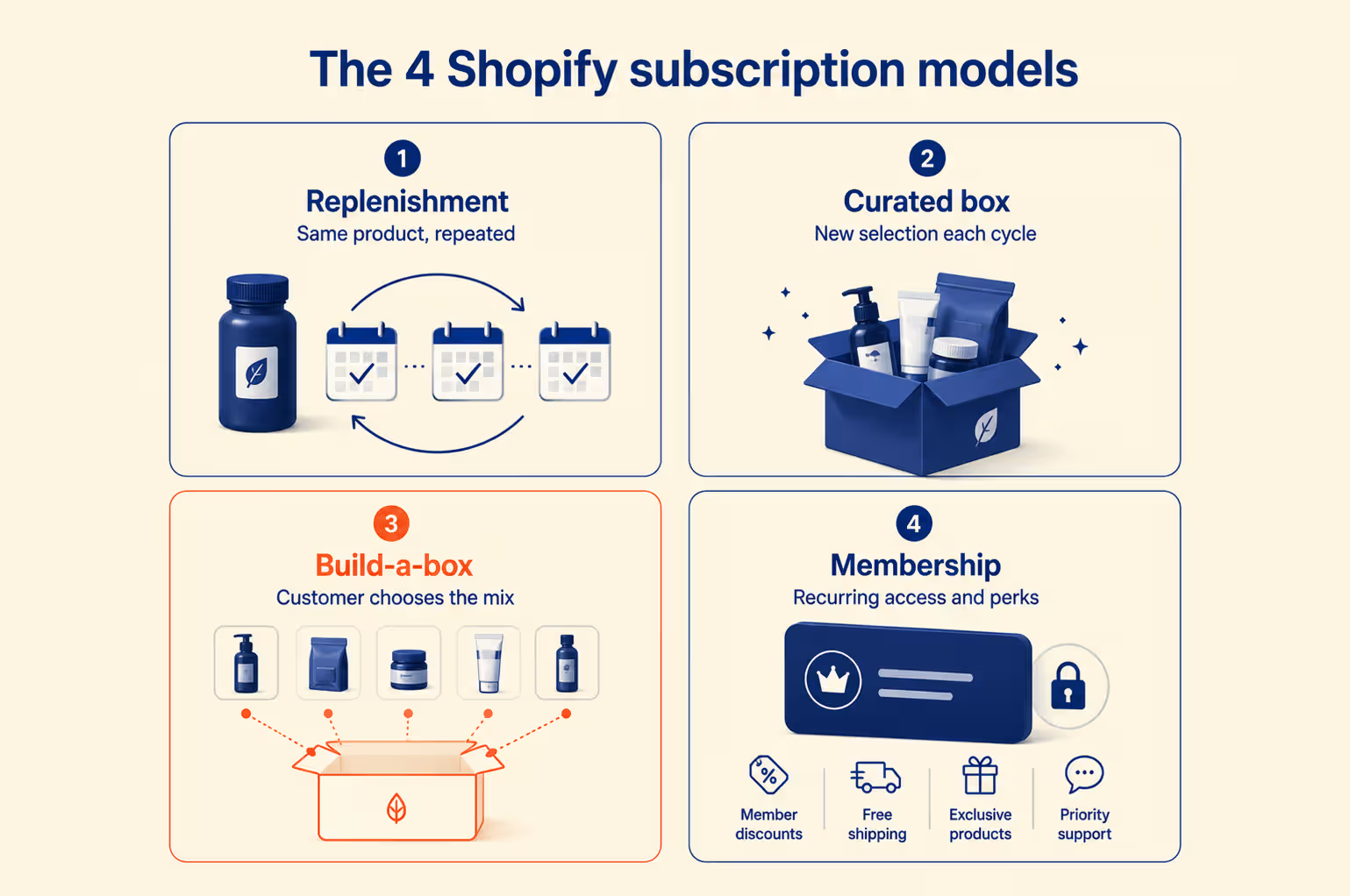
The 4 Shopify subscription models
Most subscription programs fall into one of four shapes. Picking the right one for your product matters more than picking the app.
|
Model |
How it works |
Fits products like |
|
Replenishment (subscribe & save) |
The same item ships on a set schedule, usually at a 10% to 20% discount |
Coffee, supplements, pet food, razors, skincare |
|
Curated box |
You choose the contents each cycle and ship a surprise |
Beauty, snacks, books, hobby kits |
|
Build-a-box |
The customer picks what goes in the recurring box |
Mixed grocery, supplement stacks, sample sets |
|
Membership / access |
A recurring fee buys perks or content, with no physical shipment |
Communities, digital products, services, VIP tiers |
Replenishment is the workhorse and the easiest to launch. Build-a-box tends to produce the highest lifetime value, because a subscriber who assembled their own box feels ownership and cancels less often.
How Shopify selling plans and subscription contracts work
Under the hood, three pieces do the work:
- Selling plans set the price, billing frequency, and discount for a subscription offer.
- Subscription contracts are the agreement between you and the customer.
- Billing attempts are the automated charges the app fires each cycle.
When a customer subscribes, Shopify creates the order and the first billing attempt, then generates the contract. Every renewal after that is automated by the app. Shopify deliberately splits the work this way so you are never locked to one billing provider, which is also why contract portability is a real thing to check before you choose.
Before you look at third-party apps: Shopify has its own free first-party app, Shopify Subscriptions. It handles basic recurring billing inside the admin with no monthly fee and no transaction cut. If your needs are simple (straight subscribe-and-save, one or two products), start there before paying for anything. The apps below earn their fee once you need build-a-box, real retention tooling, or deeper analytics.
{{cta}}
The 12 Best Subscription Apps for Shopify in 2026
Not every Shopify subscription app is built for the same type of business. Some prioritize low transaction fees for new stores, while others focus on enterprise integrations, subscriber retention, AI-powered churn prevention, or advanced subscription models like build-a-box and memberships.
Below, we've compared the 12 best Shopify subscription apps for 2026 based on pricing, transaction fees, Shopify Checkout compatibility, subscriber management, retention features, customer reviews, and the types of merchants each platform serves best.
1. Recharge: best for enterprise and shopify plus brands
Recharge has the largest install base in Shopify subscriptions (20,000+ merchants) and the deepest set of integrations, which is exactly why big brands pick it. If you already run a stack of tools and need every one of them to talk to your subscription data, Recharge is the safe default.
In April 2026 it acquired Skio, so the two loudest names in the category now sit under one roof.
- Key features: mature billing infrastructure, native bundle builder, wide integration support, unified checkout for mixed carts.
- Pricing:
- $25/mo for the first 50 subscribers (net-new merchants)
- Starter at $99/mo + about 1.49% + $0.19 per transaction
- Plus at $499/mo + 1.34%
- Rating: 4.8 stars (2,930 reviews)
|
Pros |
Cons |
|
Largest install base and deepest integration support in the category |
The ~1.49% Starter fee is high at scale and rose in 2026 |
|
Native bundle builder for build-a-box models |
Plus and Custom plans run on 12-month terms, so mid-term exit is hard |
|
Mature, battle-tested billing trusted by large brands |
Setup and full feature use assume a team behind them |
2. Loop Subscriptions: best for churn-focused dtc brands
Loop is the strongest independent challenger and is built around retention rather than plumbing. It processes $4B+ in subscription revenue across 2,400+ brands and has run over 1,100 migrations, including 400+ brands that left Recharge. If your subscription program already exists and your problem is people canceling, Loop is the one to shortlist.
- Key features: cancellation and win-back flows, subscriber analytics, box and build-a-box support, a passwordless mobile portal.
- Pricing:
- Free Forever up to 50 active subscriptions
- Starter at $99/mo + 1.0%
- Pro at $399/mo + 0.75%, with no per-order flat fee
- Rating: 5.0 stars (669 reviews)
|
Pros |
Cons |
|
Best-in-class cancellation and win-back flows |
Free tier caps at 50 active subscriptions |
|
No per-order flat fee, only a percentage |
Priced for brands already running subscriptions, not tiny stores |
|
Proven migration record, including 400+ brands from Recharge |
Deepest features sit on the Pro tier |
3. Appstle Subscriptions: best all-round pick for most stores
Appstle is the app we point most merchants to first, because it does the widest range of things well on a genuinely usable free plan. It serves 40,000+ merchants and holds the highest review count in the category, which lowers the risk of hitting an undiscovered edge case.
- Key features: pay-as-you-go and prepaid plans, build-a-box, tiered discounts, loyalty features, cancellation flows, a self-managed portal.
- Pricing: free until $500/mo in subscription revenue, then paid plans from about $10/mo
- Rating: 5.0 stars (7,818 reviews)
|
Pros |
Cons |
|
Widest feature set in the category on a real free plan |
Feature depth can overwhelm a first-time subscription seller |
|
Largest review base, so few undiscovered edge cases |
Interface prioritizes function over polish |
|
Responsive 24/7 support |
- |
4. Seal Subscriptions: best budget option
Seal wins on one clear number: zero transaction fees on every tier, including the free plan. For a store watching margins, that changes the math against percentage-fee apps entirely. It is a mature, steady product built in Europe, with merchants running on it happily for years.
- Key features: recurring and prepaid plans, automated product swaps, subscription editing, customer portal, free shipping rules.
- Pricing: free plan up to 150 subscribers, paid plans from about $4.95/mo, no transaction fees at any tier
- Rating: 4.9 stars (2,860 reviews)
|
Pros |
Cons |
|
No transaction fees on any tier, including free |
Lighter retention tooling than Loop or Recharge |
|
Low monthly price and a genuine free plan |
Analytics are basic |
|
Steady, reliable, well-reviewed over years |
- |
5. Smartrr: best for a premium branded subscriber portal
Smartrr is built for growing DTC and Shopify Plus brands that want subscriptions, loyalty, and a subscriber portal from one vendor, instead of stitching Recharge to a separate loyalty app. The portal is its standout: it themes to match your site, so it reads as part of your brand rather than a bolt-on. Brands like Jolie, Snif, and Slate Milk run on it.
- Key features: subscribe and save, build-a-box, sequential and prepaid plans, branded customer portal, native loyalty and rewards, AI-powered Klaviyo flows, cohort analytics.
- Pricing:
- Launch at $99/mo + 1% subscriber GMV
- Grow at $299/mo + 1%
- Excel at $499/mo + 1% (loyalty and referrals sit on the Excel tier)
- Rating: 4.9 stars (68 reviews)
|
Pros |
Cons |
|
Premium branded portal that feels native to your site |
The 1% GMV fee applies on every tier |
|
Subscriptions plus loyalty and rewards from one vendor |
Loyalty and referrals are gated to the $499 Excel plan |
|
Dedicated customer success manager and strong support record |
Smaller review base than the category veterans |
6. Bold Subscriptions: best long-standing shopify plus option
Bold has been in this space for a decade and is a Shopify Plus Certified app, which buys trust with larger merchants. It handles reliable recurring billing without pushing you toward automation you may not need.
- Key features: recurring and prepaid billing, dunning management, mixed one-time and subscription carts, 24/7 support.
- Pricing: Scale at $74.99/mo + 0.9%, with higher retention tiers adding cancellation-prevention tooling.
- Rating: 4.3 stars (373 reviews)
|
Pros |
Cons |
|
Decade-long track record and Shopify Plus certified |
Lowest rating among the established paid apps here |
|
Solid for prepaid and simple recurring billing |
Interface and analytics feel dated next to newer apps |
|
Reliable support |
- |
7. Stay AI: best for retention-led brands
Stay AI puts almost everything into reducing churn through machine learning rather than manual rules. Its RetentionEngine and WinbackEngine predict cancellations and automate win-backs. It can also run on top of Recharge, so some brands use it as a retention layer rather than a full replacement.
- Key features: AI churn prediction, automated win-back campaigns, smart cancel flows, A/B testing, self-service portal.
- Pricing: $499/mo, free trial available
- Rating: 5.0 stars (139 reviews)
|
Pros |
Cons |
|
Deepest AI-driven retention tooling in the category |
$499/mo entry is steep for smaller programs |
|
Can layer on top of Recharge rather than replace it |
ROI depends on a team acting on the tools |
|
Dedicated customer success manager |
Smaller review base |
8. Ordergroove: best for enterprise and omnichannel retailers
Ordergroove targets large retailers that need tailored subscription and reorder programs across channels. Its strength is predictive replenishment and hybrid one-time-and-subscription carts for brands operating at real scale.
- Key features: predictive reorder, omnichannel support, complex discounting, loyalty integrations, custom implementations.
- Pricing: enterprise, contact sales (typically a six-figure annual commitment), demo only.
- Rating: no public Shopify App Store rating. (sold through sales, not self-serve install)
|
Pros |
Cons |
|
Built for enterprise complexity, including hybrid carts and predictive timing |
Six-figure annual commitment |
|
Omnichannel and large-brand scale |
Leans on managed services, so changes are slow and paid |
|
Deep consumption modeling |
9. Awtomic: best for subscription boxes and build-a-box brands
Where most apps treat build-a-box as a feature, Awtomic treats it as the product, with conditional box logic (swap one item quarterly, another monthly) that curated brands actually need.
It's built for wine clubs, memberships, specialty foods, coffee, and beauty, and its POS integration makes it unusual: wineries and brands with in-store sales can run one subscription system across both channels.
- Key features: build-a-box and curated bundles, flexible/prepaid/batched schedules, add-ons and upsells, a passwordless customer portal, failed-payment recovery, POS integration, API access for scale.
- Pricing: from $299/mo, free trial available.
- Rating: 5.0 stars (34 reviews)
|
Pros |
Cons |
|
Deepest build-a-box and curation logic in the category |
$299/mo entry is steep for early-stage stores |
|
Native Shopify Checkout and a passwordless portal |
Small review base and install count vs. the veterans |
|
POS integration for wineries and in-store sales |
Smaller agency ecosystem if you need outside help |
10. Recurpay: Best for Startups and International Stores
Recurpay is built for getting started fast and cheap, with strong multi-currency and multi-language support used by merchants across 40+ countries. Almost every feature is available even on the free tier, which is unusual.
- Key features: multi-currency, WhatsApp and email notifications, tiered discounts, product trials, automatic billing.
- Pricing: free until you make $100/mo in subscription revenue, paid plans scale from there
- Rating: 4.9 stars (390 reviews)
|
Pros |
Cons |
|
Nearly all features available on the free tier |
Smaller install base than Recharge or Appstle |
|
Strong multi-currency and 40+ country support |
Younger product with a shorter track record |
|
Low starting cost that scales with revenue |
- |
11. Subify Subscriptions: Best for Subscriptions Plus Loyalty in One
Subify (listed as Subi) pairs subscription billing with a built-in loyalty and rewards engine, so brands that want both without stitching two apps together get a single, Shopify-native setup.
- Key features: subscribe-and-save, membership tiers, loyalty points and rewards, box options, self-service portal, dunning
- Pricing: free to install, with loyalty and advanced analytics on higher tiers
- Rating: 4.9 stars (890 reviews)
|
Pros |
Cons |
|
Subscriptions and loyalty in one Shopify-native app |
Loyalty and advanced analytics gated to higher tiers |
|
Clean setup and strong support |
Small per-subscription fees add up at volume |
|
Good fit for brands building repeat-purchase habits |
- |
12. PayWhirl Subscriptions: Best for Flexible Payment Gateways
PayWhirl is the pick when payment flexibility matters. It supports Shopify Payments, Stripe, PayPal Express, and Authorize.net, and keeps subscriptions and features unlimited across plans.
- Key features: multi-gateway support, multi-currency and multi-language, automatic dunning, self-managed subscriptions.
- Pricing: free to install, paid plans around $9, $49, and $249/mo
- Rating: 4.8 stars (180 reviews)
|
Pros |
Cons |
|
Widest payment-gateway support on the list |
Retention and analytics are lighter than the leaders |
|
Unlimited subscriptions on all plans |
Smaller review base |
|
Flexible for multi-gateway and international setups |
- |
Shopify subscription apps compared: features, pricing & ratings
After reviewing each platform individually, it's easier to compare them side by side. The table below summarizes the factors that matter most when choosing a Shopify subscription app: starting price, transaction fees, merchant ratings, and the type of store each app is designed for.
|
App |
Best for |
Starting price |
Transaction fee |
Rating (reviews) |
|
Recharge |
Enterprise, deep integrations |
$25/mo (50 subs) |
~1.34%–1.49% + $0.19/txn |
4.8 (2,930) |
|
Loop |
Churn-focused DTC |
Free to 50 subs |
0.75%–1.0%, no per-order fee |
5.0 (669) |
|
Appstle |
Most stores, best free plan |
Free to $500/mo rev |
None on lower tiers |
5.0 (7,818) |
|
Seal |
Budget stores |
~$4.95/mo |
None, any tier |
4.9 (2,860) |
|
Smartrr |
Mid-market DTC, branded portal + loyalty |
$99/mo |
1% subscriber GMV |
4.9 (68) |
|
Bold |
Shopify Plus, long-standing |
$74.99/mo |
0.9% |
4.3 (373) |
|
Stay AI |
AI-driven retention |
$499/mo |
included |
5.0 (139) |
|
Ordergroove |
Enterprise omnichannel |
custom (6-figure/yr) |
custom |
no public rating |
|
Awtomic |
Subscription boxes, build-a-box |
$299/mo |
included |
5.0 (34) |
|
Recurpay |
Startups, international |
free to $100/mo |
scales with revenue |
4.9 (390) |
|
Subify |
Subscriptions + loyalty |
free to install |
small per-sub fee |
4.9 (890) |
|
PayWhirl |
Gateway flexibility |
~$9/mo |
none flat |
4.8 (180) |
How to Choose the Right Subscription App for Your Shopify Store
Once you have seen the field, judge your shortlist against these, in order:
- Do the fee math on your real GMV, not the sticker price. On a $40 subscription order, a 1.49% + $0.19 fee is about $0.79 every reorder. Half a percentage point of rev-share can outweigh a $300 monthly-fee difference once your subscriber base is large. Model it before you sign.
- Insist on native Shopify Checkout. It keeps Shop Pay one-tap alive on renewals. A third-party redirect quietly lowers conversion on every cycle.
- Test the cancel and pause flow yourself. A portal that hides the cancel button feels clever until card-issuer disputes spike. A visible pause option keeps more revenue than a buried cancel.
- Check contract portability. Ask, in writing, how the app hands back payment tokens and active contracts if you leave. This is the difference between a clean migration and a churn event.
- Match retention depth to your stage. A first program does not need AI win-back. A 7-figure program does.
Which Shopify subscription app is right for your store?
Use your stage and product type to shortcut the decision:
|
Your situation |
Start with |
Why |
|
Brand new, testing subscriptions |
Shopify Subscriptions, then Appstle or Seal |
Free or near-free, quick to launch, no fee drag while you validate |
|
Under $5K/mo subscription revenue |
Appstle or Seal |
Zero or low fees, enough features to prove the model works |
|
$5K–$50K/mo, scaling |
Appstle or Loop |
Cheaper than Recharge at this volume; Loop if churn is the issue |
|
$50K–$200K/mo |
Recharge or Loop |
Recharge for integration depth, Loop for retention tooling |
|
$200K+/mo, retention critical |
Stay AI, Smartrr, or Recharge Plus |
Subscriber experience and analytics now move real money |
|
Subscription box business |
Loop |
Built for curated and build-a-box formats |
|
Tight margins, fee-averse |
Seal |
No transaction fees on any tier |
Whatever you pick, turn on, skip and pause from day one. More than a quarter of would-be cancellers will pause instead if you let them, and a paused subscriber is far easier to win back than a canceled one.
When a Shopify subscription model doesn't work (and why programs fail)
Plenty of subscription programs fail, and the app is rarely the reason. Here is where they actually break:
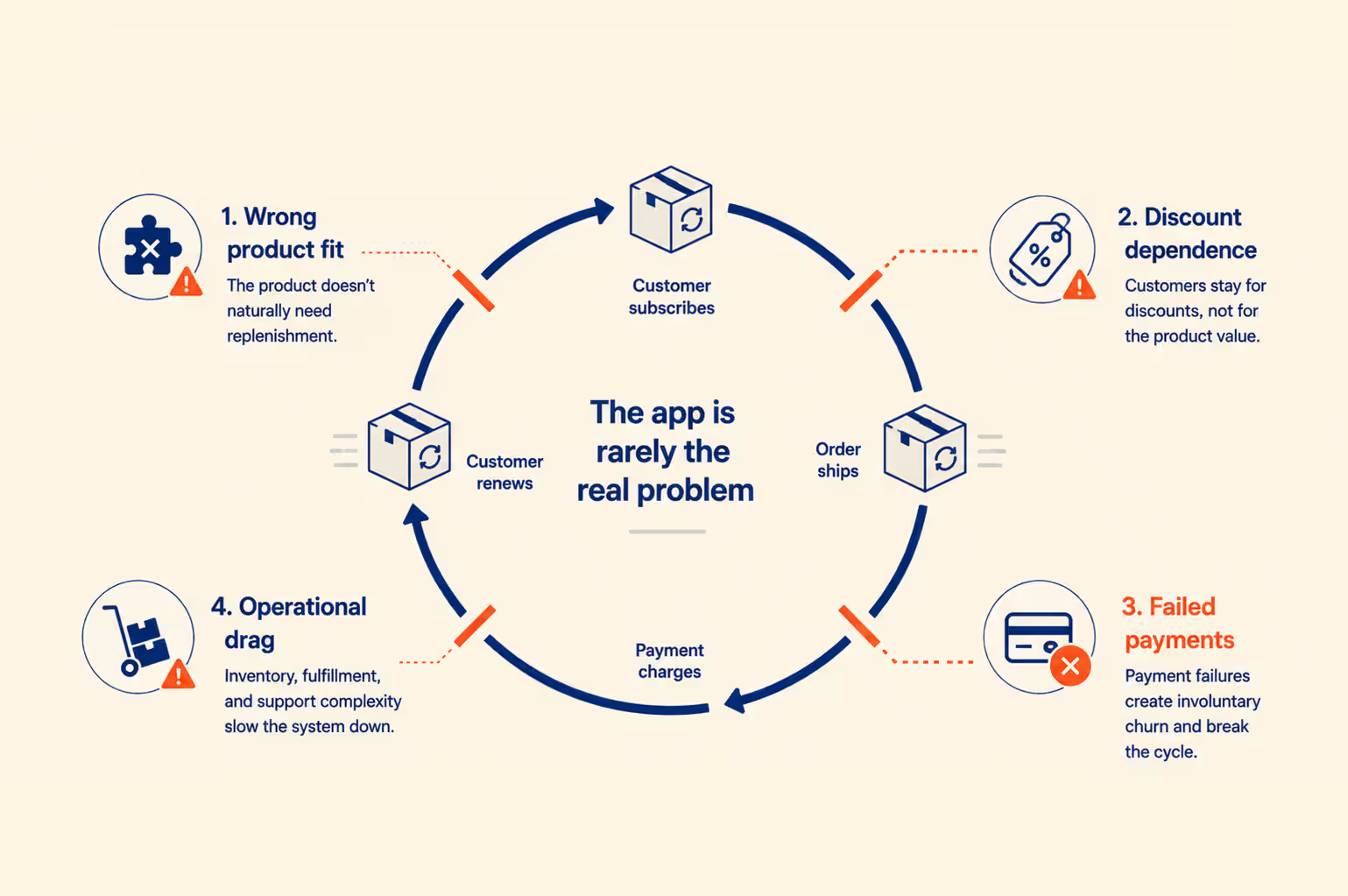
1. Wrong product fit.
Subscriptions work when a product runs out on a predictable cycle. Coffee, supplements, and pet food fit. Durable or one-time-purchase goods do not, no matter how good the app is. If your customers do not naturally reorder on a schedule, a subscription option will collect a few sign-ups and stall.
2. Discount dependence.
Brands that only sell subscriptions behind a steep discount train customers to churn the moment the discount ends. The discount should reward commitment, not be the only reason to commit.
3. Involuntary churn nobody is watching.
This is the quiet killer. Across the industry, failed payments (expired cards, declines, insufficient funds) account for roughly 20% to 40% of total subscription churn, based on analysis of millions of failed payments. These customers did not choose to leave. They were dropped by a payment that never got recovered, and most brands do far too little to win them back.
4. Operational drag.
Running subscriptions alongside one-time orders adds real complexity to inventory, fulfillment, and support. Launch it in phases so your ops team is not buried.
The honest takeaway: validate that customers reorder your product on a cycle before you build a program around the assumption that they will.
Where Subscription Apps Fit in Your Shopify Retention Stack
A subscription app handles one job: billing and recurrence. Keeping subscribers is the bigger job, and it is won across several channels working together. Your subscription app is only one layer of four:
- The subscription app bills the customer and manages the contract.
- Email and SMS carry offers, updates, and renewal reminders.
- Loyalty rewards the habit and raises the cost of leaving.
- An owned mobile app, the channel most brands underuse, reaches subscribers directly on their phone and can run in-app subscriptions.
Now look at involuntary churn again, the 20% to 40% of losses caused by failed payments. Most subscription apps try to win those back with email dunning, and it rarely works well for one simple reason:
- Renewal and payment-failure emails land in the Promotions tab and go unread.
- A push notification to a customer with your app installed shows up on the lock screen.
That gap is where an owned app earns its place. Brands that run their store as a mobile app, built on a Shopify app builder such as Appbrew, can:
- send a renewal reminder the moment a payment fails,
- let the customer update a card in a tap, and
- re-engage a lapsed subscriber with a push instead of hoping an email opens.
This is why app-based subscribers tend to show higher retention and lifetime value than web-only ones. Push wins back the reach email lost: across brands running push on Appbrew, campaigns see far higher open and click rates than email, and push notifications can lift retention substantially in the first 90 days.
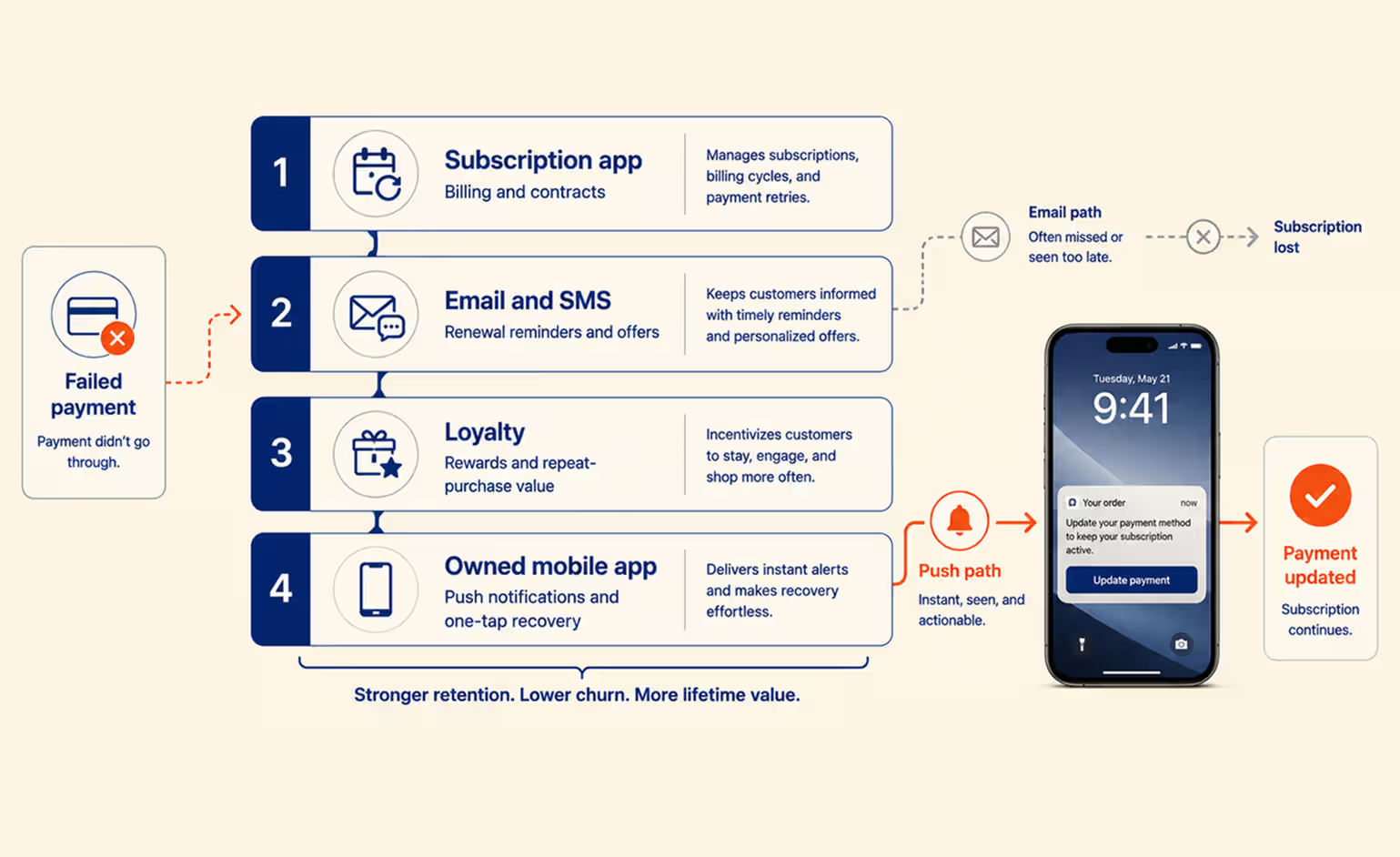
A mobile app does not replace your subscription app. They do different jobs. The subscription app bills the customer; the owned mobile channel keeps that customer from slipping away between renewals. The brands that keep subscribers longest run both, and treat retention as a system rather than a single tool.
If you want the wider view, our guide to increasing Shopify sales through owned channels covers how push, email, and app experience compound.
Conclusion: Choosing Your Shopify Subscription App
There is no single best subscription app, only the best one for your stage and product. Start on Shopify's free native app to validate. Move to Appstle or Seal when you want more without fee drag. Graduate to Loop or Recharge as retention and integrations start to matter, and to Stay AI or Smartrr when a point of churn is worth real money.
Whichever you choose, remember that the app is one layer. It bills your subscribers. What keeps them is a retention system: a portal they can actually use, dunning that recovers failed payments, and an owned channel like push that reaches them where email no longer does. Get the product-cycle fit right first, pick the app that matches your stage, and build the retention layer around it.
Turn Your Subscribers Into a Channel You Control
Your subscription app bills the customer. Appbrew gives you the mobile channel that keeps them. Push notifications recover failed payments before they become cancellations, customers update a card in one tap, and app-exclusive perks pull subscribers back between renewals, all on a channel you own and Meta cannot price you out of.
See exactly how it works in our guide to turning a Shopify store into a mobile app.
{{cta2}}
Shopify Subscription App FAQs
What is a Shopify subscription app?
A Shopify subscription app adds recurring billing to your store. It lets customers buy a product on a repeating schedule (weekly, monthly, or custom) and charges their saved payment method automatically each cycle. Shopify does not run recurring billing on its own, so you install an app to handle it.
Do Shopify subscription apps charge transaction fees?
Many do. Some charge a flat monthly fee only, while others take a percentage of each subscription order, often 0.75% to 1.5%, on top of or instead of a monthly fee. At high volume, a percentage fee can cost more than a fixed plan, so compare both against your expected subscription revenue.
Does Shopify have its own subscriptions app?
Yes. Shopify Subscriptions is a free first-party app that handles basic recurring billing inside the Shopify admin. It covers simple use cases well but sits at only 3.7 stars. Brands that need build-a-box, advanced retention tools, or deeper analytics usually move to a third-party app.
Which subscription app is best for a small store?
Small stores usually do best with an app that is free to start and quick to set up. Appstle and Seal both offer free plans that cover early subscription volume with no transaction fees, so you can launch a program before it earns meaningful revenue.
Can I run subscriptions inside a mobile app?
Yes. If you turn your Shopify store into a mobile app with a builder like Appbrew, your subscription app keeps handling billing while the app adds push notifications for renewals and failed payments. App-based subscribers often retain better than web-only subscribers, because push reminders get seen and card updates take one tap.














