



.webp)
.webp)


Shopify Sidekick vs other AI assistants for store management: what Sidekick, ChatGPT, Claude and Milo each do, what they cost, and which runs your mobile app.
Short answer: Shopify Sidekick is an AI assistant built into the Shopify admin and included with every Shopify plan. General-purpose models like ChatGPT and Claude work outside the platform, and third-party AI agents specialize in single jobs, such as customer support (Tidio Lyro), inventory planning (Prediko), cross-platform operations (Vortex IQ) or the customer-facing mobile app (Milo by Appbrew). Sidekick and the specialist agents can act on your store. ChatGPT and Claude only advise unless you connect them.
Every Shopify merchant now has an AI assistant, Shopify Sidekick, built into their admin. Most also keep ChatGPT open in another tab, plus a third-party app or two promising to run part of the store on autopilot.
The question we hear from brands is no longer "should I use AI?" Of course we all are. It is now "which one do I use for what?" Sidekick, ChatGPT, Claude and the agents in the App Store all sound like they do the same thing until you try them. They do not. Each one stops at a different wall.
After four years of building mobile apps for 250+ Shopify brands, we have seen where each of these tools helps and where it falls short.
This guide compares Shopify Sidekick with other AI assistants for store management, what Sidekick does well, where ChatGPT, Claude and specialist agents fit, and the one part of your store most of them cannot touch.
TL;DR
- Sidekick is included with every Shopify plan and strongest at Flow automations, first-draft copy and "how do I" questions.
- It gets unreliable on store-specific work. In tante-e's March 2026 test, theme editing and bulk data work each scored 2 out of 10.
- ChatGPT and Claude write and reason well, but they cannot see or change your store unless you connect them.
- Specialized agents go deeper on one job such as Tidio's Lyro on support, Prediko on inventory, Vortex IQ across platforms.
- None of them can touch your mobile app. That is where Milo works, and most brands with an app end up using Sidekick and Milo together.
Shopify Sidekick vs other AI assistants: when to use which
The quickest way to choose is by where each tool lives. An AI can only act on the systems it can reach, and these reach very different parts of a Shopify business.
| Aspect | Shopify Sidekick | ChatGPT / Claude | Specialized AI agents | AI mobile app agents (Milo) |
|---|---|---|---|---|
| Where it lives | Inside the Shopify admin, desktop and mobile | External web or desktop app | Separate app or storefront widget | Inside the app platform, acting on your native app |
| Price | Included with your Shopify plan | Free tier, paid plans around $20/month | Separate subscription | Included in every Appbrew plan, 30 days free trial. |
| Store data access | Native, real time | Only what you paste in, or via MCP/API | Its own slice (inventory, tickets) | App sessions, funnel and campaigns |
| Acts on your store | Yes, after you review: Flows, products, theme edits | No, without a custom setup | Yes, within its one job | Yes, on your live mobile app |
| Talks to customers | No | No | Some (support and shopping bots) | Yes, through push notifications |
| Changes your mobile app | No | No | No | Yes: screens, layouts, blocks |
| Setup | None, it is already in your admin | Copy and paste data in, or build an MCP connection | Install and configure | None once your app is on Appbrew |
| Best for | Admin shortcuts, Flows, first drafts | Writing, brainstorming, deep analysis | One deep job (support, inventory, multi-platform) | Running and growing the app |
| Blind spot | Your customers and your mobile app | No direct access to your store by default | Everything outside their one job | Bulk admin edits, which stay in Shopify Admin |
Two rows decide most of it: whether the AI can act, and whether it can reach your customers.
What is Shopify Sidekick?
Shopify Sidekick is the AI assistant built into your Shopify admin. It runs on Anthropic's Claude, hosted on Google Cloud, and it is included with every Shopify plan.
Role: a merchant-facing assistant for running the Shopify admin.
Access & Cost: built into the admin on desktop and in the Shopify mobile app. It is included with your plan, with features and usage limits varying by plan.
Capabilities:
- Builds Shopify Flow automations from a plain-language description.
- Drafts product descriptions, blog posts and images.
- Generates theme edits and small custom admin apps.
- Surfaces recommendations through Sidekick Pulse on the admin home.
Limitations:
- Store-specific work is shaky. Custom themes, metafields and bulk catalog edits are where it struggles most.
- Exact numbers drift on complex catalogs.
- It talks to you, never to your shoppers.
- It stays inside Shopify and cannot operate your native mobile app.
The clearest evidence comes from German Shopify Plus agency tante-e, which tested Sidekick on six real use cases across live client stores. Flow creation scored 7 out of 10. KPI analysis scored 3. Theme editing, bulk data maintenance and B2B customer setup each scored 2.
We covered every test and failure in our hands-on review of what Shopify Sidekick can and cannot do.
Shopify Sidekick vs ChatGPT and Claude
ChatGPT and Claude are better writers and thinkers than Sidekick in a vacuum. Sidekick wins on one thing that matters more for daily store work: it can see your store.
Sidekick has your orders, products and customers. Claude in a browser tab has whatever you paste into it.
ChatGPT
- Role: general-purpose AI for writing, ideation and analysis.
- Access & Cost: standalone app, free tier with paid plans.
- Capabilities: fast, high-volume copy: ad hooks, email subject lines, product naming, landing page drafts.
- Limitations: no native access to inventory, orders or the admin. Every analysis starts with an export.
Claude
- Role: general-purpose AI suited to long-form writing and careful reasoning over large files.
- Access & Cost: standalone app, free tier with paid plans.
- Capabilities: structured analysis, code and digesting a large CSV export without losing the thread. It can be linked to a Shopify store through MCP for custom audits.
- Limitations: it does not read live metrics or take admin actions unless someone builds that connection.
Sidekick does not reach out to your other tools the way an MCP-connected Claude can. It extends through Sidekick app extensions instead, which let apps expose features inside a Sidekick chat. That keeps Sidekick inside Shopify, and it keeps general AI outside.
A general AI is enough for creative work, strategy and one-off analysis on data you have already exported. It is not enough for anything that has to happen on the live store.
Shopify Sidekick vs specialized AI agents
Specialized Shopify AI agents exist because Sidekick is a generalist. Each one takes a job Sidekick does not do, or does not do deeply, and builds for it.
Support, inventory and workflow agents
- Role: operational agents built around one function.
- Access & Cost: separate subscriptions with their own dashboards. Tidio's Lyro, for example, charges per conversation after 50 free ones.
- Capabilities: Lyro answers shopper questions from your support content. Prediko forecasts demand and plans purchase orders, with an inventory agent called Pia. Vortex IQ finds revenue leaks and carries out approved fixes across Shopify, BigCommerce and Adobe Commerce.
- Limitations: another bill, another login, and data syncing outside Shopify.
Shopper-facing assistants
Tools like Dori sit on the storefront and help shoppers find products, compare options and add to cart from chat. They help buyers buy. Sidekick helps merchants manage. Different jobs entirely.
AI mobile app agents
- Role: agents that operate a brand's native iOS and Android app, the channel admin tools do not reach.
- Access & Cost: part of an AI mobile app platform. Milo, for example, is included in every Appbrew plan.
- Capabilities: edit app screens and layouts, send push notifications with deep links, build tracked campaign links and read the app's conversion funnel.
- Limitations: they work on the app, not the Shopify admin, so they sit alongside Sidekick rather than replacing it.
The trade-off across all of these is the same. A specialist is worth its subscription when the job is big enough. For a support-heavy brand, it usually is. For a store doing 50 orders a week, Sidekick and a good inbox might cover it.
| Job | Example agent | What it adds that Sidekick does not |
|---|---|---|
| Customer-facing mobile app | Milo by Appbrew | Edits app screens, sends push, builds deep links, reads the app funnel |
| Customer support | Tidio Lyro | Answers shoppers directly, across chat and email |
| Cross-platform operations | Vortex IQ | Agents that work across Shopify, BigCommerce and Adobe Commerce |
Shopify Sidekick vs Milo
Shopify merchants ask us how Milo compares to Shopify Sidekick. If you have used Shopify Sidekick, you know it is a good explainer but not an operator. You ask it to fix something, and it tells you how to fix it yourself.
Milo starts exactly where Sidekick ends. Here's how Milo fills the gap.
| Question | Shopify Sidekick | Milo by Appbrew |
|---|---|---|
| Where does it work? | Shopify admin, desktop and mobile | Your brand's native iOS and Android app |
| Can it redesign a page? | Partly. Generates theme edits and blocks; theme work scored 2/10 in testing | Yes. Rebuilds app screens from a prompt or a screenshot, as a draft you preview |
| Can it see metafields and custom code? | Limited. Guesses when it cannot see them | Yes. Inspects and rewires metafield bindings |
| Can it reach customers with push directly? | No. It is merchant-facing only | Yes. Writes, deep-links, tests and schedules push |
| How deep is its funnel data? | Surface summaries; KPI analysis scored 3/10 | Stage-by-stage app funnel, with a likely cause |
| Can it make bulk catalog changes? | Yes, with mixed reliability; bulk work scored 2/10 | Reads the catalog and hands you the spec for Shopify Admin |
| What happens when it is unsure? | Rarely says "I don't know" | Says it cannot, and tells you where to go instead |
| What does it cost? | Included with your Shopify plan | Part of every Appbrew plan (see pricing) |
| Who is it for? | Every Shopify merchant | Shopify brands with a mobile app |
{{cta}}
Shopify Sidekick and Milo tested on real tasks
On the same prompt, Sidekick usually explains or drafts, while Milo makes the change on the app. We ran six requests merchants send us every week through both tools. Each one below shows the prompt, what Sidekick does, and what Milo does.
1. "Redesign my homepage." Sidekick describes. Milo rebuilds.
Sidekick built a requested homepage section on the product page instead, and a simple task took four to six iterations to get right. It diagnoses layout problems better than it solves them.
Milo works on the app. One merchant asked it to rebrand their live app from their website while keeping the existing layout. Milo pulled the colors, fonts and carousel styles from the site and built a draft the team previewed before publishing. You can also share a screenshot of a layout you like and ask Milo to match it.
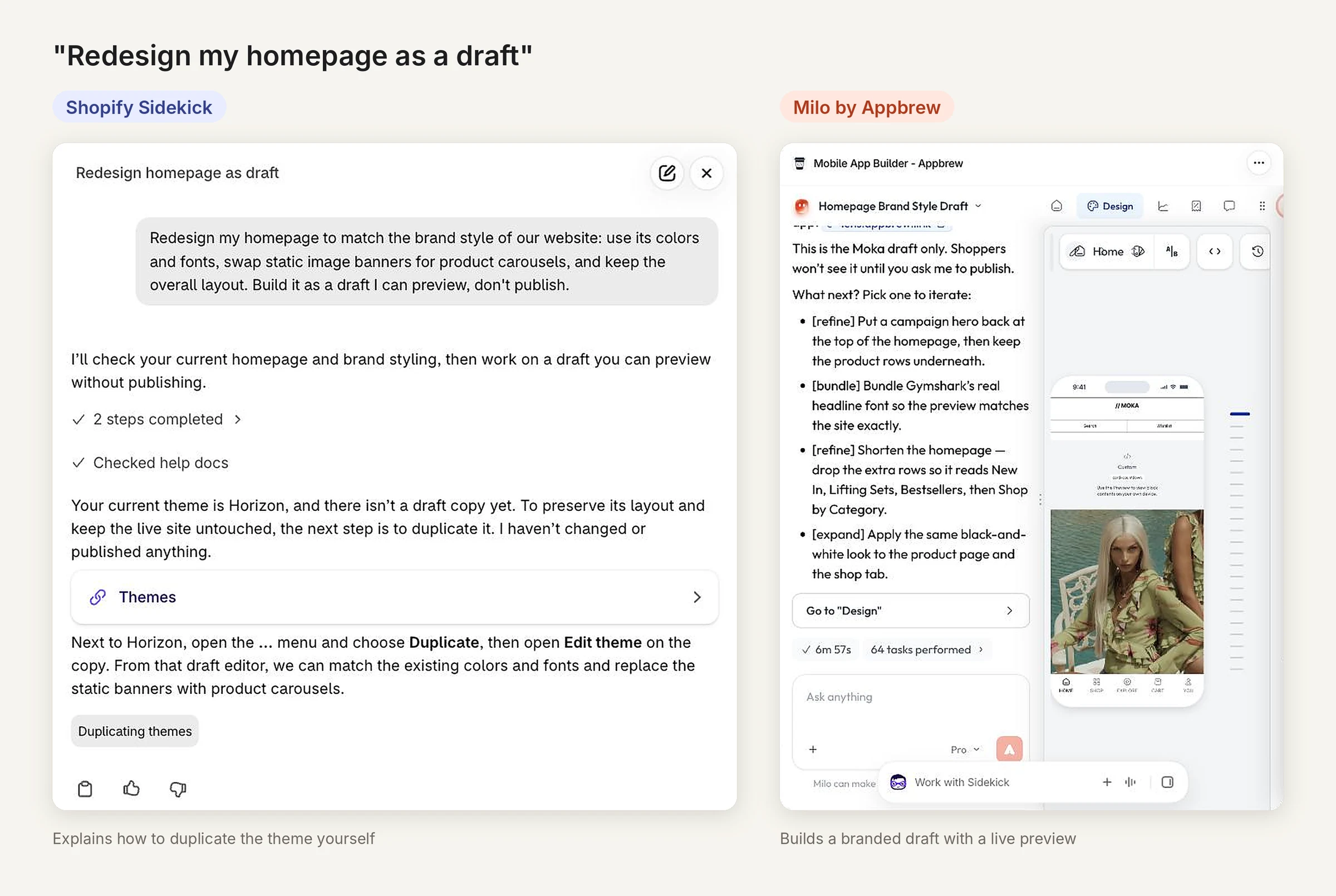
Same prompt, both tools. Tested on a Shopify Plus store, October 2026. Nothing was published.
2. "Fix my product page metafield." Sidekick guesses. Milo traces it.
Custom code and metafields are invisible to Sidekick, so it guesses. One merchant's product page was pulling from a metafield and showing nothing.
Milo inspected the binding, found it pointed at an empty namespace, switched it to the right one, and the content appeared. That is a two-minute fix that used to be a developer ticket.
3. "Send a push for the new drop." Sidekick cannot reach customers. Milo runs it end to end.
Sidekick can draft the message. It cannot send it, because it has no channel to your customers.
Milo handles the full job. It writes the copy in your brand voice, builds the deep link to the exact product or collection, sends a test to your team's devices, and schedules the send.
Brand use case: Svaha USA used it this way from early on, with Milo reading the brand's voice from its website and writing on-brand push notifications.
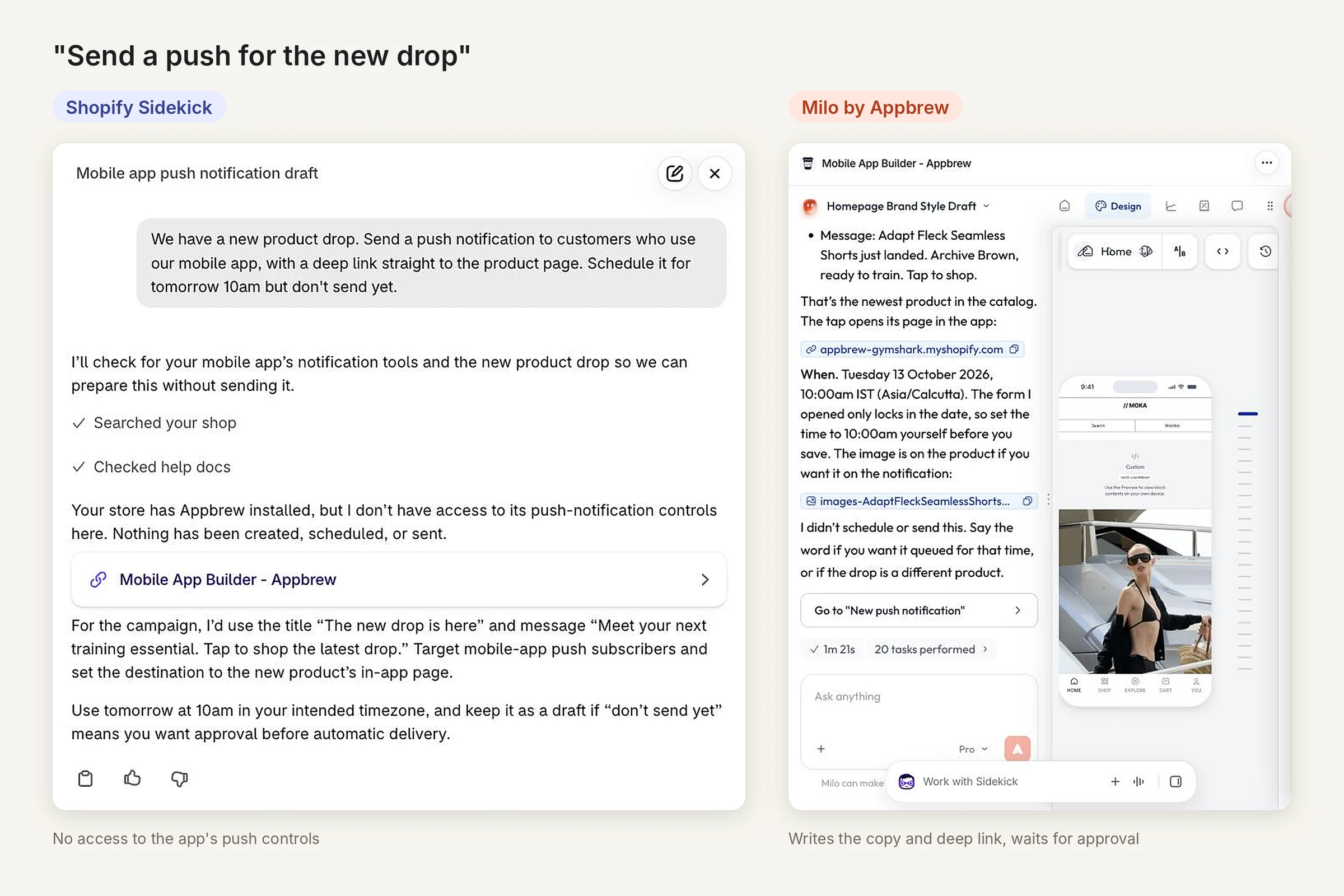
Same prompt, both tools. Milo left the push unscheduled until approved.
4. "Where am I losing customers?" Sidekick summarizes. Milo gets specific.
On a store with complex variants, tante-e saw Sidekick report 887% growth while sales were actually declining.
Milo reads the app's own funnel analytics.
Brand use case: In September 2026, a beauty brand asked it to improve cart-to-checkout and checkout-to-purchase. Milo pulled the last 30 days: cart to checkout at 38.9% (452 carts, 176 checkouts) and checkout to purchase at 51.7%.
Then it opened the cart screen settings and found the problem. The checkout button triggered a sign-in wall with the skip option turned off, so shoppers without an account had no way to check out as a guest. The numbers and the cause, in one answer.
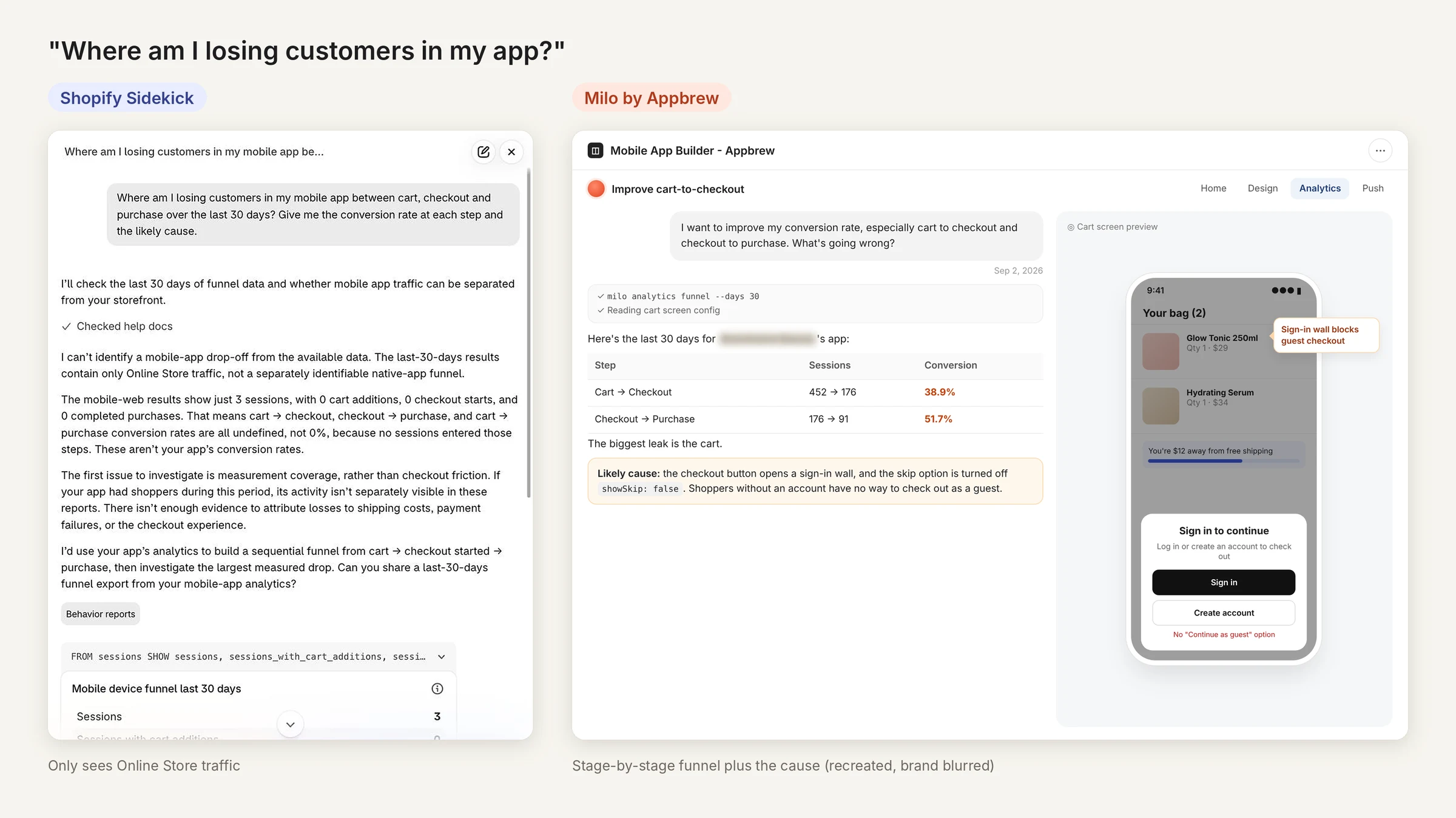
Left: Sidekick on our test store, October 2026. Right: recreated from a real Milo session (September 2026), brand name blurred.
5. "Create a tracked link for my Meta campaign." Sidekick stays in the admin. Milo builds the link.
App install campaigns need deep links with attribution baked in. Sidekick has no way to create them.
Type "Create a OneLink with UTM parameters for Meta and Google app install campaigns" into Milo, and once your app is live on both app stores, the link comes back in the chat. What used to mean pinging a developer now takes one line.
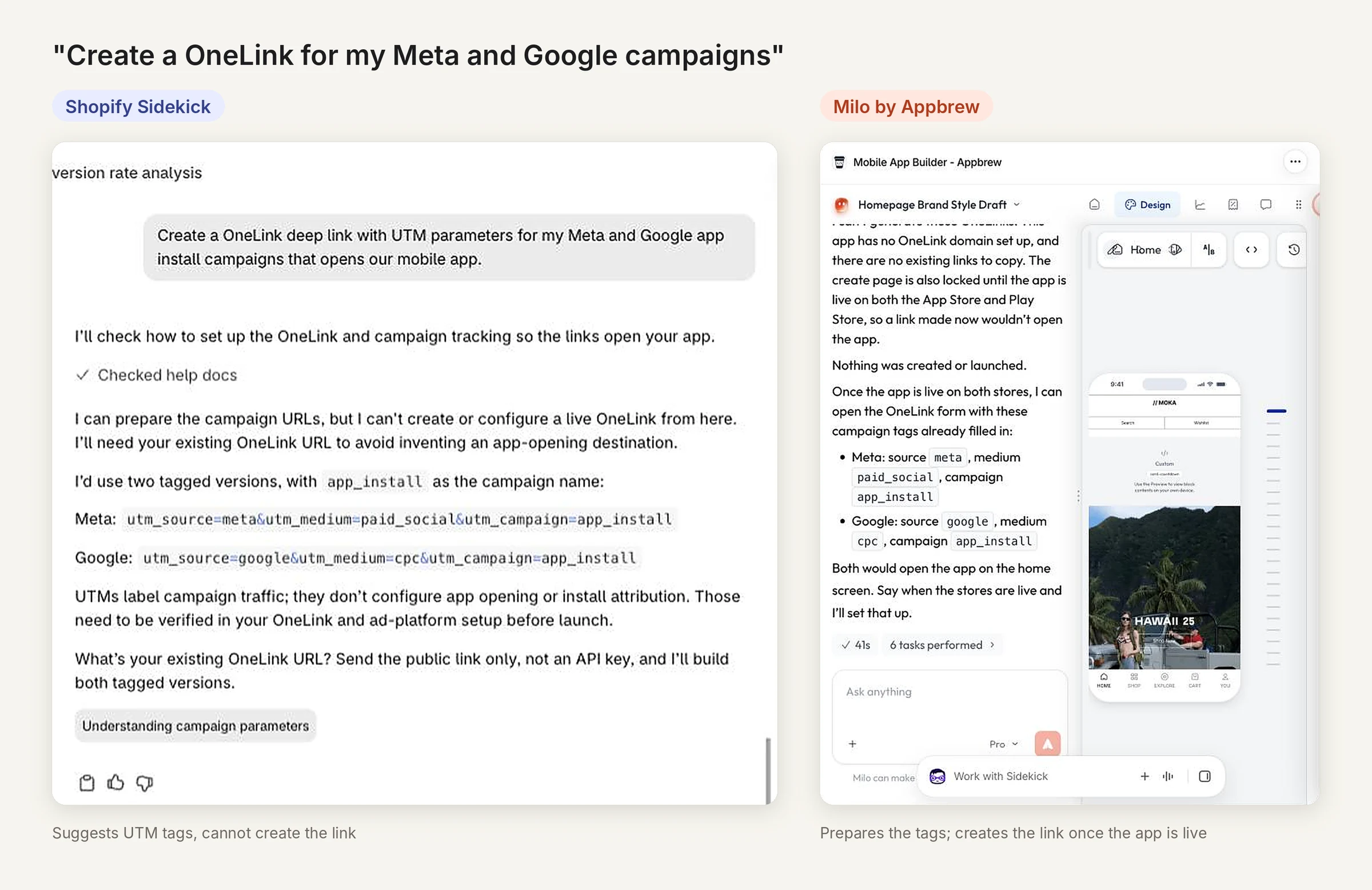
Same prompt, both tools. Milo ran on an unpublished test app, so it prepared the tags and created nothing.
6. "Are you sure?" Sidekick rarely admits doubt. Milo tells you.
The complaint that comes up most about Sidekick is that it sounds equally confident when it is right and when it is guessing. One merchant documented five months of invented product codes and ignored SEO rules, and reported that Shopify support told them there is no setting to stop it.
When Milo cannot do something, it says so. For bulk catalog edits and discounts, it does the analysis and hands you the exact spec to finish in Shopify Admin, because that is the system of record for your catalog. On a live app, a confident guess is the expensive kind.
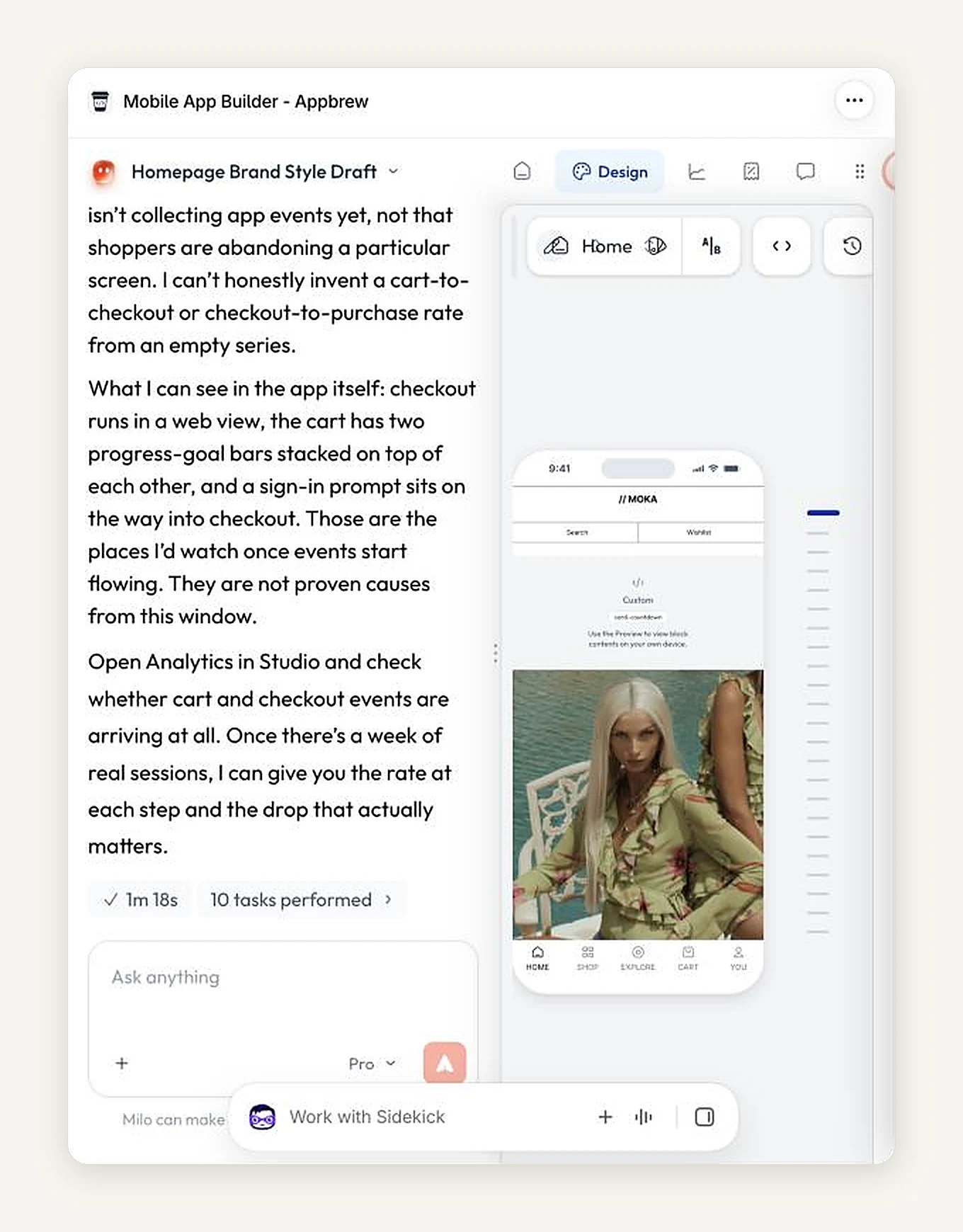
On a test app with no traffic, Milo would not "invent a cart-to-checkout or checkout-to-purchase rate from an empty series." It named the screens to watch instead.
When to use Sidekick, Milo, or both
Pick the tool by where the work happens. If the job lives in the Shopify admin, use Sidekick. If it lives in your app, use Milo. The best AI for Shopify is using both together.
- Building a Flow automation, a report or a product description? Use Sidekick. It is included with your plan, it is already open, and Flow is its strongest skill.
- Bulk catalog edits or discount codes? Use Shopify Admin, with Sidekick's help if you like, and check the output row by row.
- Changing a screen, banner or collection layout in your app? Use Milo. Sidekick cannot reach it.
- Launching a drop and need a push plus a tracked link for Meta ads? Use Milo. It writes the push and builds a OneLink deep link with UTMs in the same conversation.
- Diagnosing why app conversion dipped? Use Milo for the app funnel, and Sidekick for the web store side.
- Don't have a mobile app yet? Sidekick plus one specialist agent covers the web store. When you are ready for an app, Milo can build it end to end: it turns your Shopify store into native iOS and Android apps, then keeps running them after launch.
Can AI manage my Shopify store?
Partly. AI can now run a real share of daily store operations, but it cannot own the judgment calls, and the tools that act still need you to approve the changes that matter.
Here is where the line sits in late 2026:
- Safe to hand off: first-draft copy, Flow automations, image edits and quick sales reads (Sidekick), app screen updates, push campaigns, campaign links and funnel reads (Milo).
- Keep a human on it: bulk catalog changes, pricing, tax and legal settings.
At Forever Beaumore, Milo helped the team go from spotting a funnel leak to launching a promotion without adding headcount.
That is the pattern we see as more Shopify brands on Appbrew use it. They are not handing the store over to AI. They are letting the agent do the heavy lifting, from reading the data to drafting the fix, while they keep the final approval.
That works because AI is not an add-on in Appbrew. It is built into the product and drives it, with marketing IQ built in.
Which AI tool is best for your Shopify store in 2026?
The best AI for a Shopify store in 2026 is the one that removes your biggest time sink. Choose by job, not by brand name.
- Admin work takes too long. Start with Shopify Sidekick. It is already in your admin.
- You need copy, ideas or analysis on exported data. Add ChatGPT or Claude.
- Support tickets are swamping the team. Add a support agent like Tidio Lyro.
- Stockouts or overstock keep happening. Look at an inventory tool like Prediko.
- You sell on more than one platform. A multi-platform agent like Vortex IQ fits.
- You have a mobile app, and every change waits on a developer. You need an AI agent for Shopify apps, like Milo.
Most brands with an app use Sidekick for the admin, Milo for the app.
{{cta2}}
FAQs
Can Shopify Sidekick edit my mobile app?
No. Sidekick works inside the Shopify admin, on desktop and in the Shopify mobile app you use to run your store. It has no access to your brand's native shopping app. App screens, push notifications and deep links need an AI mobile app agent such as Milo.
Is Shopify Sidekick free?
Sidekick is included with every Shopify plan at no extra fee, though Shopify says features and usage limits vary by plan. The paid "Sidekick" listed in the Shopify App Store is an unrelated third-party app.
Can AI manage my Shopify store?
AI can handle a large share of daily operations: copy, Flows, image edits, support replies and, with an app agent, app updates and push campaigns. Bulk catalog changes, pricing and strategic decisions still need a person to approve them.
What is the best AI for Shopify?
There is no single best tool. Sidekick is the natural starting point for admin work, ChatGPT and Claude are best for writing and analysis, specialist agents win on support or inventory, and Milo fits brands running a Shopify mobile app.
Is there a Shopify Sidekick alternative?
For admin tasks, Sidekick is hard to replace because it is built in and included with your plan. For support, inventory or multi-platform work, specialist agents go deeper. For a mobile app, an app agent like Milo covers ground Sidekick cannot reach.
Can I use Sidekick and Milo together?
Yes, and most Appbrew brands do. Sidekick handles the Shopify admin and Milo handles the mobile app. They work on different systems, so they do not overlap.
Which AI tool is best for building Shopify stores?
For building and editing the web store, Shopify's own tools, including Sidekick's theme edits, are the natural start. For building a native mobile app on top of a Shopify store, an AI-native app builder like Appbrew lets you create and change screens by describing them.
Does Milo replace Shopify Sidekick?
No. Milo does not touch Shopify admin work like Flows or product descriptions, and Sidekick does not touch your app. What Milo replaces is the developer ticket you would otherwise file to change your app.














