





.webp)
.webp)

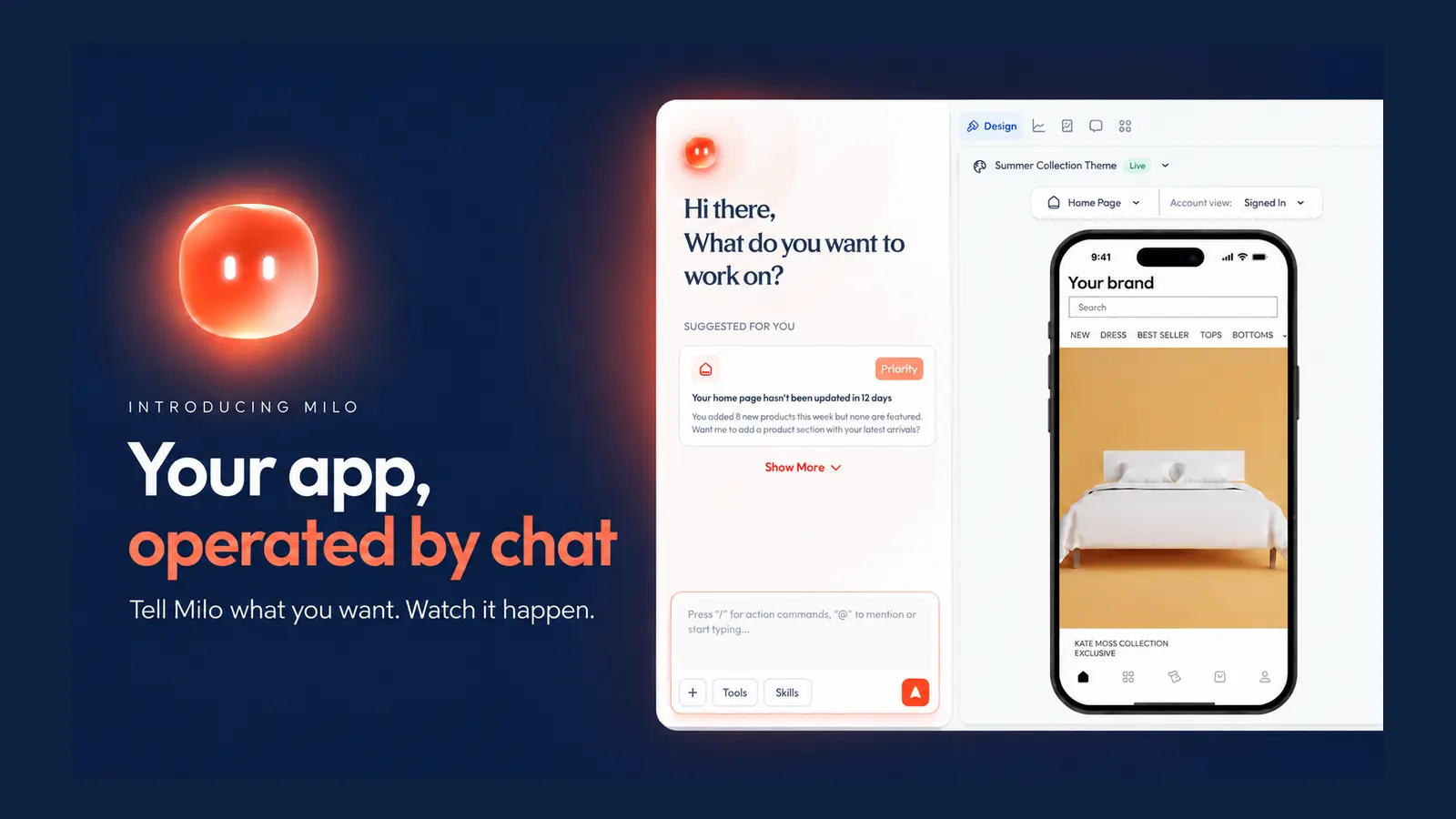
Meet Milo, your Mobile growth agent that edits screens, launches push campaigns, builds deep links, and analyzes funnels through chat.
Anything you'd ask a developer to change in your app, Milo just does. By chat, on your live app, in minutes, with marketing IQ built in.
AI in commerce has become extremely good at telling you what to do.
Ask why conversion dropped, and it will give you a list of possible reasons. Ask how to improve retention, and it will suggest ten campaigns. Then it stops. You still have to open the dashboards, find the problem, make the changes, raise a ticket, and wait for someone to push it live.
That never made sense to us. After four years of building mobile apps for hundreds of ecommerce brands, we saw the same problem again and again. Brands usually knew what they wanted to change. What slowed them down was everything required to make that change happen.
So we built Milo. Milo came from the same place Appbrew always has.
As Abhijeet Singh (co-founder and CEO) put it:
"We started Appbrew with a simple mission, to help brands deliver the best mobile shopping experience. Today we're taking that mission further with the power of AI. We're building Milo to become the smartest growth partner for your mobile app."
What is Milo?
MiLo (Mobile App Intelligence and Lifecycle Operator) is Appbrew's AI growth agent for Shopify mobile apps. Milo lives inside your app dashboard, and you run it by typing what you want. Change a homepage, restyle a product page, schedule a push notification, build a campaign deep link, or ask how your funnel is doing. Milo does the work on your live app. No developer, no support ticket, no release cycle. Milo's built for the marketers, merchandisers, and founders who own the app's revenue but were never able to touch the app themselves.
Who Milo is for
Milo is for growing Shopify brands that live on their app but don't have a mobile team to run it. If you own the app's results without owning the code, it's built for you.
Why Milo?
Over 85% of ecommerce happens on a phone. And when your brand has an app, it beats mobile web on every number that matters. Session time. Conversion rate. How much people browse.
So why is it that the most effective channel is also the one that has so much external dependency?
You want to swap the homepage hero for a sale banner. Move the autumn collection up the grid. Every one of those is a ticket. The ticket goes to a developer in a queue. By the time it ships, the drop is over.
So your app becomes a catalog. Live, working, and barely different month to month. Not because you want it that way, but because changing it costs a developer and a wait.
You can see exactly what you want to do. You just can't do it yourself. That's the gap. Not knowing what to change was never the problem. Reaching it was. And in 2026, that dependency is the thing that shouldn't still exist.
From configuration to action: what we did?
So we had a choice about how to fix it.
The obvious answer was to keep adding more settings. Every new request could become another toggle, field, or dropdown. We had already done plenty of that. But there would always be one more use case we had not planned for, which meant the brand was back in the queue waiting for us.
The whole industry's answer to this right now is to bolt a chat window onto the dashboard. A traditional CMS can only make something self-serve after the product team has predicted it, designed it, and added a setting for it. The moment a brand wants something outside those settings, self-serve ends.
So the question changed:
What if brands did not need us to predict every action in advance? What if they could simply describe what they wanted, and the product could figure out how to do it?
As Mayank Agarwal (co-founder and CTO) said:
"Conversation is your UI right now."
You don't need a screen for every input and every output. You describe the thing, and the agent does the work. Even the complicated stuff. Especially the complicated stuff. The intelligence was already there. What was missing was giving it the tools to actually reach into your app and change it. That's the part we built; not a tool, but an agent that uses tools on your behalf.
So Milo isn't a smarter help desk. Milo's an operator built for you. You don't ask it how to move the collection up the grid. You tell it to, and it moves.
What does Milo actually do?
Anything you'd do in your app, Milo does. You just tell it what you want.
Milo lives inside your Appbrew dashboard. You open a chat, type what you want, and watch it happen on your app.
Edit your app screens.
Homepage, product pages, collection pages, carousels, banners, badges.
Type "Add a cart goal banner offering free shipping over $75 and feature the autumn collection on the home grid." Milo updates the blocks. If you'd rather show it than describe it, drop in a screenshot of a layout you like and tell it to match.
Launch and schedule push.
Push is the single biggest driver of app revenue, and it's the thing lean teams under-use the most. Milo writes the copy, sets the schedule, and points the deep link straight at the right product or collection.
Build campaign links.
"Create a OneLink with UTM parameters for Meta and Google app install campaigns." Done. The kind of deep link with attribution baked in that used to mean pinging a developer now takes one line.
Ask your numbers a question.
Install to open, product page to cart, cart to checkout, push open rates. Instead of clicking through a BI tool, you ask. "How's my checkout funnel looking this month?" "Where are people dropping off?" Milo reads the app-native funnel and tells you.
Set up promotions.
Cart goals, bundles, app-only offers, tiered discounts. The upsell logic that keeps average order value up, configured by describing it.
And all of it runs through your Brand Context. Milo knows your catalog, your tone, your active campaigns. So the copy it writes sounds like you, and the products it features are ones you actually sell.
How to use Milo: best use cases
An AI operator does three things: it understands what is happening, decides what deserves attention, and helps get the next action live. Milo follows that loop across the mobile app:
- Understand the app. Milo looks at the funnel, customer behavior, campaigns, merchandising, and the context specific to that brand.
- Find what matters. Milo turns the data into a clear problem or opportunity, then helps the team decide what to prioritize.
- Take action. Milo can update app content and layouts, create customer segments, and help launch or improve lifecycle campaigns from the same conversation.
A dashboard can have problems. A chatbot can explain them. An operator connects the problem to the next action. As Veer Jindal (product lead) put it,
“Milo turns a multi-hour mobile operational workflow into a five-minute daily health check.”
Here are some of the best use cases-
Restyle from a screenshot.
You saw an app you love and you want yours to feel like that. Drop the screenshot in, tell Milo to match it. Milo reads the layout and reworks your screens toward it. You're art-directing, not filing a design brief.
Ship a sale in five minutes.
It's the morning of a flash sale and the app still looks like last week. You type: "Add a free shipping cart goal banner and feature the autumn collection on the home grid." It's live before your coffee's cold.
Recover the carts you're losing.
Someone adds to cart and leaves. Right now that push either fires hours late or never. You tell Milo to send a cart-abandonment push at 30 minutes with a deep link straight to the product they left behind. The customer taps it and lands on the exact page.
Launch a campaign without a developer.
You're spinning up a Meta install campaign and you need a tracked link. "Create a OneLink with UTM parameters for Meta and Google." You get the attribution link in the chat. The thing that used to be a dev request is now a sentence.
Ask your data without opening a dashboard.
"How can I scale revenue?" "Where's my checkout leaking?" You ask in plain English and Milo pulls the app-native numbers and answers. Founders use it exactly like this, to get a read on the business without navigating a BI tool.
Benchmark against the best.
"Help me build an app like Nike." "Make it feel more like AJIO." Milo studies the reference and moves your app in that direction. A starting point in minutes instead of a mood board and a month.
Every one of these used to be someone else's job, on someone else's timeline. Now it's yours, and it's done in the time it takes to describe it.
Milo vs. Shopify Sidekick
People ask us how Milo compares to Shopify Sidekick. If you've used Shopify Sidekick, you know it is a good explainer but not an operator. You ask it to fix something, and it tells you how to fix it yourself.
Milo starts exactly where Sidekick ends. Here’s how Milo fills the gap.
"Redesign my page." Sidekick describes. Milo rebuilds.
Ask Sidekick to redo a layout and you get advice. Ask Milo and it does the work.
A merchant typed "rebrand the live theme according to the website, keep the layout." Milo pulled the brand's colors and fonts off their site, swapped image banners for product carousels on alternating backgrounds, mapped the collections, and built it into a draft you preview before it goes live.
"Change my metafields." Sidekick can't see them. Milo wires them.
Custom code and metafields are invisible to Sidekick, so it guesses. Milo actually inspects them. One merchant's product page was pulling from the wrong metafield and showing nothing. Milo found it was bound to an empty namespace, switched it to the right one, and the content appeared.
"Send a push." Sidekick doesn't do customer-facing. Milo runs it end to end.
Sidekick talks to you, not your customers. Milo drafted the copy for a new-product push, built the deep link straight to that product's page, sent a test to the team's devices, then scheduled the send.
"Tell me where I'm losing people." Sidekick summarizes. Milo gets specific.
Instead of a surface read, Milo pulled a merchant's full 30-day funnel: cart to checkout at 38.9%, checkout to purchase at 51.7%, both up on the prior month. Then it looked at the cart screen and flagged the mandatory sign-in gate slowing people down. Numbers and the cause, in one answer.
When Milo doesn't know or can't do something, it says so. The most repeated complaint about Sidekick across every independent test is that it answers confidently whether or not it actually has the context to be right. On your live app, a confident guess is the expensive kind.
We think about this a lot internally. Any model can get you the easy 80% of an answer. The last stretch, the part that's actually right for your store, is the part that matters.
As Mayank puts it:
"When you prompt a model, you get an average result. You can't Claude your way to that. People will have to push their thinking."
That's the line we build Milo around. Milo does the operating so you can spend your judgment where it counts, and it won't pretend to have judgment it doesn't.
|
Aspects |
Shopify Sidekick |
Milo |
|
Where it works |
Shopify web admin |
Your native mobile app |
|
Redesign a page |
Describes, doesn't rebuild |
Rebuilds it live |
|
Custom code & metafields |
Can't see them |
Inspects and wires them |
|
Push / customer-facing |
Not customer-facing |
Drafts, deep-links, sends |
|
Funnel data |
Surface summaries |
Stage-by-stage, plus the cause |
|
Bulk catalog writes |
Unreliable |
Reads and specs, doesn't mutate |
|
When unsure |
Answers anyway |
Tells you |
Why we built an operator, not more features
For most of Appbrew's life, when a brand asked for something, we built it.
For the first ten, twenty, thirty customers, that worked. Then you grow, and yes-to-everything stops being possible. Every brand comes with its own list of requests. So we made a rule. Sharat Chandra (co-founder, Appbrew) calls it the 20% rule: build a feature only if at least 20% of our customers would use it.
It's a good rule. But look at what it does to the other 80% of requests, the ones specific to a single brand. They never get built and the brand keeps waiting on us.
As Sharat puts it:
"The 20% rule sounds like discipline. Really it was us admitting brands couldn't move without us."
That's what made us build Milo. Not so we could ship faster, since faster was never the problem. The problem was that every change had to come through us at all.
"So we took ourselves out of the loop. That's all Milo is."
We rebuilt our own company on agents first. We swapped fragile automation scripts for plain documents the agent reads as instructions. We built Echo, an internal agent that answers any question about our own work and cites its source so it doesn't make things up. Nobody here files a ticket and waits for someone else to build. We lived inside this shift before we asked you to.
Milo is the same thing, pointed at you. Not a product we operate for you. An agent you operate yourself.
What's next after Milo?
Milo today edits screens, runs push, reads your funnel, and now reads down to the individual session: who hit sign-in and didn't log in, who applied a coupon and didn't check out, where the upsell openings are. But the direction it's pointed is bigger than what it does today.
Right now Milo works on the blocks we've built: layouts, carousels, cart upsells, campaigns, analytics. The next phase is opening the platform underneath it. The same way Cursor and Claude Code let developers build far past the tools they shipped with, Milo will let brands build on their own data and their own logic, not just the blocks we predefined. Custom upsell experiences derived from real purchase behavior, merchandising rules that respond to how your customers actually move through the app, entire flows we never designed a setting for.
Milo becomes the interface, and your use cases become the product. You describe what your store needs, and the platform builds toward it. The catalog stops being a fixed set of features and starts being whatever you can articulate.
FAQs
Can Shopify Sidekick edit my mobile app?
No. Sidekick works inside the Shopify web admin. It's useful for drafting copy, answering how-to questions, and building Flow automations, but it doesn't touch your storefront theme and has no access to your native mobile app. For app changes, you need a tool built for the app. That's what Milo is.
Do I need a developer to use Milo?
No. Milo is built for marketers, merchandisers, and founders, not engineers. You describe what you want in plain language and Milo makes the change. The day-to-day work of running your app, like screens, push, promotions, and links, is yours to do directly.
What can Milo actually do?
Milo edits app screens and layouts, restyles pages from a screenshot, drafts and schedules push notifications with deep links, builds campaign links with UTM tracking, sets up promotions and bundles, wires product metafields into your pages, and pulls your funnel numbers so you can see where customers drop off. All by chat, on your live app.
How is Milo different from Tapcart or Vajro?
Tapcart and Vajro are app builders with fixed layouts and limited customization. Milo is an AI agent that runs on Appbrew's flexible, code-backed app platform, so you're not boxed into a template. If you've hit a wall on what your current builder lets you change, that flexibility is the difference.
Is there anything Milo won't do for you?
By design, yes. Milo runs your app end to end: screens, layouts, push, blocks. For discounts and bulk catalog changes, it does the analysis and hands you the exact spec to finish in Studio or Shopify Admin, because those are the systems of record for your catalog. It's a deliberate guardrail, not a gap. And when Milo can't do something, it tells you plainly instead of guessing on your live store.









