


.webp)
.webp)
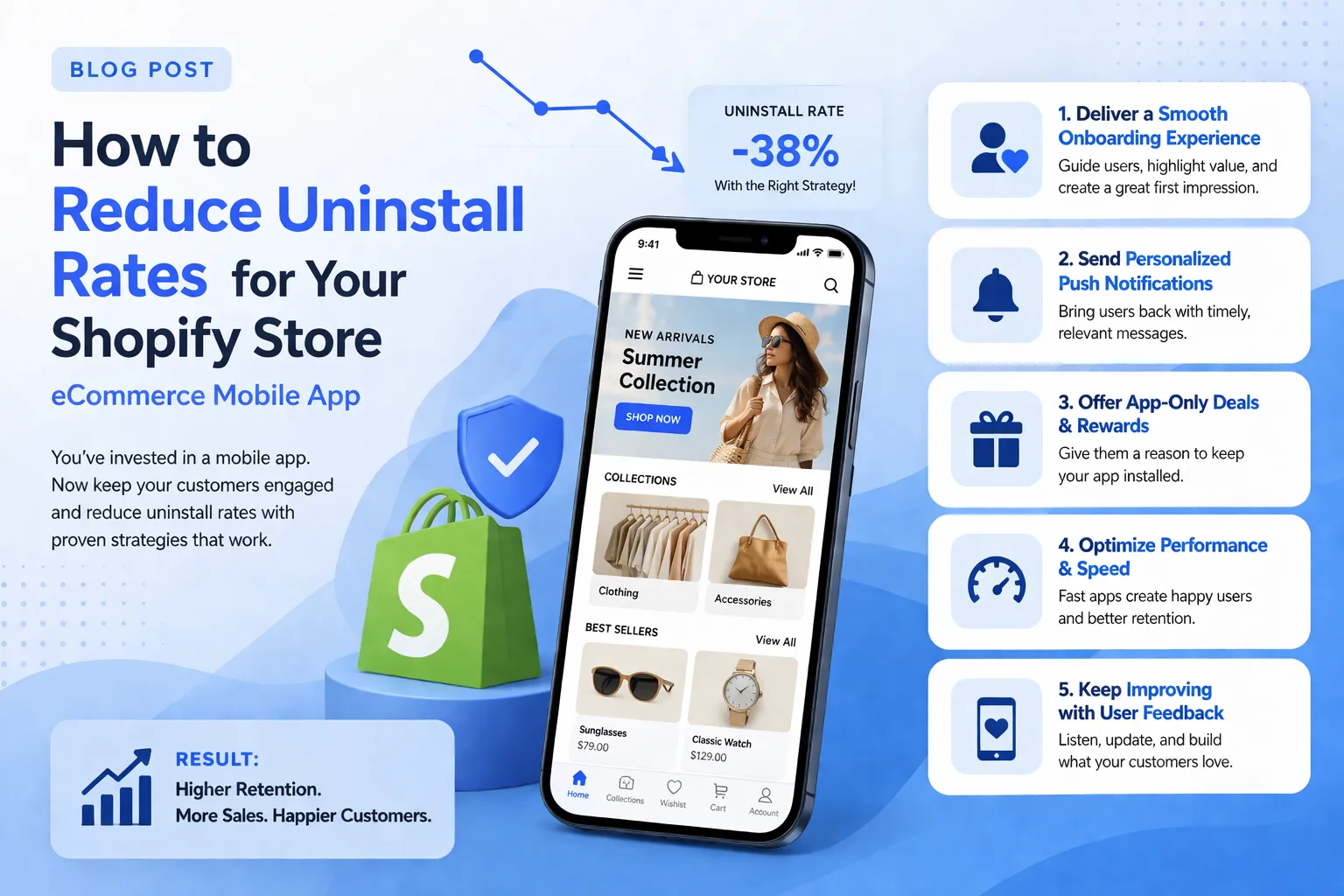
Reduce uninstall rates for your Shopify ecommerce mobile app with proven retention strategies. Learn how onboarding optimization, faster performance, personalized push notifications, and behavioral analytics can improve engagement and increase conversions within the first 30 days
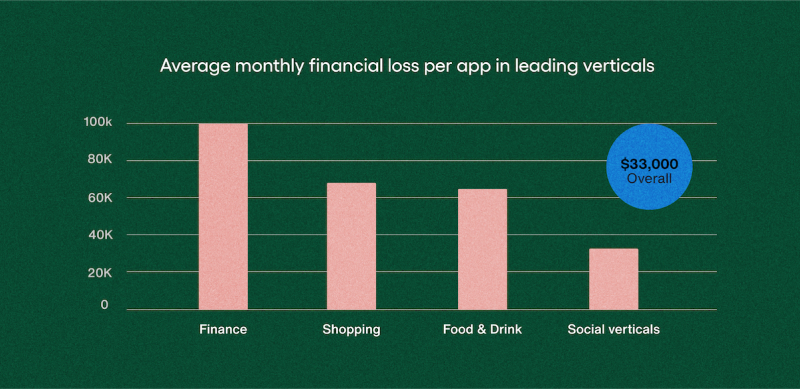
Retail and eCommerce apps lose an average of $68,000 per month to uninstalls. 53% of users abandon an app within the first 30 days of downloading it. For a Shopify brand that went through the work of building a native app, those aren't abstract metrics.
Most brands track installs carefully. Uninstalls get a lot less attention - no structured process, no clear owner, often treated as expected attrition. But the reasons users leave are specific and largely fixable, assuming you know where to look.
This guide covers the main reasons Shopify app users uninstall and what actually moves the needle on each: onboarding drop-off, performance issues, notification fatigue, missing personalization, and re-engagement gaps. By the end, you'll have a clear picture of where your app is losing users and what to fix first.
Let’s dive right in!
TL;DR
- 53% of users uninstall within 30 days; retail apps lose around $68K/month from uninstalls alone
- Poor onboarding, slow load times, and irrelevant push notifications are the top three causes
- Fixing the first session experience has the fastest impact on early-stage churn
- Personalized, behavior-triggered push notifications reduce uninstall likelihood by 15%
- Tracking in-app funnel drop-off points is necessary before any retention strategy can be effective
- Re-engagement via email, push, and exclusive offers can recover a share of churned users
- If your app lacks retention features, consider switching to Appbrew, a Shopify mobile app builder used by growing eCommerce businesses
- Apps built with Appbrew guarantee performance (both conversion and retention)
Why users uninstall Shopify store ecommerce mobile apps
Before getting into fixes, it helps to understand exactly what's driving users out and what it actually costs when they leave.
The numbers behind app churn
The $68,000/month figure is specific to retail and ecommerce apps. Across all categories, the average sits around $33,000/month. Both numbers assume something most brands don't fully account for: an uninstall isn't just one lost customer.
When early-stage churn is high, it signals low engagement to App Store and Google Play algorithms. That hurts your app's organic ranking, which raises the cost of every future install.
You end up spending more to acquire users who are walking into the same broken experience. The compounding effect is why uninstall rates belong in revenue conversations.
The most common reasons users leave
We have noticed a consistent set of culprits.
- 15.6% of users abandon an app before completing onboarding, before they've seen anything worth staying for.
- Storage use and performance issues account for roughly 31% of uninstalls combined (20% storage, 11% crashes).
- Push notifications that come too often or miss the mark entirely push out a significant share of the rest.
Then there's UX: cluttered layouts, navigation that wasn't designed for thumbs, flows that don't match how someone actually shops on a phone.
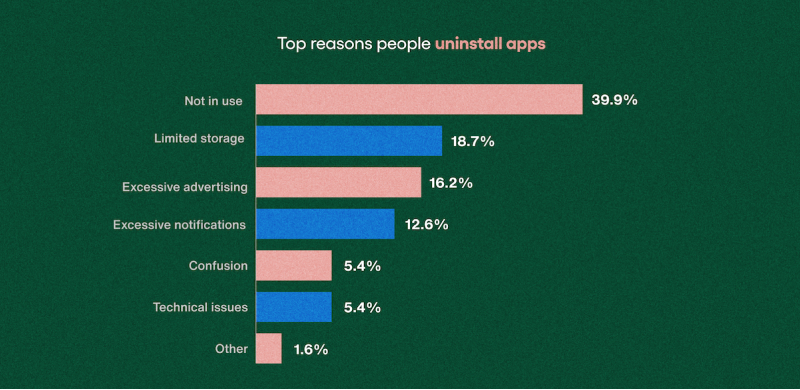
What these have in common is that none of them are fixed by spending more on acquisition. They're product and messaging problems, and they show up at specific points in the funnel, which means they can be found and addressed.
15 Strategies to reduce your (Shopify) eCommerce mobile app uninstall rates
Most uninstalls happen early. The strategies below are ordered to address that:
1. Keep registration out of the way
Hitting users with a full sign-up form before they've seen a single product is one of the fastest ways to lose them. 15.6% of users abandon an app if the process is cumbersome. And it’s important to acknowledge, they came to browse, not to hand over their email address.
Let users into the app first. Guest browsing shouldn't be a hidden option, it should be the default path. Account creation makes sense after someone has done something meaningful: added a product to their cart, saved an item, or applied a discount code. At that point, there's a reason to create an account.
When you do ask for information, ask for less of it. Every additional field is a small friction point, and they add up. Social login and one-tap sign-in options cut that friction significantly. If a user can get in with Google in two seconds, most will.
2. Show value in the first session
The first 60 seconds matter more than most brands treat them. If a user opens your app and spends that time tapping through a tutorial, you've already lost the plot.
Limit onboarding to two or three screens that surface what's actually relevant to the user, not a feature list. Use contextual tooltips that appear as someone navigates naturally, rather than front-loading everything before they reach the app.
The goal of the first session is simple: the user should finish it having done something. Browsed a category, saved a product, used a promo code. A quick win is what turns a first-time opener into a second session.
3. Speed is a baseline, not a differentiator
A slow app doesn't get a second chance. Users don't troubleshoot load times, they leave.
Google's mobile standard is sub-2-second load time. On a mid-range Android device, which represents the majority of your install base outside of North America, that bar is harder to hit than most teams assume.
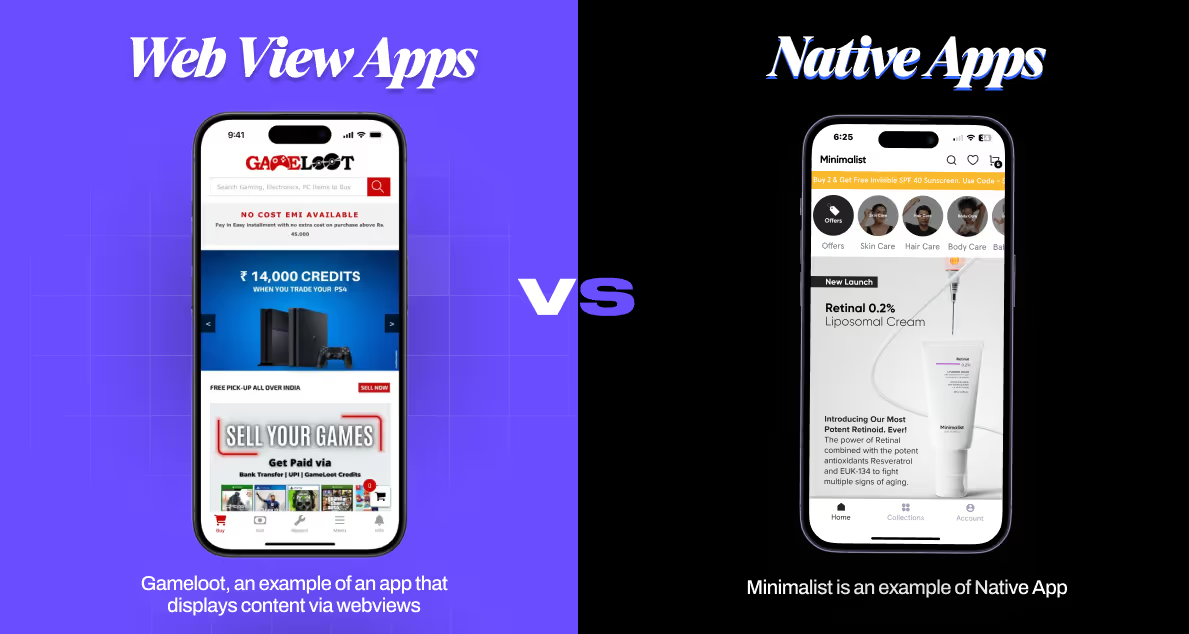
Compressed image assets, lazy loading, and a clean launch script help. But if your app is built on a webview shell, essentially a browser wrapper around your mobile website, you're inheriting the same load lag as the site, with none of the native speed advantages.
React Native and fully native architectures render faster and respond to touch more immediately. Appbrew builds on React Native, which is part of why the apps built with it have sub-1-second load times. If you're evaluating platforms, ask directly: is the app native or webview-based, and what are page load times on a mid-range Android?
4. Reduce bloat and fix crashes proactively
20% of users uninstall because of storage pressure. When a device runs low, the apps that go first are the ones that take up the most space and deliver the least perceived value. A lighter app survives that clean-up. A bloated one doesn't.
Crashes are a separate issue but equally invisible to most teams. They surface in App Store reviews and uninstall data long after users have already left. Regular testing across device types catches these before users do. Monitoring crash rates and ANR (Application Not Responding) events post-launch gives you a live signal to act on.
The pattern worth fixing: most performance issues get discovered reactively. A structured testing and monitoring process turns them into scheduled work rather than fire drills.
5. Push notification frequency and relevance are everything
eCommerce app push notification is the highest-leverage retention channel available in a mobile app. It's also, when misused, the fastest way to lose users.
Personalized push messages double retention rates and reduce uninstall likelihood by 15%. Generic broadcast notifications - same message, full install base, regardless of behavior - produce low open rates and accelerate opt-outs. The math doesn't favor the blast approach.
Cadence needs to vary by segment. New users, returning buyers, and lapsed users all have different tolerance thresholds. A welcome series that works for day-one users is intrusive for someone who's already purchased three times.
Appbrew's Milo handles AI-assisted push generation and campaign segmentation, letting marketers build and adjust audience rules without needing developer support. If your current setup requires engineering work to create a new segment, that's a friction point that will limit how quickly you can respond to behavior signals.
6. Build event-based push automation flows
Abandoned cart reminders, back-in-stock alerts, order tracking updates, and re-engagement nudges are the table-stakes flows. If these aren't running, that's the first gap to close.
Two details that determine whether they work.
First, deep links: a push notification that lands users on the app homepage instead of the specific product or cart they were browsing loses most of its value. The link should take users exactly where the message implied.
Second, user control: giving users the ability to manage their notification preferences in-app reduces opt-outs. People who can dial back frequency tend to stay subscribed at lower volume rather than turning off push entirely.
Appbrew's Klaviyo integration lets behavioral data flow between the two platforms, so push flows and email flows can run in parallel without duplicating effort or messaging. A user who abandoned a cart at midnight doesn't need an email and three pushes, they need the right channel at the right time.
7. Behavior-based content beats broadcast content
The same homepage for a first-time visitor and a repeat buyer is a missed opportunity at both ends. New visitors need a reason to stay. High-LTV customers already know the brand and want to feel like the app knows them back.
Conditional content blocks let you show different banners, offers, and collections based on user tags, purchase history, location, or behavior. A loyalty reward block for customers who've bought four times. A first-order discount for someone who's never converted. A seasonal banner that only shows in relevant markets.
"Recently viewed," "you might also like," and cart-based recommendations reduce browse friction and extend session time. Neither requires significant setup if your app builder supports behavioral data, which any serious platform should.
8. Let users shape their own experience
Notification preferences, product category filters, saved addresses - giving users control over settings improves how the app feels to use. It also reduces the volume of complaints that come from a one-size experience that fits nobody particularly well.
The limit worth noting: over-personalization that makes users aware of how much data the app is using can feel unsettling. Recommendation relevance based on browsing history is expected. Surfacing personal data too explicitly, "We noticed you looked at this product 12 times" tips into territory that makes users uncomfortable.
Good mobile app personalization reduces friction quietly. It doesn't announce itself.
9. Navigation should be invisible
If a user has to think about how to find something, you've already created a friction point. Navigation that works doesn't get noticed. Navigation that doesn't get the shopping app deleted.
Limit the primary navigation bar to three to five core actions. Secondary features can live behind a menu without penalizing the users who never need them. Finger-friendly tap targets (spaced to avoid misclicks on smaller screens) matter more than most desktop-first teams give them credit for.
Consistent design language also reduces churn in a way that's easy to underestimate. Unconventional UI patterns make users relearn how to use the app every time they return. Standard conventions exist because they work.
10. Handle errors and edge cases gracefully
Out-of-stock products, payment failures, and session timeouts should return a useful state, not a blank screen. A clear error message with the next step keeps the session alive. A dead end ends it.
In-app messaging triggered by inactivity on a single screen can recover users who've hit a wall without realizing it. Someone who's been on the checkout screen for three minutes without completing a purchase is stuck, not browsing.
A prompt can resolve that. Accessibility basics (readable text size, sufficient contrast, screen reader compatibility) extend that quality to a broader user base than most teams account for.
11. Stale content is a passive uninstall trigger
A user who returns after two weeks and sees the same promotional banner they saw before has no reason to think anything has changed. They're right. That's the problem.
Holiday eCommerce campaigns, new collection highlights, and product launch content should refresh the app experience on a regular schedule. Theme scheduling for BFCM, festive sales, and drops keeps the app feeling active. Feature updates surfaced through in-app messaging to help users discover capabilities they haven't found yet.
The signal this sends matters beyond conversion: brands that maintain their app content are telling users the channel is worth checking. Brands that don't are quietly telling them the opposite.
12. Measure where users drop off, not just that they leave
An aggregate uninstall rate tells you something is wrong. It doesn't tell you where to look. That requires mapping churn to specific moments in the funnel.
Define your milestones: category browse, product view, add to cart, first purchase, repeat purchase. Identify which step precedes the highest share of uninstalls and treat it as a product problem, not a marketing one. Segment by acquisition channel, device type, and user cohort - different sources produce different retention profiles, and fixing the wrong thing is expensive.
Appbrew's analytics dashboard tracks session and funnel performance at a level that goes beyond install and uninstall counts. This data connects to MMP integrations like AppsFlyer, Adjust, and Branch for cohort-level attribution. The goal is to get to a place where you know which screen, which flow, or which message is losing users and can test a fix against a measurable baseline.
13. Track acquisition quality, not just acquisition volume
A campaign that drives a thousand installs with a 60% 30-day churn rate is more expensive than it looks. The reported CPI doesn't capture the downstream cost of the users who leave.
Shifting budget toward channels that deliver lower-churn users (even at a higher CPI) tends to improve overall unit economics. MMPs like AppsFlyer, Adjust, and Branch give you the attribution data to make that comparison at the cohort level. Without it, you're optimizing for install volume and hoping retention follows.
14. Catch the signal before the uninstall happens
Inactivity is a pre-uninstall signal. Acting on it is cheaper than re-acquiring the same user after they've left.
Define what "inactive" means for your app (no session in seven days, no purchase in 30 days) and build triggered flows for each threshold. The reactivation offer needs to be specific: a discount, exclusive content, or a personalized recommendation based on past behavior.
According to Google survey data, 30% of users would reinstall an app for a discount or coupon; 26% for exclusive content. Generic "we miss you" messages don't move those numbers.
15. Build a recovery path for churned users
An uninstall isn't always the end. Email and SMS remain accessible after a user leaves the app, and a well-timed message with a specific reason to reinstall recovers a share of churned users that would otherwise require paid re-acquisition.
Remarketing on Meta and Google using lapsed-user audiences surfaces the app to people who still have purchase intent. Video ads are particularly effective here because they set accurate expectations, users who install after seeing a realistic product demo are less likely to leave because the experience matched what they expected.
Misaligned expectations between an install ad and the in-app experience drive more churn than most brands measure for.
A quick audit to run on your app this week
A full retention program takes time to build. But most apps have at least one obvious gap that's driving uninstalls right now, and it usually shows up within the first five minutes of looking in the right place. Before prioritizing a roadmap, run these checks first.
- Open the app on a mid-range Android device and time how long it takes to reach the first product page. If it's over two seconds, performance is costing you users before they've seen anything.
- Go through onboarding as a new user and count how many steps are required before you can browse freely. If the number is more than three, you have a registration friction problem.
- Review the last 10 push notifications sent and note how many were personalized versus broadcast. A majority of broadcasts is a sign your segmentation setup needs attention.
- Pull your funnel drop-off data and find the single step with the highest abandonment rate. That step is a product problem, not a traffic problem.
- Check your most recent App Store and Google Play reviews for recurring complaints about UI, speed, or relevance. Users who bother to write a review are telling you what drove the users who didn't.
Each check points to something specific. Fix the biggest one first.
Conclusion
Most Shopify app uninstalls aren't random. They cluster around a small number of causes (onboarding friction, performance issues, irrelevant push, stale content) and the majority happen within the first 30 days.
The strategies in this guide are most relevant if you have a growing install base but flat retention, or if you're about to scale paid installs and need the in-app experience to justify that spend.
If you're also evaluating whether your current app infrastructure actually supports what's covered here (native performance, segmented push, behavioral personalization) Appbrew is built specifically for Shopify brands working at this level. Worth comparing against what you have.
FAQs
1. What is a good app uninstall rate for ecommerce?
A 30-day uninstall rate below 25% is considered strong for ecommerce apps. Industry average sits closer to 53%.
2. What is the difference between an uninstall rate and a churn rate for mobile apps?
Uninstall rate measures app deletions. Churn rate captures all inactive users, including those who stopped opening the app without uninstalling.
3. How do push notifications affect app uninstall rates?
Personalized push reduces uninstall likelihood by 15%. Broadcast notifications sent without segmentation accelerate opt-outs and increase overall churn.
4. How long does it typically take to see results after making retention improvements?
Most changes show measurable impact within 30 days. Onboarding and performance fixes tend to show results faster than personalization or re-engagement programs.
5. Can you recover users who have already uninstalled your app?
Yes. Email, SMS, and paid remarketing remain accessible post-uninstall. Around 30% of churned users will reinstall for a relevant discount or exclusive offer.