



.webp)

Not getting enough conversion in your Shopify mobile app? Learn how top eCommerce brands optimize their eCommerce app conversion rate and how you can too.
eCommerce apps that don’t drive conversions are not worth the effort of building; those that convert deserve all the attention. Keep reading to find out how top eCommerce brands optimize their eCommerce app conversion rate—and how you can, too.
The average eCommerce conversion rate hovers around 2.5% to 3%. But here’s the thing—statistics can sometimes be misleading. This number is often pumped up by industries like beverage and skincare, which naturally have higher conversion rates.
Conversion rates also vary widely by industry. Dynamic Yield’s live ecommerce benchmarks show categories like luxury and jewelry converting well below food and beverage or beauty.
So if you’re selling luxury apparel or handbags, even a 1% conversion rate might be considered a win. Many app installs in these categories are from users who just want to browse prices and check out the designs you offer.
So, while conversion rate is often treated as a universal metric, it’s actually quite personal for each brand. A lot of it depends on the overall experience, design, and user flows of your app.
However, there are some strategies that can help you beat the benchmark—and those strategies are exactly what we’re going to discuss in this blog.
Let’s dive right in!
What is an eCommerce app conversion?
An eCommerce app conversion is essentially the percentage of your app’s users who complete a specific action that you’ve defined as valuable. This action, or "app conversion," can vary depending on your business goals.
There are two main types of app conversions to keep an eye on:
- App Store/Google Play Store Conversions: This measures how many visitors to your app’s page on the store actually download or install your app. It’s a simple metric, giving you a clear picture of how appealing your app is to potential users.
- In-App Conversion Events: These are the actions users take within your app that you consider valuable. While the most obvious example might be making a purchase, in-app conversions can also include actions like viewing a product page, adding items to the cart, starting or completing the checkout process, revisiting the same product page, or even sharing a product page with others.
To effectively improve your eCommerce app's conversion rate, you first need to define these conversion goals. Once you have these goals in place, you can apply mobile conversion rate best practices to your app’s design, experience, and user flows to encourage more users to take these actions.
20 Best eCommerce in-app conversion strategies
By now, customers are practically numb to the constant barrage of discounts. The overexposure has stripped discounts of their value—shoppers know that if they don’t buy today, the same deal will likely be there tomorrow.
This doesn’t mean you should stop offering discounts altogether, but it’s important to recognize that discounts alone are no longer enough to drive conversions.
You’ll need to think beyond price cuts to truly engage and convert your Shopify mobile app users. Here are some strategies to help you do just that:
1. App exclusive deals
Considering customer expectations, this is still the first area to address. Why? Because there’s a good chance you enticed shoppers to download your app with the promise of exclusive deals and discounts.
To meet those expectations, reinforce the value of your app by continuing to offer these exclusive deals as soon as users log in. This helps maintain the excitement and reinforces the idea that your app is special.
2. Show top-selling products on the app’s homepage
Use tools like Google Analytics and administrator reports to identify which products and categories are performing well. Once you know which pages are driving the most views or sales, focus your marketing efforts on promoting these bestsellers. Feature them prominently in banner sliders or recommended product sections on your app’s homepage.
💡 Pro tip: If you’ve built your app with Appbrew, a Shopify app builder, you get access to actionable analytics that reveal what’s working best on your app. This app-specific data is far more effective than relying on your online store’s data alone.
3. In-app video promotions
Want to showcase the quality of your products? There’s no better content format than a video to do so. A well-made video can instantly boost credibility by showing the effort and craftsmanship behind your product.
Whether it's a how-to video, a lifestyle shot, or a customer testimonial, videos make it easier for customers to connect with your brand and trust your product. Plus, videos grab attention better than text or images alone.
💡 Pro tip: With Appbrew, you can easily incorporate in-app videos, including lifestyle or how-to videos, making your products stand out even more. This is one features that you would find missing in many popular Shopify mobile app builder, but considering the growing importance of Video Commerce, it’s something that you should not ignore.

4. Countdown timer on discount pages
Creating urgency is key to driving in-app eCommerce conversions, and countdown timers are perfect for that. If you’re running a time-sensitive discount or flash sale, display a countdown timer on your app’s homepage banner. This simple feature triggers the fear of missing out (FOMO) and encourages users to act quickly before the deal expires.
5. Avoid vague category structures
The organization of your app’s categories should reflect the size of your inventory. Don’t clutter your app with unnecessary categories; keep it simple and intuitive. Focus on the categories that your users are most likely to search for, ensuring that navigation is simple and user-friendly.
6. Sort category structure by popularity
Arrange your app’s category pages by popularity, placing the most clicked pages at the top. This way, users can easily find what others are most interested in, which can guide their shopping decisions. If popularity isn’t an option, consider sorting categories alphabetically to meet user expectations for standard navigation.
7. Do not write vague “unique selling points”
To convert visitors into buyers, your Unique Selling Points (USPs) must be clear and specific. Avoid vague terms like "Best Quality" or "Fast Delivery." Instead, focus on concrete details that set you apart, such as "Free Shipping on Orders Over $50" or "100% Organic Products."
When you provide this level of clarity to customers, it helps them understand exactly why they should choose your app, eliminating doubts and increasing their confidence to make a purchase. Well-defined USPs can be the deciding factor in convincing a potential customer to complete a transaction.
8. Implement an intelligent search
A smart, intuitive search function is crucial for user satisfaction. Ensure your in-app search delivers accurate results for various keyword variations, like “nail paint” and “nail polish.”
An effective search function should also include auto-suggestions that guide users to the right products as they type. This feature not only improves the shopping experience but also speeds up the process, making it easier for customers to find what they need and increasing the likelihood of a purchase.
Because if a customer cannot find a “nail polish,” your “nail paints” might end up collecting the dust.

9. Be very transparent with your pricing
Unexpected costs are the number one reason for shopping cart abandonments, leading to 48% of abandoned carts. To prevent this, display the full price, including shipping and handling, as early as possible in the shopping process.
Make the price stand out with bold fonts and contrasting colors so that customers are fully aware of the total cost before they reach checkout. Transparency in pricing builds trust and reduces the chances of customers leaving your app without completing their purchase.
By eliminating surprises, you create a smoother, more reliable shopping experience that encourages conversions on your eCommerce app.
10. Display reviews on product pages
Imagine downloading an app because you liked the product ads, but you’re unsure about the quality when delivered. You’re not alone—your customers, just like you, also share this concern.
In fact, 46% of consumers worry about not being able to feel products, and 45% are uncertain about quality when shopping online.
Including customer reviews on your app can significantly ease these concerns. Seeing that others have had positive experiences gives potential buyers confidence in their purchase. To boost conversions, prominently display star ratings and make it easy for users to read reviews without leaving your app.
💡Pro tip: Make it easy for customers to find reviews by displaying a star rating prominently on the product page. Appbrew can help you build a setup like ASOS, where tapping on the star rating takes users directly to the review section, with an option to expand and read in detail.
11. Make your PDPs ROI machines
Your Product Description Pages (PDPs) are crucial in driving conversions. Look at the ASOS example above. They enhance their PDPs by adding a “selling fast” label to create urgency and offering alternative product suggestions. These tactics encourage users to act quickly and keep browsing if they’re unsure about a particular item.
💡Pro tip: Always provide alternative product suggestions on your PDPs. This keeps users engaged even if they decide the initial product isn’t for them, leading to higher retention and potential sales.
12. Show visitors their recently viewed products
Helping users pick up where they left off is key to enhancing their shopping experience. By displaying recently viewed products, you make it easier for customers to remember and revisit items they liked. This simple feature not only improves navigation but also encourages users to continue exploring and ultimately complete a purchase. It’s a small yet powerful way to keep your customers engaged and moving toward a buying decision, reducing the chances of them abandoning your app.
13. Make the shopping cart persistent
Many users add items to their cart intending to complete the purchase later. However, if they return to an empty cart, they may abandon their purchase altogether.
A persistent shopping cart ensures that the items remain in the cart until the user decides to remove them. This feature is a win-win for both the user and the store, as it reduces cart abandonment and makes it easier for customers to pick up where they left off.
14. Offers on payment modes
Make shopping more appealing by showcasing offers on various payment modes like credit cards, debit cards, and wallets. Often, customers delay purchases based on available discounts and the total cart value.
By clearly displaying the payment options and associated offers on your app’s homepage, you can encourage users to complete their purchases. It’s a smart way to make the shopping experience more user-friendly and incentivize buyers to take action, boosting your conversion rates.
15. Show the expected delivery time
Customers appreciate knowing when to expect their orders. By showing the expected delivery date on the product page, you give them a sense of control over their purchase.
If the proposed date doesn’t work for them, consider offering flexible delivery options, like allowing users to choose a more convenient date or leave special instructions.
This added convenience can make a big difference in the shopping experience. Because let’s say if you’re on vacation for the next 7-10 day. Now you want to order the product but are not sure if the order will arrive when you’re back or when you away. If the eCommerce app doesn’t have a flexible delivery option, you might think it’s best to order it after coming back, which you might forget.
However, offering it like Amazon reduces anxiety around delivery and increases the likelihood of completing the purchase.

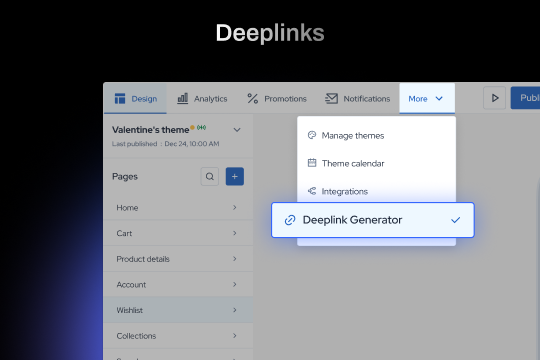
16. Enable mobile deep linking
Deep linking allows users to be redirected to specific pages within an app, creating a seamless experience. Imagine seeing an ad on Instagram for a product you like. When you click on it, you’re instantly taken to the product page within an app you’ve already installed.

This convenience is due to deep linking, which reduces the steps required to complete a purchase and increases conversion rates by making the buying process more efficient.
💡Pro tip: Appbrew makes deep linking easy. Unlike most Shopify mobile app builders, Appbrew prioritizes both your app’s appearance and performance. With Appbrew, you can effortlessly integrate deep links to enhance conversion rates.
17. App loading speed optimization
If your app’s pages don’t load quickly, you risk losing potential impulse buys. Research shows that even a one-second delay can reduce conversion rates by up to 7%.
Fast loading times are crucial because the quicker your pages load, the more likely customers are to follow through with their purchase.
Slow pages might cause users to abandon their cart, missing out on a sale simply because the app didn’t load fast enough.
18. Optimize your shipping and returns
Customers love free shipping—it’s often more appealing than a discount of a higher value.
If you must charge for shipping, make the costs transparent from the start. Offering a flat fee can simplify the buying decision. Also, prominently display your free shipping threshold across all pages.
In addition, a clear and attractive returns policy can alleviate concerns and encourage more purchases. If customers aren’t confident in your returns policy, they might hesitate to buy.
19. Use Adwords for remarketing
Remarketing with AdWords allows you to target users who have visited your app but didn’t complete a purchase.
Tools like AdRoll let you create dynamic, personalized ads that re-engage these potential customers.
You can segment your audience based on their behavior, such as the products they’ve viewed or how far they’ve progressed in the purchase process.
Showing them customized ads on other websites within Google’s Display Network can bring them back to your app to complete their purchase.
20. Offer cashbacks
Cashbacks are a powerful way to encourage repeat purchases. By offering cash back in the form of gift cards or vouchers, such as “Get a $15 voucher on your next purchase when you spend $40 or more,” you incentivize customers to return.
This not only increases the likelihood of repeat visits but also boosts your store’s conversion rate as customers are more likely to make another purchase to take advantage of the cashback offer.
Appbrew: a platform that helps you smash your app conversion goals
Simply having a mobile app is no longer enough. Shoppers have more options than ever, and their expectations are constantly rising.
To stay ahead, it’s essential to implement strategies that don’t just drive traffic but actively convert it into sales. There’s no one-size-fits-all solution that will guarantee a fixed increase in your conversion rate. The key lies in using multiple strategies together—reviews, persistent carts, personalized offers, and fast load times—to create a holistic shopping experience.
The urgency to act has never been greater. With market trends shifting rapidly, businesses that fail to optimize their mobile apps risk losing out to competitors who are more agile and responsive to consumer needs.
You need to engage customers at every touchpoint, reduce friction in the buying process, and offer a seamless, personalized experience. This level of optimization demands more than just a basic app setup. It requires a comprehensive approach where each of these strategies works together to create a high-performing app experience that converts.
Now, to implement all these strategies successfully, you need a powerful Shopify mobile app builder. Most solutions lack the features necessary to build an app that truly performs, but that’s where Appbrew stands apart.
Built for performance, Appbrew goes beyond just making your app look good. It offers advanced features like deep linking, custom designs to showcase reviews prominently, the ability to integrate videos, offer app-specific discounts, and much more. Whatever you can imagine to boost your app's performance, Appbrew can make it happen.
It's time to act—don’t wait for your competitors to outpace you. Book a demo with Appbrew today!














