



.webp)

Discover effective strategies to optimize search and filters in your Shopify mobile app, boosting conversions for BFCM and the holiday season.
In one of our previous posts, we discussed how to prepare your Shopify mobile app for increased sales during Black Friday, Cyber Monday (BFCM), and the holiday season.
One of the first things you need to prioritize to boost conversions during sales like BFCM is optimizing product discovery. After all, customers should always be able to find exactly what they’re searching for when using your Shopify mobile app.
Search and filter functions play a crucial role in this process. If done right, they make it easier for shoppers to navigate through your products, which can lead to higher conversion rates.
In this blog, we’ll show you how to fine-tune your app's search and filters, ensuring that they work effectively—especially during peak shopping seasons like BFCM and the holidays.
Let’s dive right in!
How to optimize your Shopify mobile app’s search and filters?
Three in every four potential customers leave in 120 seconds or less if they can’t find what they’re looking for. In fact, most customers head straight to the search bar when they visit an eCommerce business, indicating a high-intent audience that is just waiting to be engaged effectively.
Now that we understand how crucial this is, let’s get into the search and filter optimization strategies for your eCommerce mobile app!
1. Intuitive Search Functionality
An intuitive search experience can significantly enhance the product discovery process and keep users engaged — and engagement is where the conversion begins.
Autocomplete & Suggestions
One key feature is to offer instant suggestions as users begin typing. This speeds up the search process, helping customers find what they’re looking for quickly.
For example, if someone types “blac,” the search could immediately suggest "black dress," "black shoes," or "black jeans." You can also display popular and recent searches, along with trending products, to inspire users who aren’t sure what to buy.
Error Tolerance & Spelling Corrections
Implementing a fuzzy search that corrects typos ensures users still get relevant results even if they misspell something. For instance, if someone searches for "snikers," the search function should understand they meant "sneakers."
Natural Language Processing (NLP)
Allowing users to search using everyday language like “blue shirt under $30” adds flexibility and makes your search feature more intuitive.
Image Search
Finally, integrating image search is becoming increasingly important, especially on mobile apps. This feature provides added convenience for users who know what they want to buy but are not sure how to find it.
2. Relevant Product Suggestions
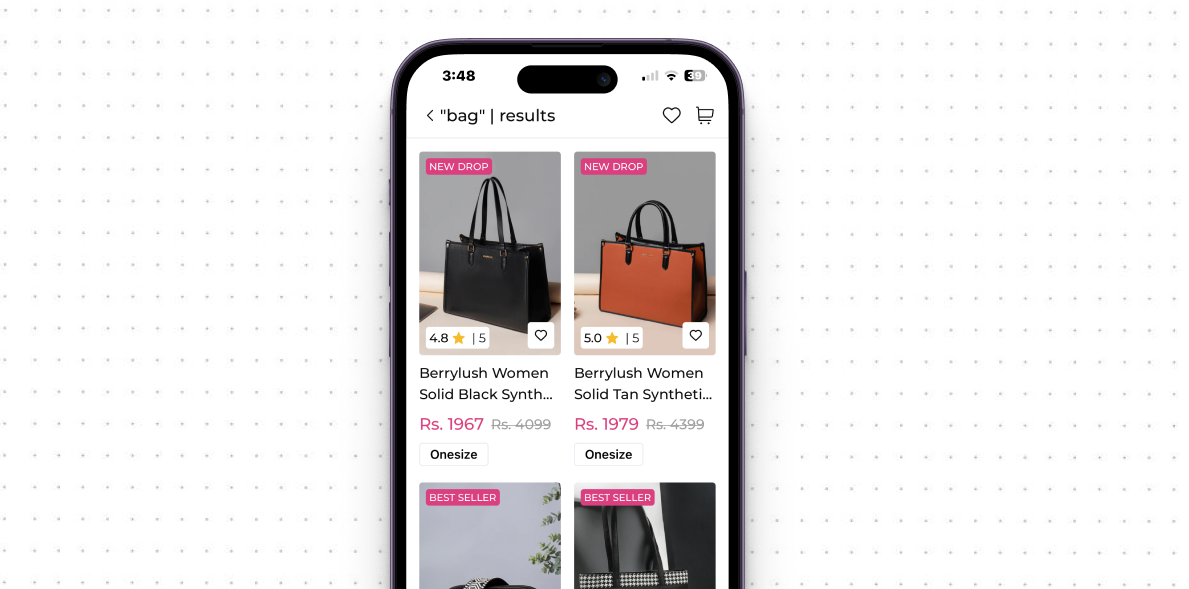
Offering relevant product suggestions not only helps users find items but also encourages them to explore more, increasing the chances of conversions and higher AOV.
Personalized Search Results
By analyzing browsing and purchase history, you can offer product suggestions to individual users. For example, if a customer frequently buys sports apparel, showing related items like "new running shoes" or "fitness wear" increases the chances of a sale.
AI-Powered Recommendations
Using AI and machine learning to recommend products based on user behavior is another effective strategy. AI can analyze patterns in user searches and suggest similar products, making the search results more precise and relevant.

Synonyms & Related Terms
Expanding the scope of your search function to recognize synonyms ensures users find what they’re looking for, even if they use different terms.
For example, if someone searches for "trainers," your app should also display results for "sneakers." This broadens the search experience and leads to higher engagement.

3. Advanced Filters and Sorting Options
Search results are only accurate to an extent — there’s a lot to filter after the results are displayed. With advanced filters and sorting options on your Shopify mobile app, you can help potential customers refine their searches and find the desired products faster.
Dynamic Filters
Offer filters like price, size, color, brand, customer ratings, and shipping options to help users narrow down their choices. Tailor filters to each product category—for instance, showing “material” options for clothing or “wattage” for electronics.

Smart Filtering
Make your filters dynamic by updating them automatically based on user selections. For example, if a certain size is out of stock, remove it from the available options to avoid user frustration.
Sticky Filters
Save users’ filter preferences across searches or sessions, so they don’t have to reapply filters every time they browse.
Interactive Filtering
Show users live updates on how many products match their filter selections. This real-time feedback keeps users informed and improves their browsing experience by showing available options instantly.
4. User-Friendly Interface
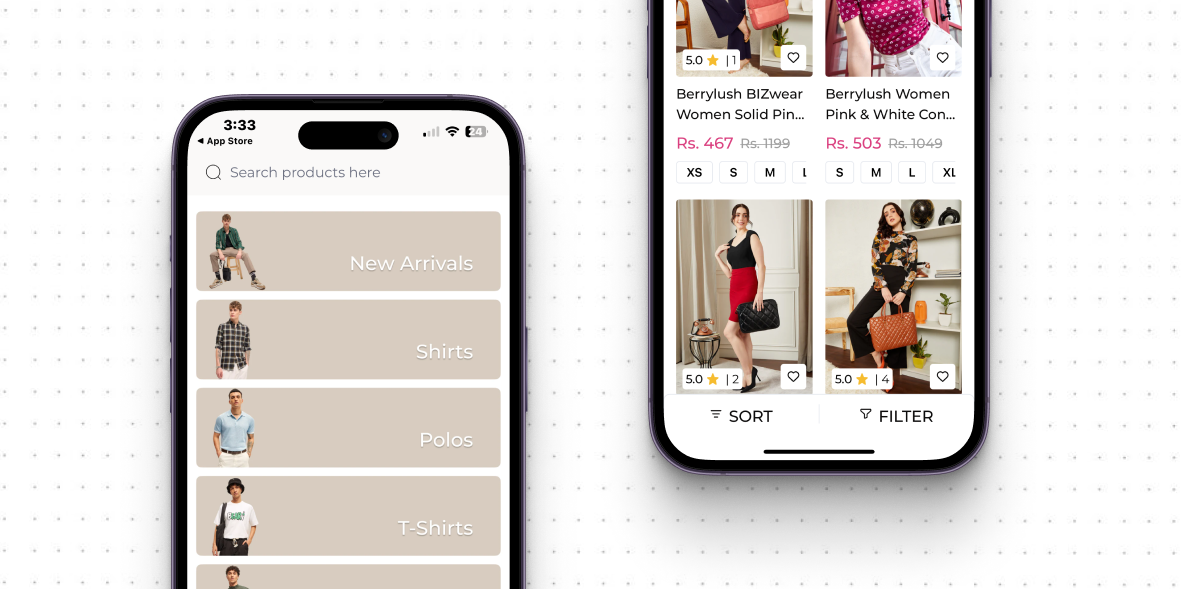
A clean and easy-to-navigate interface improves the overall search and filtering experience — this is especially important for mobile devices, considering the smaller screen size. Here’s how you can make it more user-friendly:
Mobile-Optimized Search Bar
On mobile, ensure the search bar is highly visible and easy to use, as users rely on it more due to smaller screen sizes. Make sure it's always accessible, ideally at the top of the screen.
Clear Filter Visibility
Don’t bury filters in hidden menus. Keep them easily accessible with expandable sections to avoid overwhelming users while still providing detailed options.
Visual Cues for Active Filters
Clearly highlight active filters so users know which filters are applied. Also, make it easy to remove or adjust them for a smoother navigation experience.
5. Real-Time Product Updates
Keeping your search results and filters up-to-date in real-time is key to enhancing the user experience.
Inventory Awareness
Ensure your search results reflect the latest inventory status. If a product is low in stock or sold out, it should be updated instantly. Additionally, offer alternative products or suggest similar items when a customer’s desired product is unavailable. This keeps the customer engaged rather than frustrated by out-of-stock items.
Dynamic Pricing Filters
Include real-time discounts, deals, and limited-time offers in your search and filter results. Highlighting promotions directly in the search results, such as “50% off” or “Buy One Get One,” can encourage users to act quickly and complete their purchase. This strategy not only creates urgency but also boosts conversions, especially during BFCM sales and holiday sales when customers are actively seeking deals.
6. Search Analytics & A/B Testing
Optimizing search and filters is an ongoing process, and using Shopify mobile app customer data can help you make informed decisions.
Track Search Behavior
Analyze how users interact with your search feature by reviewing common search queries, bounce rates, and time spent on results pages. Understanding user behavior helps identify gaps in your product offerings or areas where search results may be falling short. For example, if users search for items that frequently return zero results, you might need to add relevant products or adjust search algorithms.
A/B Test Search and Filters
Continuously experiment with different search layouts, filter arrangements, or even search algorithms to find the best combination for user engagement and conversions. By testing one version of your search or filters against another, you can identify what resonates best with your audience, ultimately improving the overall shopping experience and chances of conversion.
Did you know?
With Appbrew, apps gather data that goes beyond basic store metrics, capturing insights from high-intent user behavior in searches and item views. This enables businesses to refine search and filter functionality, creating a highly relevant shopping experience that leads to stronger product discovery and higher conversions from users who are ready to buy.
7. Boosting Popular & High-Margin Products
If you want to increase profitability, your search should be designed to show high-margin or best-selling products at the top of the results.
By displaying these items at the top, you can drive more attention to the products that generate the highest returns.
Additionally, using a “Featured” or “Recommended” tag helps highlight these items, drawing more eyes towards these products.
So, if you sell electronics, showing a popular, high-margin product like wireless earbuds first in search results can increase its visibility and, hence, sales.
The idea behind this approach is to sell as many high-margin products as you can — so that you see an increase in profit, not just in revenue.
8. Localized Search & Filters
Tailoring search and filters based on user location improves the shopping experience for global audiences. So, if you intend to sell globally, below are some of the must-have features for your eCommerce mobile app.
Geolocation-Based Results
Adjust search results and filters according to the user’s location. For example, display region-specific products, shipping options, or climate-appropriate items to make the results more relevant. If a user in the U.S. searches for jackets, showing cold-weather styles may be more appealing compared to lighter options.
Language and Currency Filters
Ensure your app supports multiple languages, currencies, and units of measurement. For example, users in Europe should see prices in euros, with filters reflecting local shipping rates and product availability, providing a seamless, localized experience.
Shopify Mobile App Search and Filters Tips for BFCM and Holiday Season
With Black Friday, Cyber Monday (BFCM), and the holiday season just around the corner, it's crucial to fine-tune your Shopify mobile app's search and filters.
During these peak sales periods, shoppers are in a hurry to find the best deals and products quickly.
Optimizing search and filters for BFCM can help you capture the attention of high-intent buyers and drive more conversions.
Here are some best practices to optimize search and filters for BFCM and holiday shopping:
1. Highlight Deals in Search Results: Feature Black Friday and Cyber Monday discounts in your search results and use tags like "BFCM Special" or "Holiday Deal" to grab attention.
2. Enable Seasonal Filters: Add seasonal filters like “Holiday Gifts,” “Stocking Stuffers,” or “Limited-Time Offers” to help shoppers easily navigate through holiday-specific products.
3. Prioritize High-Margin & Trending Products: Pin your best-selling or high-margin products at the top of the search results, especially those with holiday discounts.
4. Real-Time Inventory Updates: Ensure your app shows real-time stock availability to avoid frustration from customers looking for popular items during BFCM.
5. Use Personalized Recommendations: Tailor search results by leveraging user behavior to show the most relevant BFCM products, boosting chances of a sale.
By implementing these strategies, you’ll enhance your customers’ holiday shopping experience and boost conversions during BFCM.
On a concluding note…
Optimizing search and filters in your Shopify mobile app is essential to boosting conversions, especially during BFCM and the holiday season.
With features like personalized recommendations, real-time inventory updates, and intuitive filtering, you can deliver a seamless shopping experience for your customers.
Appbrew makes it easy to implement these strategies in your eCommerce mobile app with its powerful integrations, allowing you to enhance search functionality effortlessly.
Explore our search app integrations and start optimizing your Shopify mobile app for better results.
Ready to boost your BFCM conversion? Book a demo of Appbrew today!














