




A dated BFCM checklist for Shopify mobile apps: final app build, installs, push, in-app sales, sale-week checks and keeping new app users after the sale.
BFCM 2026 starts with Black Friday on November 27 and ends with Cyber Monday on November 30. For brands with a Shopify mobile app, those four days are when the app does its most important work. It reaches shoppers with push at no cost per message, gives your best customers a faster way to buy, and keeps new buyers close after the sale.
Most of that is decided before the weekend starts. An app update that is stuck in review, a deep link that opens the wrong screen or a code that also works on the website can cost you sales at the busiest moment of the year.
This BFCM checklist walks through what to prepare in your Shopify mobile app, week by week, from the final app build to the first week after Cyber Monday.
TL;DR
- Get the final app build live early. Aim for at least two weeks before Black Friday, then freeze app changes until the sale ends.
- Test the full purchase on a real phone. Go from push to product to checkout, with Shop Pay, Apple Pay, Google Pay and BNPL working.
- Grow your app audience before the sale. Use install banners, store buttons in emails, QR codes and a well-timed push permission prompt.
- Set up the sale in the app in advance. Plan the BFCM homepage, countdown, product and cart banners, app-only codes locked to the app, and test every deep link.
- Schedule pushes and watch a few numbers live. Track app orders, conversion, AOV, push clicks, checkout errors and crashes.
- Retain new app users after BFCM. Send delivery updates, run a welcome flow and write a short review that becomes next year's checklist.
Quick insights to start with
- Get your final app build live by November 13, then freeze app changes.
- Test checkout with Shop Pay, Apple Pay, Google Pay and BNPL on a real phone.
- Test every deep link in your BFCM emails, SMS and pushes.
- Check that app-only codes don't work on the website and that each discount applies the way you expect.
- Schedule your BFCM pushes now, starting with Black Friday morning.
If your brand is still running on mobile web alone, there is time to launch an app before this Black Friday. Install Appbrew from the Shopify App Store, describe the app you want to Milo, and it builds the app from your products and branding.
Our team sets up your App Store and Google Play accounts and handles submission and review, so the app is live and tested before the sale. Future releases are managed for you through automations, and you can start with a 30-day free trial on the Starter plan.
BFCM checklist at a glance
When | Dates (BFCM 2026) | What to get done |
4–6 weeks before | Oct 16–30 | Submit the final app build, test checkout and payments on a real phone, check search, analytics and push audiences |
2–4 weeks before | Oct 30–Nov 13 | Promote app installs, set up the push permission prompt, turn on wishlists and back-in-stock alerts, and have the final build live by Nov 13 |
1–2 weeks before | Nov 13–26 | Set up the sale inside the app, lock app-only codes to the app, test every deep link |
Sale week | Nov 27–30 | Send scheduled pushes, watch a few numbers live, keep support and inventory in sync |
After BFCM | From Dec 1 | Send delivery updates, welcome new app users, review what worked |
Get the app ready 4–6 weeks before BFCM (Oct 16–30)
This is the stage for anything that needs time to approve, test or fix. Changes to the app itself, checkout and payment tests, and your tracking all belong here, while there is still room to catch problems.
Reading this in November? It's not too late. Most items here take days, not weeks. Start with item 1 today and work down the list in order.
1. Submit your final app build, then freeze changes
Any change that needs a new version of the app has to pass App Store and Google Play review before shoppers see it.
Plan your last build so it is live at least two weeks before Black Friday, by November 13 this year. That includes anything tied to the app binary, like a seasonal app icon or a new launch screen. After that, freeze the build. Ship no new features and no risky updates until the sale is over.
Last year, one app on Appbrew shipped an SDK update in mid-November and its crash rate jumped from 0.33% to 3.07%. The fixed version went live on December 3, after the sale was over. A freeze two weeks out keeps a stable build in place for the weekend that matters most.
2. Test the full purchase on a real phone
Go through the whole journey the way a shopper would. Open the app from a push, search, add to cart, apply a code and pay. Do it on both iPhone and Android, on mobile data as well as Wi-Fi.
Check that one-tap wallets like Shop Pay, Apple Pay and Google Pay work, and that Buy Now, Pay Later shows the installment amount. Run a few test orders, including a cancellation and a refund, so you know the flow works end to end before real orders come in.
3. Plan for traffic spikes
Your app's busiest minutes are right after a push goes out, when thousands of shoppers open the same collection at once. Make sure product images are compressed, collections load quickly, and third-party scripts on the checkout don't slow it down.
Heavy media is a common cause. During BFCM prep last year, one brand's Android crash alerts traced back to a 214 MB homepage video that loaded even while its block was hidden. Keep banners and videos under 25 MB.
Write a simple backup plan that says who to call if checkout fails, which push to pause, and how to tell shoppers if a deal sells out early.
4. Get search and filters ready
Shoppers who search in the app already know what they want. Before the sale, add a filter or sort option for discounts, create gift collections, and make sure sold-out products don't sit at the top of results. Our guide to optimizing Shopify mobile app search and filters covers this in detail.
5. Check your app analytics
Make sure you can see app installs, sessions, orders, push clicks and revenue by channel before the sale starts, not after. Compare app and web numbers from last year, so you have a baseline and know what a good day looks like.
Check that your push audience matches across tools too. A few days before BFCM last year, one brand found about 2,200 push subscribers in Klaviyo but only about 300 in its app platform, so segments built in one would have missed most of the other.
Grow your app audience 2–4 weeks before BFCM (Oct 30–Nov 13)
The more shoppers have your app and allow notifications before Black Friday, the more of the sale you can reach with push. These weeks are about installs, permission and giving shoppers a reason to save products ahead of time.
6. Promote app installs everywhere you already have shoppers
Every shopper who installs your app before Black Friday is one you can reach with push during the sale. Add an install banner to your mobile website, App Store and Google Play buttons to your emails, and a QR code to packaging inserts and in-store signs.
On Appbrew, the download banner can be turned on from App Settings in Studio, which opens your Shopify theme editor with the banner already in place.
Installs keep climbing into the sale itself. Across apps on Appbrew, new app users per day rose 24% during BFCM week 2025 compared with the week before, so keep the install banner and app links live through Cyber Monday.
A dedicated app page on your website helps too. Explain what app users get, such as early access or app-only deals, and link to both stores. If you run install ads, exclude people who already have the app, so the budget goes to new installs.
7. Ask for push permission at the right moment
Both iOS and recent versions of Android ask shoppers to allow notifications, and a shopper who says no is hard to win back. Instead of asking the moment the app opens, explain the value first, for example "Turn on notifications to get early access to our Black Friday sale," and then show the system prompt.
8. Turn on wishlists and back-in-stock alerts
Wishlists tell you what each shopper wants before the sale starts. When BFCM opens, you can let them know their saved items are on sale. Back-in-stock alerts work the same way for bestsellers that sell out early. Set both up now so they have time to fill.
For the campaigns and offers to run, see our 18 BFCM marketing strategies for 2026.
Set up the sale inside the app 1–2 weeks before BFCM (Nov 13–26)
With the app live and the audience growing, set up what shoppers will see when the sale opens. Everything here can change without a new app version, so schedule it in advance and test it on a real phone.
9. Build your BFCM homepage
The homepage is the first screen most app users see, so plan it as carefully as your website. Add a clear BFCM banner, a section for app-exclusive deals, and a countdown to the start or end of the sale.
- FUAARK ran its four-day Hustler Sale this way. App users got first access while website checkout stayed locked, an in-app countdown built anticipation, and a "last day" banner closed the window.
App revenue grew 1,047% against the week before, and the app's share of revenue went from 32.8% to 52.7% in four days.
On Appbrew, you can set this up by describing it to Milo. Ask it to "add a Black Friday banner above the bestsellers and link it to the sale collection" and Milo drafts the change for your approval, without waiting on a developer.
Once your app is on a release that supports Appbrew's Instant Code, your team can ship custom features to the app without waiting on another store review.
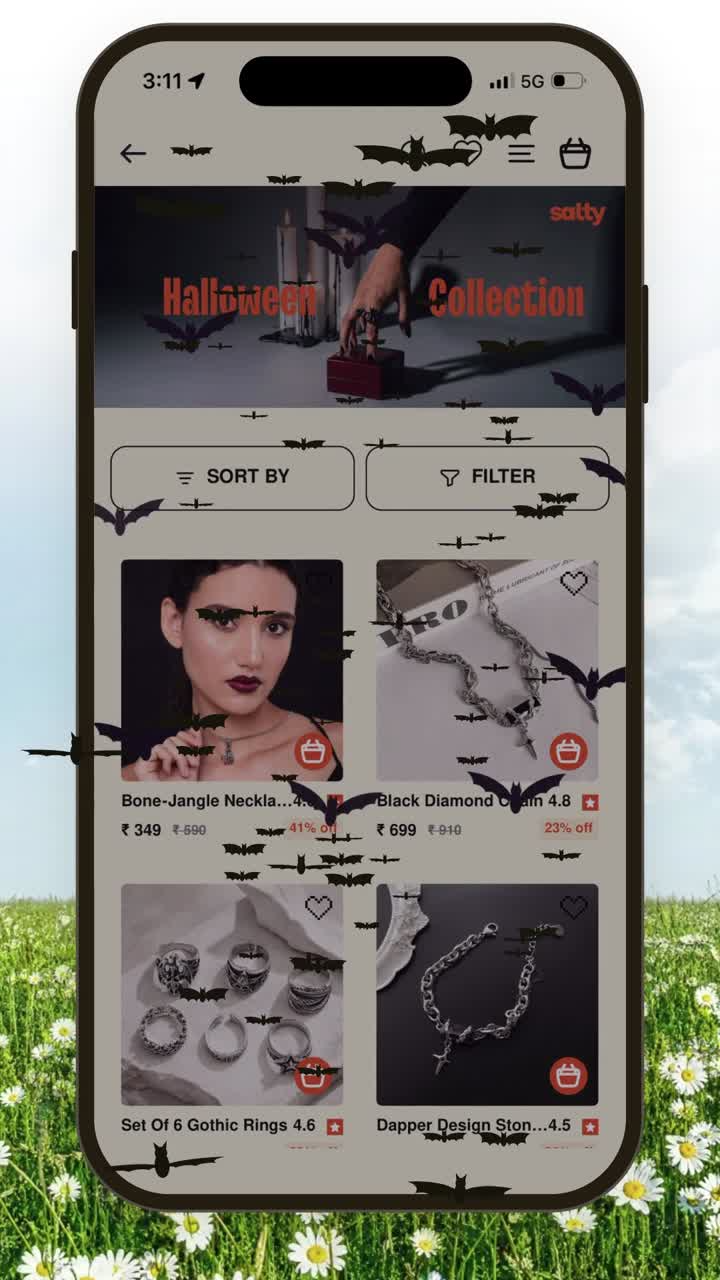
- Salty's team built a Halloween bat swarm across its app themselves, using Claude and the Milo CLI, as real React Native rather than a webview. Before, an effect like that meant a new build, App Store review and waiting on approval, then undoing it all after the season. A BFCM version can go up and come down the same way.
10. Show the deal on product pages and in the cart
Add badges for discounted, app-only or low-stock products, and a short banner on product pages with the offer and its end time. In the cart, a banner can remind shoppers of free shipping thresholds or a gift with purchase one last time before checkout.
11. Lock app-exclusive deals to the app
App-exclusive deals only work if they stay exclusive. Test that your app-only codes can't be applied on the website, and that the discount shows correctly in the app cart. Decide in advance whether app codes can stack with sitewide markdowns, so one order can't take two discounts.
Test the exact offer, not just the code. Last year, a "buy 3, get any 1 free" deal on one store made the lowest-priced item free, which only showed up when the team tested it.
Milo can catch mismatches too. While building a Diwali homepage banner for one brand, it flagged that the store's Shopify discounts didn't match the "up to 50% off" creative.
If you are still choosing between offer formats, our guide to types of discounts explains how each one works at checkout.
“Whenever we run a campaign, we send it to app users first because we consider them premium customers. The offers for mobile users last longer and are released earlier than those for web users.”
Kiran Kotla, CEO of Dista, whose app converts 3x better than its website.
12. Test every deep link
Every email, SMS and push you send during BFCM should open the right screen in the app, not the homepage and not the mobile website. Test each link on both platforms, with the app installed and without it, before the campaign goes out.
Deep links fail more often than most teams expect. As Abhijeet Singh, Appbrew's co-founder and CEO, puts it, even attribution tools like AppsFlyer or Branch land a new user on the exact right in-app page only around 60% of the time.
Last BFCM, one brand's campaign links quietly fell back to the mobile site until a configuration key was fixed, and another sent a WhatsApp campaign with plain web links instead of deep links.
{{cta}}
Run and monitor the sale week (Nov 27–30)
By sale week, the work is mostly done. The goal now is to send the right messages at the right time, spot problems early and keep orders moving.
13. Schedule your Black Friday push notifications in advance
Lead with Black Friday itself. Across 8.6 million pushes sent by apps on Appbrew over BFCM 2025, the open rate peaked on Black Friday at 0.72%, against 0.65% on Saturday and 0.57% on Cyber Monday.
Around those sale pushes, keep transactional pushes for order confirmations and shipping updates, and leave room for one or two unplanned sends, such as a restock. Personal messages work best when they go to a smaller segment, and AI can now build and schedule those for you.
14. Watch a few numbers live
Pick a short list and check it a few times a day. App orders, conversion rate, average order value, push clicks, checkout errors and app crashes are enough. A drop in one of them during the sale is a reason to act the same day.
Keep the list short enough to check between other work. In our conversation with Cecilia Tsai, founder of MiaMily, whose app converts at double the rate of its website and whose customers are mostly in the US, she named the two numbers she watches most.
“I'm definitely looking at how many people are downloading our app every month and the conversion rate.”
Cecilia Tsai, founder of MiaMily
On Appbrew, you can also ask Milo during the sale, for example "How many app orders did we get between 3 and 4 PM today, and what was the AOV?" Its app analytics refresh every hour.
15. Keep support and inventory in sync
Update your FAQs, shipping cut-off dates and return policy before the rush, and make sure the support team knows about every app-only offer.
If you are still choosing tools for support, reviews or loyalty, see our list of the best Shopify apps for BFCM. Check that stock levels in the app match your store, so shoppers don't buy items that are already gone.
How to use AI for BFCM sale push notifications in your Shopify app
AI can write and target your BFCM pushes while you approve every send. On Appbrew, Milo does it in three steps.
- Describe the campaign. For example, "Draft pushes for our Black Friday sale, from early access to Cyber Monday."
- Pick the audience. Ask Milo to target shoppers with wishlist items on sale, carts left behind or past buyers. Milo builds each segment from your store data.
- Review and schedule. Milo drafts the titles, messages, links and send times. You edit and approve, and Milo schedules only what you approved.
Push needs to be set up for your app before you start. For more message ideas, see our guide to Shopify app push notifications.
How to retain your new mobile app customers after BFCM
BFCM brings in a wave of first-time app users. The first weeks after the sale decide whether they keep the app or delete it, so the focus shifts from selling to staying useful.
16. Send delivery updates and welcome new app users
The days after the sale are when new buyers decide whether to keep your app. Send order and shipping updates by push, so the app feels useful, and set up a short welcome flow for shoppers who installed during BFCM.
In our conversation with Steve Morales, Head of Growth at Kut from the Kloth, whose app converts 2.3x better than its website, he called the first 7 to 14 days after a purchase the most fragile window. It is when a new buyer either forms a habit with your brand or forgets you.
The second order is where the app pays off. In an Appbrew analysis of around 2 million fashion customers, shoppers routed to the app for their second purchase generated roughly 10x the lifetime value of other cohorts over the next 18 months.
17. Review what worked
Within a week or two, write down what happened. Note app orders and revenue against web, which pushes drove the most clicks, which deep links or codes broke, and how many new users the app gained. Keep it short, and it becomes next year's checklist. Then carry what worked into the rest of your holiday marketing calendar.
To sum up
A strong BFCM in your Shopify mobile app comes from preparation weeks before the sale. That means a final build that is already live, an audience that has installed the app and allowed notifications, a homepage and deals that are set up in advance, and a short list of numbers to watch while the sale runs.
If you still need an app for this season, start a 30-day free trial on the Starter plan from Appbrew on the Shopify App Store, and our team will get it through App Store and Google Play review in time for the sale.
{{cta2}}
FAQs
1. What should a BFCM checklist include?
A good BFCM checklist covers four stages. Get your store and app ready with a final app build, checkout and payment tests and traffic planning. Grow your audience with app installs and push permission. Set up the sale with your homepage, deals and deep links. Then run and review the sale with a push schedule, live metrics, support and a post-sale review.
2. When should I start preparing my Shopify mobile app for Black Friday?
Start four to six weeks before Black Friday. That leaves time to submit and approve a final app build, grow your app audience, and set up the sale inside the app before traffic peaks.
3. When should I submit my app update before BFCM?
Aim to have your final app version live at least two weeks before Black Friday, then freeze changes until the sale ends. Banners, collections and push notifications can still change without a new app version.
4. How do I get more app installs before Black Friday?
Promote the app where shoppers already are. Use an install banner on your mobile site, store buttons in emails, QR codes on packaging, and a page that explains app-only perks like early access or app-exclusive deals.
5. How do I prepare my Shopify store for Black Friday?
Test checkout and payments on a real phone, plan for traffic spikes, sync inventory, update FAQs and shipping dates, and schedule your emails, SMS and pushes in advance. For your app, also submit the final build early and test every deep link.
6. How many push notifications should I send during BFCM?
Plan a handful of key moments, such as early access, sale live, new drops, final hours and Cyber Monday, and use segments for personal messages like wishlist items on sale. Spread them out so shoppers stay subscribed.