



.webp)





Learn how to make your PWA rank in 2026. Fix JavaScript rendering, improve Core Web Vitals, and boost visibility across Google and AI search.
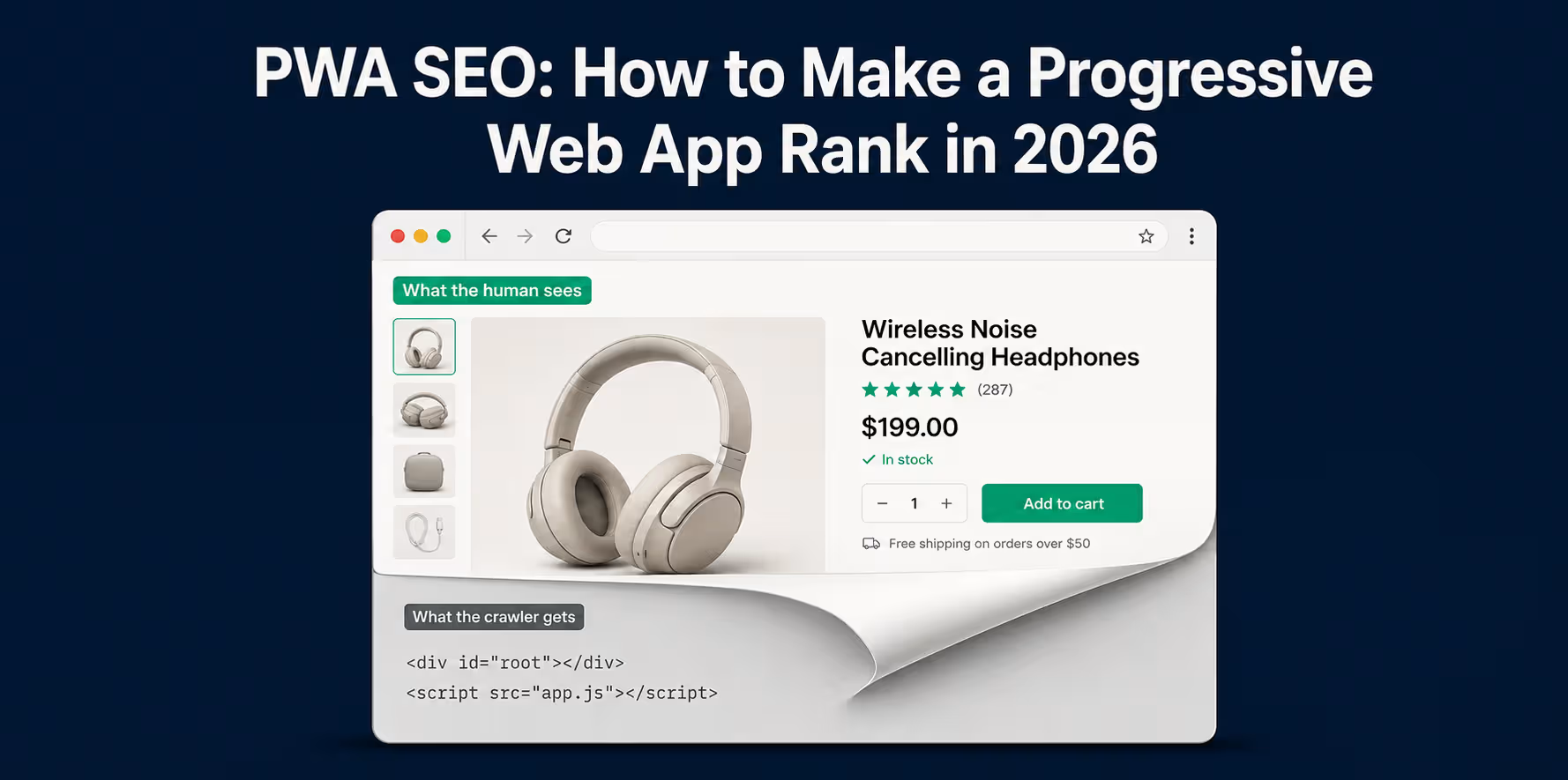
You turned your store into a progressive web app. It loads fast, it feels like a native app. Then you check Search Console and your new collection pages still are not indexed, or your organic traffic has gone flat since the rebuild.
That is not a Google penalty and it is not a content problem. It is a rendering problem, and rendering is the single thing that decides whether a crawler ever sees your pages. The most expensive myth in PWA SEO is the idea that modern Google "just handles" JavaScript, so no special steps are needed. It is half true for Googlebot and completely false for the AI answer engines that now sit between your buyers and their next purchase.
This breaks down whether a PWA can actually rank, exactly where PWAs leak SEO traffic in 2026, and how to fix rendering so both Google and tools like ChatGPT and Perplexity can read your store.
TL;DR
- A PWA can rank as well as any website. The risk is never the PWA itself, it is how you render the JavaScript that builds the page.
- Googlebot renders JavaScript. The major AI crawlers (GPTBot, ClaudeBot, PerplexityBot) do not. They read only the raw HTML your server returns (Vercel and MERJ, 2024 to 2026).
- Client-side rendered content can rank on Google yet be completely invisible in ChatGPT, Perplexity, and Google AI Overviews.
- Core Web Vitals changed. INP replaced FID as the responsiveness metric in March 2024, and roughly 43% of sites still fail the 200ms threshold (DigitalApplied, 2026).
- The fix for both problems is the same: get your real content into server-delivered HTML through server-side rendering or prerendering.
Can a PWA rank in Google?
Yes. A progressive web app ranks exactly as well as the content a crawler can read in your HTML, and Google has rendered JavaScript for years. There is no ranking penalty attached to the PWA architecture.
The catch is in the phrase "content a crawler can read." A PWA built to render everything in the browser hands Google an almost empty page on first request, then relies on Google to run your JavaScript before it sees anything worth indexing. Google usually does. But "usually" carries a cost in speed, consistency, and, as you will see below, in whether any engine other than Google sees your store at all.
If you want the full primer on the technology itself, see what a PWA is and how it works.
Why PWAs create an SEO risk (it is the rendering, not the PWA)
The exact thing that makes a PWA feel like an app is what can hide your content from search engines. A PWA loads a JavaScript application once, then swaps content in and out without full page reloads. Handled carelessly, that means the words, prices, and links a crawler needs never appear in the HTML the server sends.
This is an architectural decision, not a flaw in the standard. A PWA that renders its content on the server is as crawlable as any static site. A PWA that renders everything client-side is betting its entire organic channel on a crawler executing its code correctly and on time. The rest of this post is about not making that bet.
How Googlebot sees each rendering method
The rendering method you choose determines what a crawler receives on its first request, before any of your JavaScript runs. That first payload is what most engines index.
|
Rendering method |
What the crawler gets on first fetch |
SEO risk |
|
Client-side (CSR) |
Empty shell plus JavaScript |
High |
|
Server-side (SSR) |
Full HTML, ready to index |
Low |
|
Static generation (SSG) |
Full prebuilt HTML |
Low |
|
Dynamic rendering |
Prerendered HTML served to bots |
Workaround, not a fix |
Client-side rendering (and why it is risky)
With client-side rendering, the server sends a near-empty page and a bundle of JavaScript. The browser builds the page for a human visitor. A crawler that does not execute JavaScript sees the empty shell. Even Googlebot, which does render, has to defer that work, which brings the next problem.
Server-side rendering
Server-side rendering builds the full HTML on the server for every request and sends it ready to read. The crawler gets your headings, body copy, prices, and links immediately. For an ecommerce PWA, this is the safe default for anything you want indexed.
Static generation and prerendering
Static generation builds pages ahead of time and serves prebuilt HTML. It is the fastest option and it is crawler-friendly by default. It fits pages that do not change per request, like content and evergreen collection pages, and pairs well with on-demand rebuilds when inventory changes.
Dynamic rendering
Dynamic rendering detects bots and serves them a prerendered version while humans get the client-side app. Google has described this as a workaround rather than a long-term recommendation, because you end up maintaining two paths and hoping they stay in sync. Treat it as a bridge, not a destination.
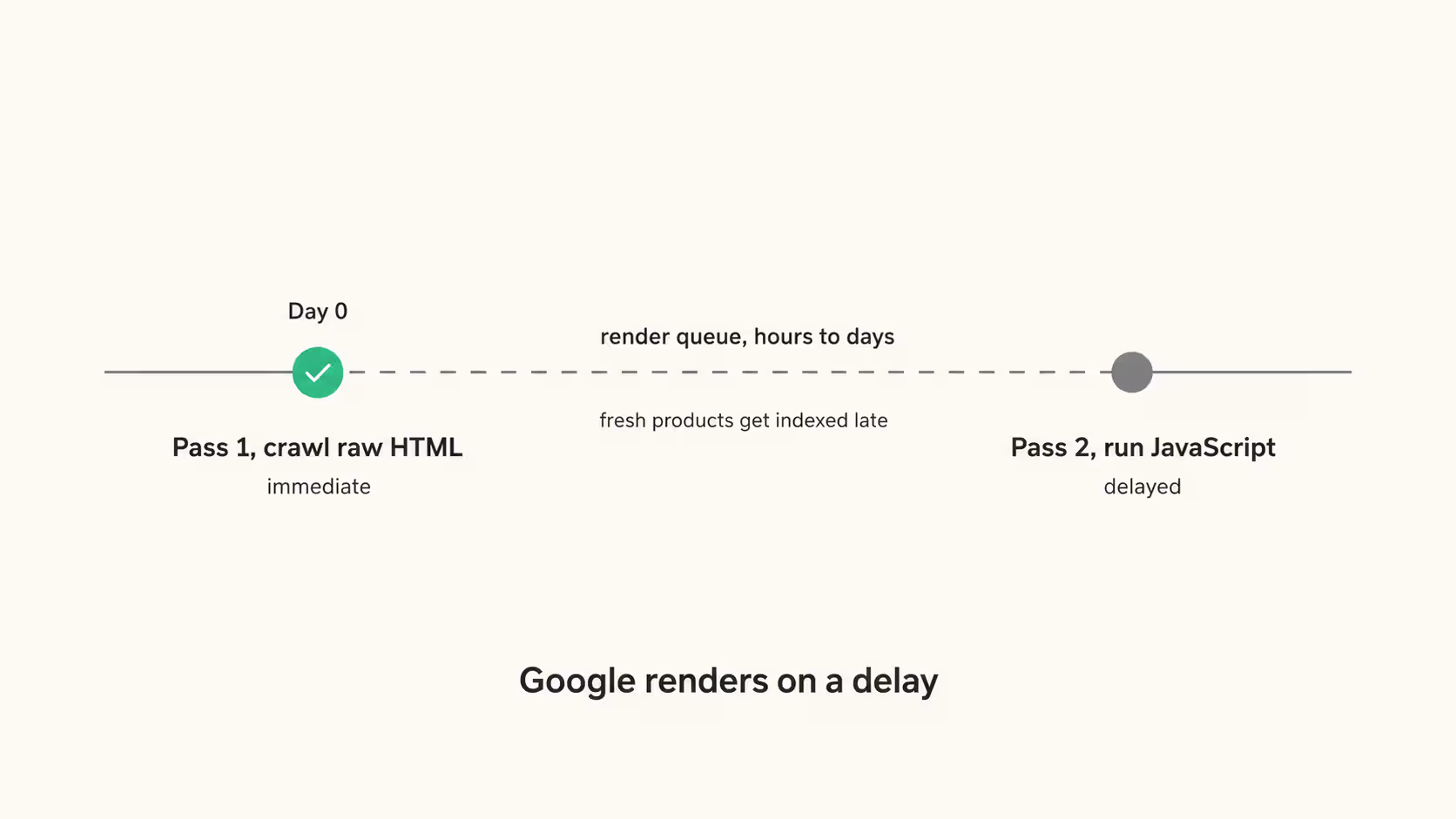
There is a second cost to client-side rendering. Google does not render your JavaScript in the same pass it crawls your HTML. It crawls the raw HTML first, then queues the page for a separate rendering step that can lag by days. For a store pushing new products and price changes, that delay means your freshest, highest-intent pages get indexed late or inconsistently, and it quietly eats the crawl budget on a large catalog.
A related trap is the app shell. The static frame of your PWA, the header, footer, and navigation that stays constant, can get indexed in place of the actual page content, or multiple near-identical shells can compete with each other. Canonical tags and real per-page content in the server HTML are what prevent it.
Do service workers help or hurt SEO?
Neither, when configured correctly. A service worker is neutral for SEO on its own, but aggressive caching logic can serve a crawler stale content or interfere with what Googlebot fetches.
The failure mode is a service worker that intercepts requests and returns a cached shell or outdated page to whatever asks for it, including a bot revisiting to check for changes. Scope your caching so that crawlable HTML always reflects current content, and never let the service worker gate the first server response a crawler receives. Cache assets and speed, not the content you need indexed.
Core Web Vitals for PWAs in 2026
Start with the correction that dates half the advice online: INP replaced FID as Google's responsiveness metric in March 2024. Any PWA SEO guide still citing First Input Delay is out of date. The three Core Web Vitals you are measured on now are Largest Contentful Paint, Interaction to Next Paint, and Cumulative Layout Shift.
|
Metric |
Measures |
Good threshold (2026) |
|
LCP |
Loading |
Under 2.5s |
|
INP |
Responsiveness |
Under 200ms |
|
CLS |
Visual stability |
Under 0.1 |
Each is measured on real Chrome users at the 75th percentile over a rolling 28-day window, not in a lab. A perfect Lighthouse score means little if a quarter of your visitors on mid-range phones get slow results.
INP is the one that punishes PWAs specifically. It captures the full delay between a tap and the screen updating across the entire session, and it is the most commonly failed vital, with about 43% of sites missing the 200ms mark (DigitalApplied, 2026).
A JavaScript-heavy app that ties up the main thread with hydration and event handlers will fail INP on real devices even when it feels fine on your laptop. Shipping less JavaScript and keeping the main thread free is the work.
Can AI answer engines read your PWA?
Mostly, no. Googlebot renders JavaScript. The crawlers behind the major AI answer engines do not. GPTBot, ClaudeBot, and PerplexityBot fetch your page and read only the raw HTML the server returns, then move on (Vercel and MERJ, 2024 to 2026). ClaudeBot downloaded JavaScript files in about 24% of requests and executed none of them.
This creates a visibility split that catches teams off guard. A client-side rendered PWA can rank on page one of Google, look perfectly healthy in Search Console, and be completely invisible to ChatGPT, Perplexity, and Google AI Overviews, because those engines only ever saw a loading state.
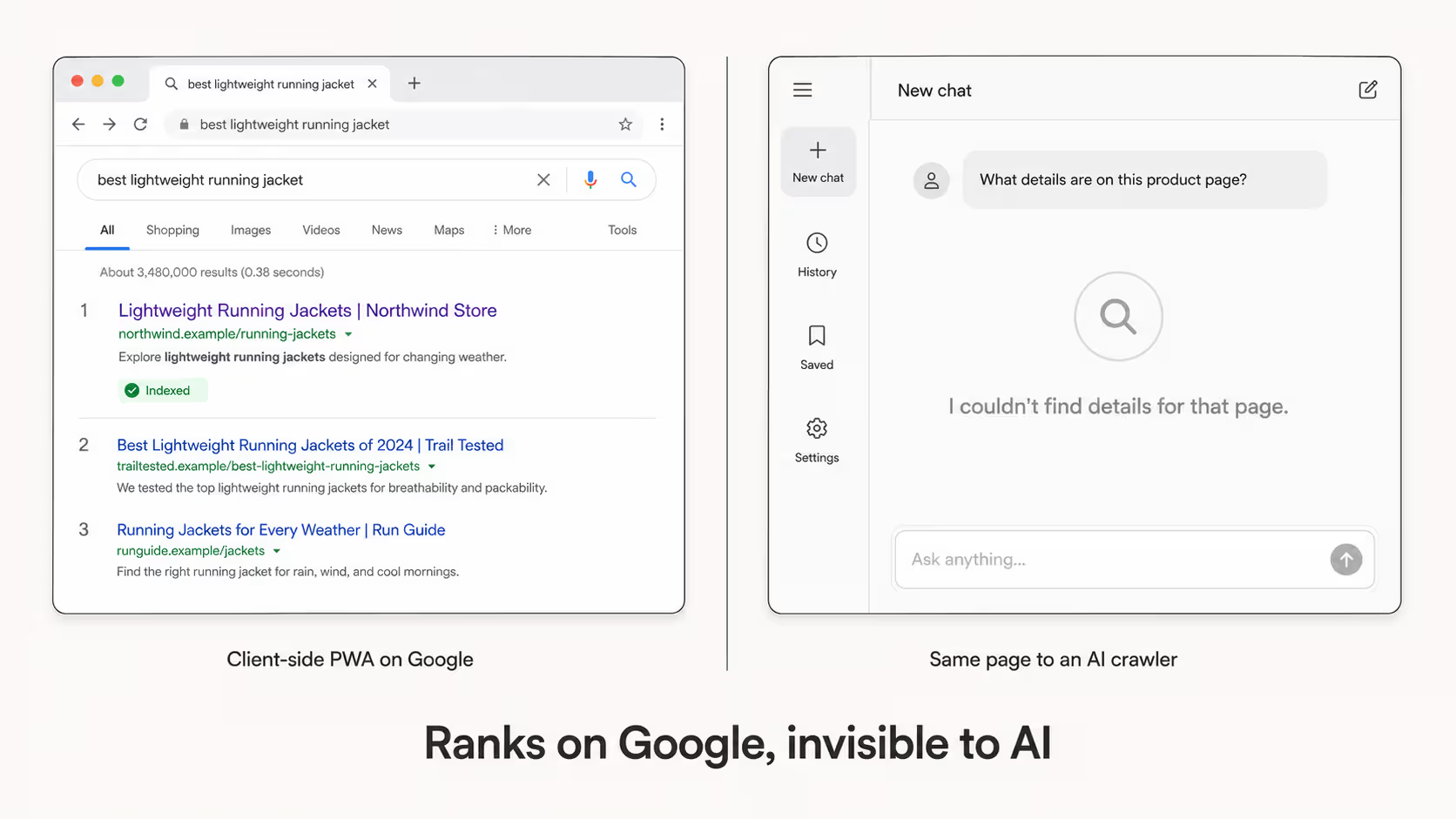
In a documented 2025 test, a fully client-rendered page returned blank to all three. Your product descriptions, comparison tables, and FAQs, often your highest-value content, do not exist to an AI crawler if JavaScript builds them.
The fix is the same one that fixes classic SEO: put the real content in the server-delivered HTML. That includes your canonical tags and hreflang annotations for international stores, which also have to be in the raw HTML rather than injected client-side. Get this right and you become quotable in the fastest-growing referral channel of the year instead of absent from it.
{{cta}}
The technical SEO checklist for PWAs
Once rendering is handled, PWA SEO is standard technical SEO applied with discipline. Work through these in order:
- Give every page a real, crawlable URL with a clean path. No hash fragment routing, no content that changes without the URL changing.
- Ship a complete XML sitemap, and make sure internal links use standard crawlable HTML anchors, not JavaScript click handlers that search engines may struggle to follow.
- Set canonical tags on every page and eliminate duplicate app-shell URLs.
- Add structured data as JSON-LD in the server HTML, not injected after load. This machine-readable data also helps AI shopping agents discover and evaluate your products as agentic commerce becomes a bigger part of product discovery.
- Render title tags, meta descriptions, and social tags server-side so crawlers and previews get them on first fetch.
Mobile-first indexing
Google indexes and ranks your store on its mobile version, so the mobile PWA experience is the one that counts. A layout or a piece of content that only appears on desktop is effectively invisible for ranking. Test the mobile render, not the desktop one.
Framework-specific rendering guidance
Every major framework supports server rendering. The default you reach for matters more than the framework you pick.
Shopify Hydrogen
Hydrogen is React-based and built for server-side rendering out of the box, which is exactly what you want for a Shopify storefront. Lean into its server components for product and collection pages so the catalog ships as HTML.
Next.js (React)
Next.js gives you SSR, SSG, and incremental static regeneration in one framework. Use static generation with on-demand revalidation for content and stable collection pages, and server rendering for anything personalized or inventory-sensitive.
Nuxt (Vue)
Nuxt defaults to universal (server-side) rendering and supports static generation. For a content-and-catalog store, its hybrid rendering lets you pick per route, static where you can, server-rendered where you must.
PWA SEO for Shopify and ecommerce stores
For a store, the rendering rules land hardest on the pages that make money. Product and collection pages must render server-side so their titles, descriptions, prices, and reviews are in the HTML. Watch faceted navigation, where filter and sort combinations spawn thousands of crawlable URLs and drain crawl budget. And use the schema that earns rich results in commerce: Product, Offer, Review and AggregateRating, and BreadcrumbList.
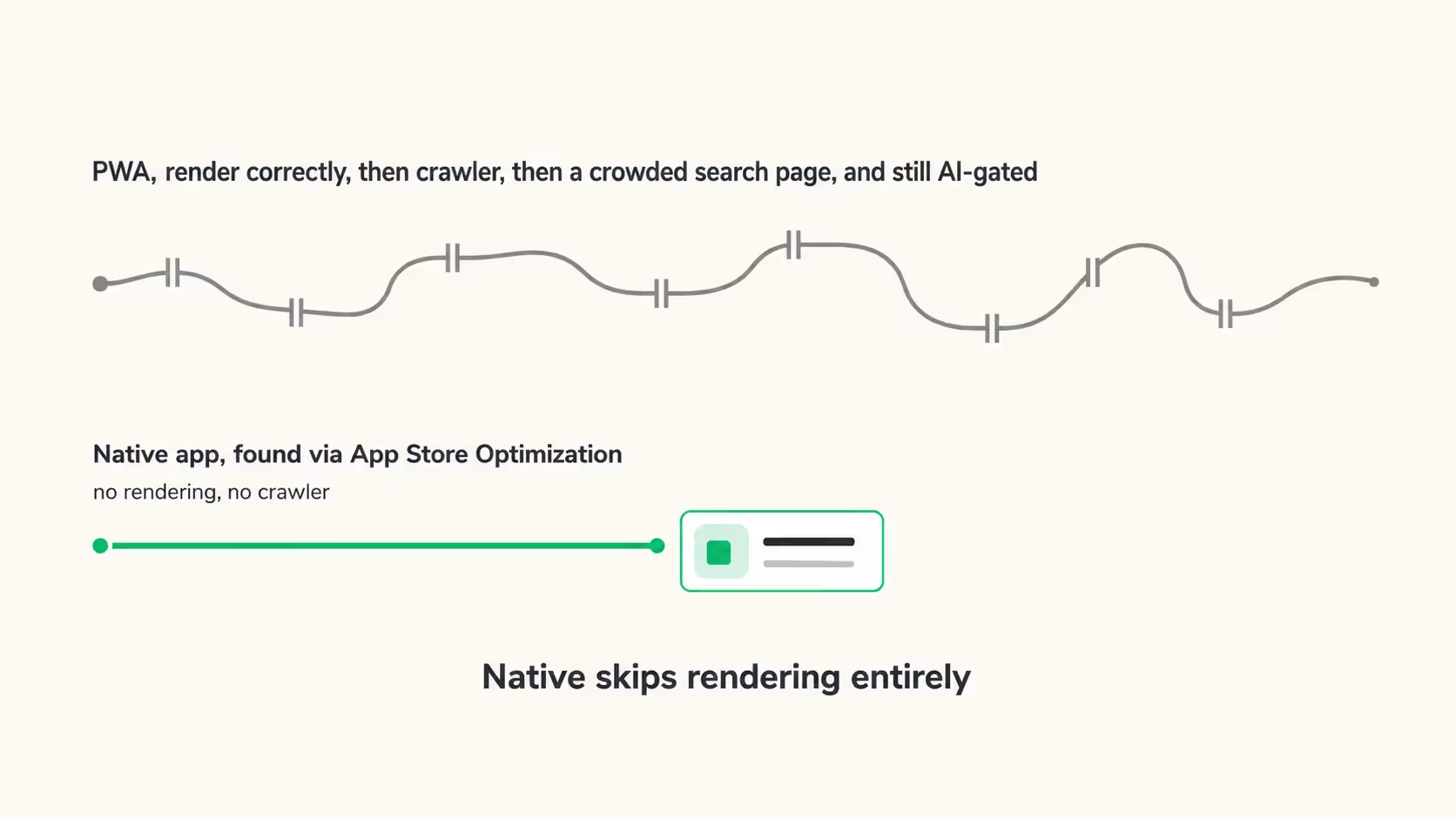
There is a ceiling worth naming. Even a flawlessly optimized PWA competes for discovery through the same crowded search results as everyone else, and it is invisible to the AI crawlers unless you have done the server-rendering work above.
A native app sidesteps web-rendering SEO entirely, because it is found through App Store Optimization rather than crawler rendering. This is what Appbrew does; turning a Shopify store into a native iOS and Android app without a six-figure build.
The bottom line
PWA SEO is not about the PWA. It is about whether the content exists in the HTML before any JavaScript runs, because that single decision governs how Google indexes you, how fast, and whether an AI engine can see you at all. Fix rendering first and everything else on the checklist starts to work.
If retention is where you actually need to win, see what a branded native app could do for your store.
{{cta2}}
FAQs
What is PWA in SEO?
PWA SEO is the practice of making a progressive web app crawlable and rankable despite its JavaScript-heavy architecture. The core work is ensuring content renders into server-delivered HTML, plus standard technical SEO like crawlable URLs, sitemaps, canonicals, and structured data.
Is PWA good for SEO?
It is neutral to good when built correctly and risky when built carelessly. A server-rendered PWA is as crawlable as any site and benefits from the speed and mobile experience Google rewards. A fully client-side rendered PWA can hide its content from crawlers and, in 2026, from AI answer engines entirely.
Is PWA still relevant in 2026?
Yes. PWAs remain a low-friction way to give a website app-like speed and offline behavior without an app-store download. The relevance question for a store is not whether PWAs work, but whether a PWA alone covers retention, which is where a native app tends to pull ahead.
Is PWA still a thing?
It is. The technology is mature and widely used across ecommerce and media. What changed is the bar: Core Web Vitals now judge responsiveness through INP, and AI crawlers have made server-side rendering a requirement rather than a nice-to-have.














