


.webp)

What a native app is, how it works, examples, cost, and how it compares to web and hybrid apps, with a 2026 build guide for stores.
A native app is one of three ways to put your store on a phone. The other two are web apps and hybrid apps. This guide explains what a native app is, how it works, and when it fits a store.
Quick definition: A native app is software built for one operating system, iOS or Android. Developers use that platform's own language, like Swift or Kotlin. You download it from an app store, and it can use the whole device.
What is a native app?
A native app is a program built for a single operating system and installed from its app store. It is written in that platform's own language and compiled to run directly on the device. That direct build is what makes it fast and able to use every device feature.
Native application is the formal term for the same thing. Native mobile app means the same idea, applied to phones rather than desktops.
How do native apps work?
Native apps are built, packaged, and shipped through each platform's own tools. The work runs in four stages.
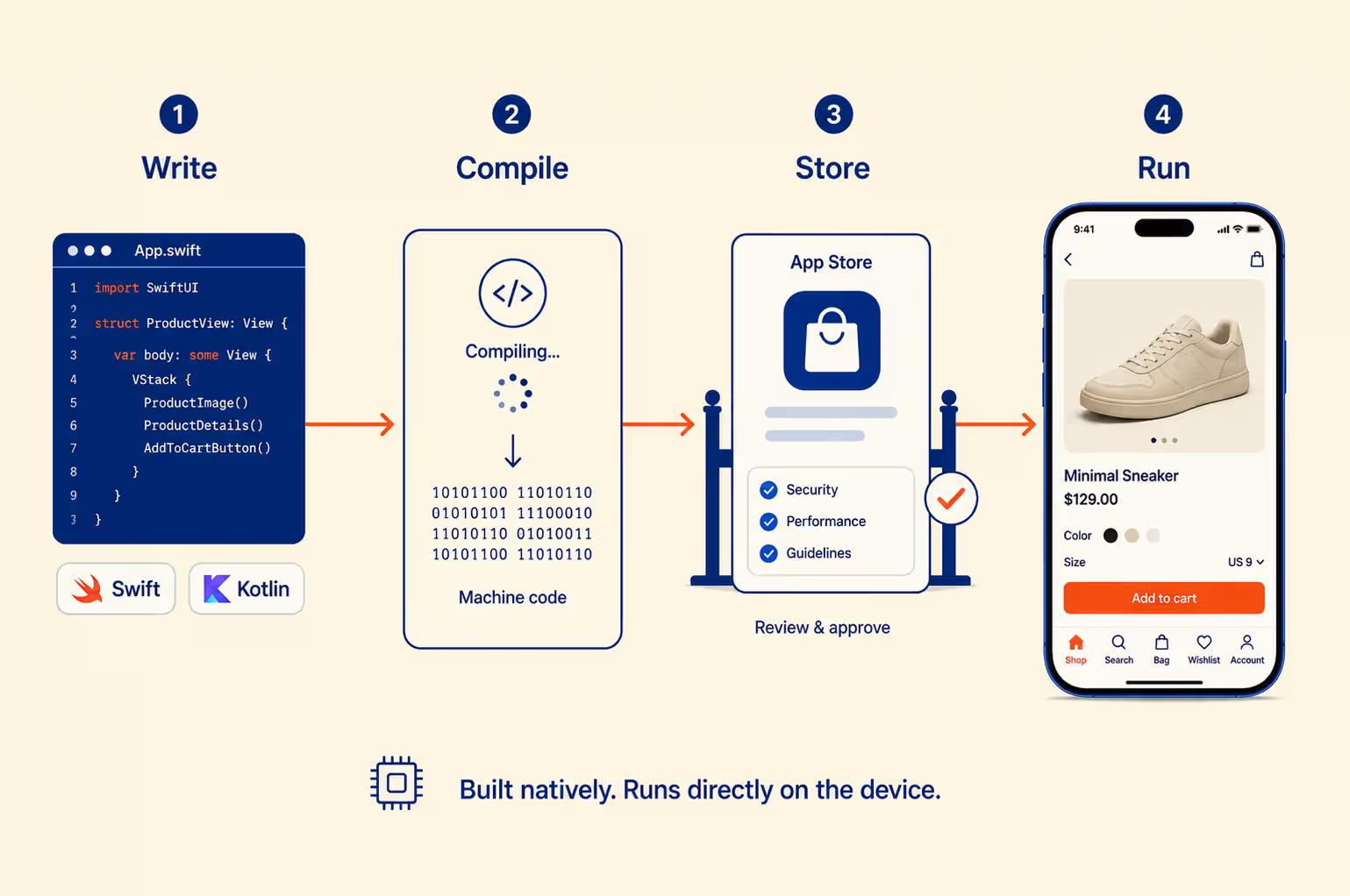
- Write the code. For iOS, developers use Swift in Xcode, with tools like SwiftUI. For Android, they use Kotlin in Android Studio, with Jetpack Compose. Each platform provides a software development kit, or SDK. The SDK bundles ready-made components and APIs, which are hooks into features like the camera or GPS.
- Compile it. Compiling turns the code into machine code, the raw instructions a phone's chip runs. Nothing sits in between, like a browser or interpreter. That direct path is the main reason native apps feel fast.
- Submit to the store. The app goes to the App Store or Google Play. Each store reviews it for security, privacy, and quality. Once approved, it is listed for anyone to download.
- Run and update. The app installs locally and can store data on the phone. New versions ship through the store, which also handles payment security.
What does it take to publish a native app?
Building the app is only half the job. Getting it into the store is the other half. The process runs in clear steps.
- Prepare the build. The team packages the app, screenshots, a description, and a privacy label.
- Pay to register. Apple charges $99 a year to publish. Google charges a one-time $25 fee.
- Submit for review. The build goes to App Store Connect or Google Play Console.
- Pass review. Each store runs automated checks, then a human review. Apple clears most apps within 24 hours.
- Handle rejections. Apple rejected about 1 in 4 submissions in 2024 (Apple App Store Transparency Report, 2025). The team fixes the issues and resubmits.
- Go live and update. The app is listed for download. Every future update passes through the same review.
This review step is a gate a web app never faces. It adds friction, but it also filters out unsafe and broken apps.
What can a native app access on your device?
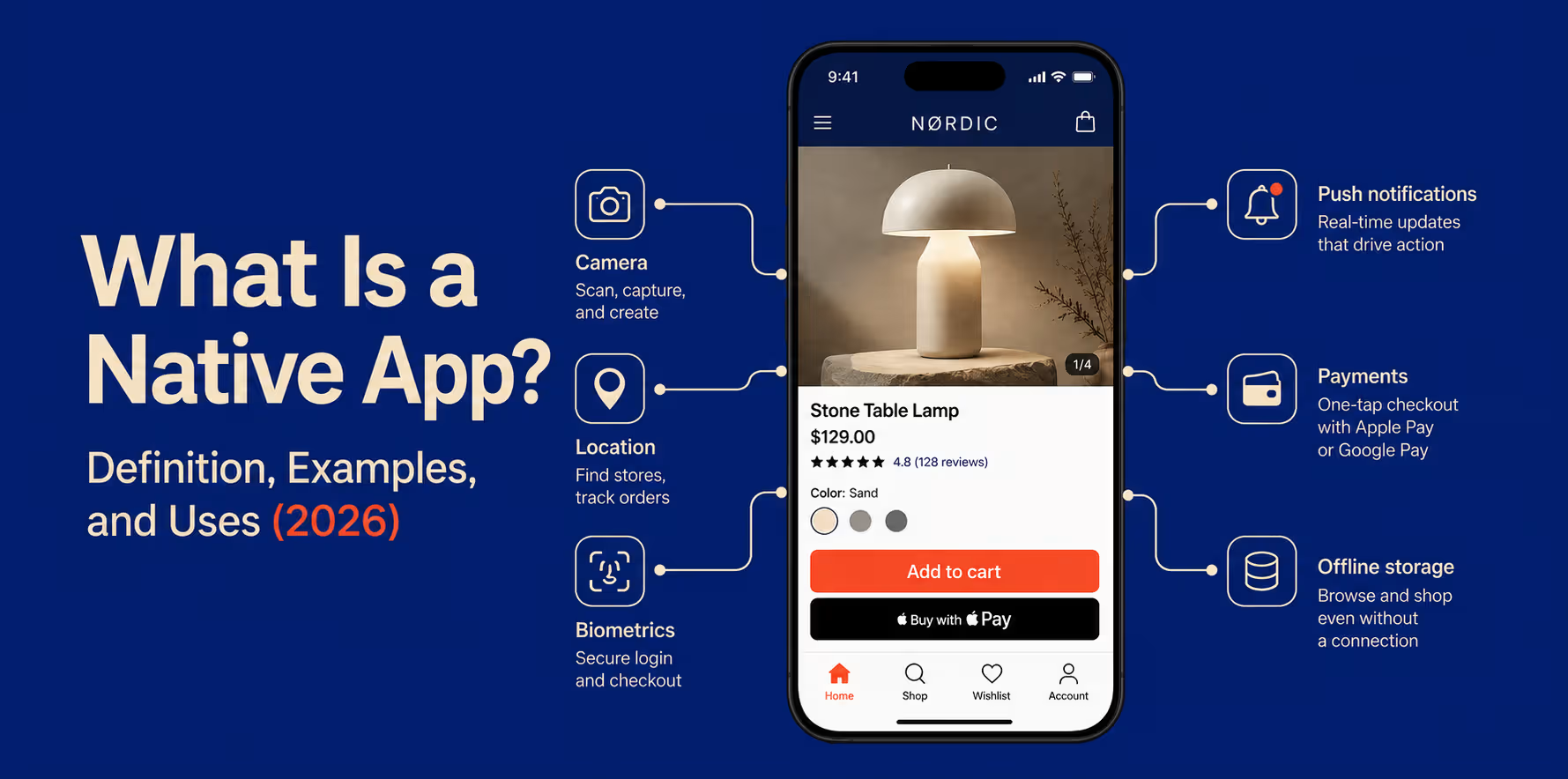
A native app can reach almost every hardware and software feature on a phone. Each one powers a real store feature.
- Camera and photo library: visual search, barcode scanning, and photo uploads
- GPS and location: store locators, local offers, and delivery tracking
- Face ID, Touch ID, and fingerprint: fast, secure login and checkout
- Push notifications: cart recovery, drops, and back-in-stock alerts
- Contacts and calendar: referrals and event reminders
- Bluetooth and NFC: contactless payment and connected devices
- Motion sensors: gestures and augmented-reality try-ons
- Apple Pay and Google Pay: one-tap checkout
- Offline storage: browsing and cart access without a connection
A web app reaches only some of these. On iOS, several are blocked outright, which limits a browser-based store. For the commerce use cases behind these capabilities, see this guide to ecommerce mobile app features and examples.
How native apps keep your data secure
Security is one of the strongest reasons brands choose native. Several layers work together.
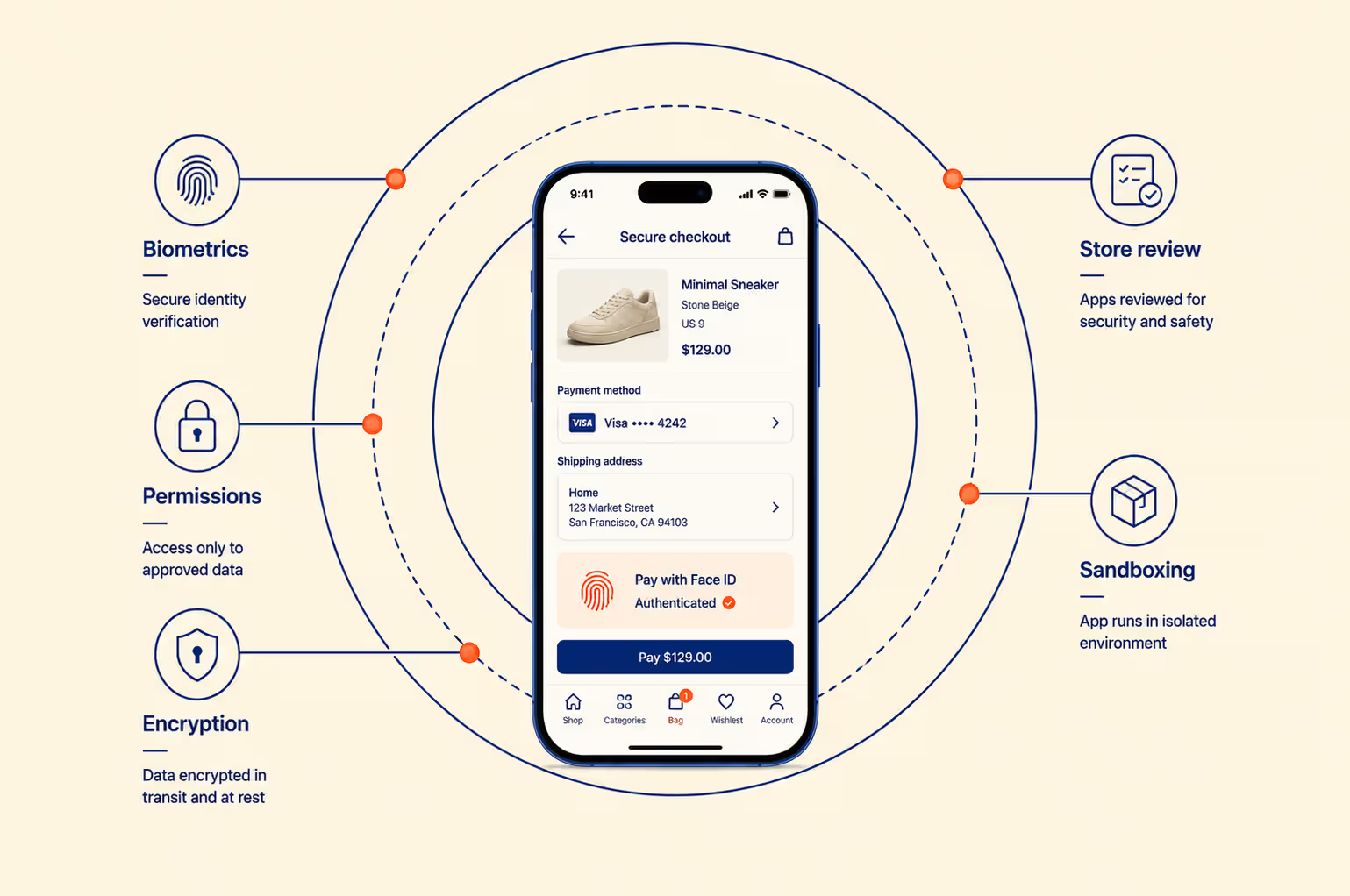
- App sandboxing. Each app runs in its own isolated space and cannot freely read another app's data.
- Encrypted storage. Sensitive data on the device can be encrypted at the system level.
- Biometric login. Face ID, Touch ID, and fingerprint add a strong, built-in lock.
- Permission prompts. The app must ask before using the camera, location, or contacts.
- Store review. Every app is checked before listing, which filters obvious threats.
- Automatic security updates. Fixes reach users quickly through the store.
No system is perfect, and security still depends on good coding and careful data handling. But native apps start from a stronger base than most web apps.
5 examples of native apps in 2026
Most apps you use every day are native apps. Here are five well-known examples, and what makes each one native.
- WhatsApp. It is native on iOS and Android, using your contacts, camera, and notifications directly.
- Instagram. It is native, and it uses React Native for large parts of the app.
- Spotify. It streams audio, caches playlists offline, and controls playback in the background.
- Uber. It uses continuous GPS, live maps, and push updates for trip tracking.
- The Amazon app. It uses one-tap payment, notifications, and camera-based visual search.
Facebook is native too. Meta built React Native and uses it across parts of Facebook and Instagram.
Native apps built by Shopify brands
You do not need to be a tech giant to run a native app. Many US Shopify brands have one, built with app builders rather than large in-house teams.
- Karma and Luck (Las Vegas decor): a custom app with bundles, loyalty, and a horoscope feature.
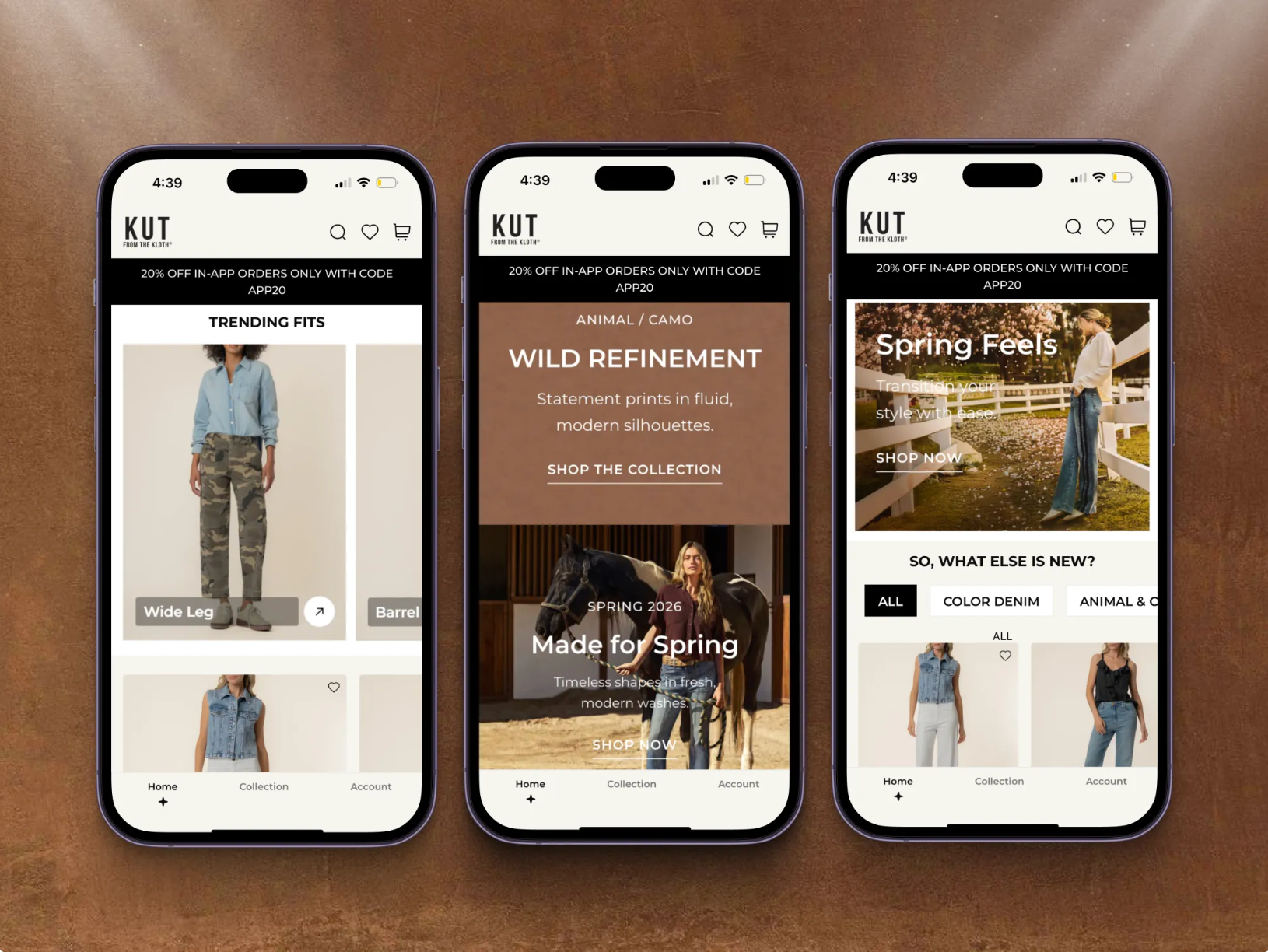
- Kut from the Kloth (US denim): a mobile channel built for high-intent shoppers.
- Anatomie (US travel apparel): an app focused on repeat buyers and lifetime value.
These are all native apps, built on React Native and tuned for shopping.
Native app vs web app vs hybrid app
A native app is built for one platform. A web app runs in a browser. A hybrid app mixes the two. The right choice depends on speed, budget, and how much device power you need. Here is how they compare.
Native app vs web app
The native app vs web app choice comes down to depth versus reach. Here is how they differ, point by point.
- How they are built. A web app runs in the browser, using HTML, CSS, and JavaScript. A native app is built for one platform. One codebase serves the web, while native usually needs two.
- Cost and speed to launch. A web app is cheaper and faster to build. It also updates instantly, with no store review. A native app costs more and takes longer.
- Performance. A native app runs directly on the device, so it feels faster. A web app runs through the browser, which adds a slower layer.
- Device access. A native app reaches the full device, from camera to biometrics. A web app reaches only some features, and iOS blocks several.
- Offline use. A native app works offline and syncs when it reconnects. A web app struggles without a connection.
- Push notifications. Native push is reliable on both platforms. On iOS, a web app cannot send reliable push.
- Discovery. A web app is found through search, using SEO. A native app is found in the app store, using ASO.
A PWA is a type of web app with some app-like features. It closes part of the gap, though iOS still holds it back.
The same trade-off is sometimes written as native application vs web application, or web app vs native app. The terms are interchangeable: web for reach, native for depth.
Native app vs hybrid app
A hybrid app wraps a web app inside a native shell. It ships from one codebase to both iOS and Android. That saves time and money during the build. It can also reach some device features the shell exposes.
The cost is performance. A hybrid app renders through a webview, so it runs slower than native. Complex animations and fast interactions are where it feels weakest. Well-known hybrid apps include H&R Block, the AAA app, and Sworkit. For a simple content app, the trade can be fine. For a busy store, it usually is not.
The difference is clearer in this breakdown of webview apps vs native apps for Shopify.
Which one should you choose?
Match the app type to your main goal:
- Choose native for the best speed, full device access, and retention.
- Choose a web app or PWA for the widest reach at the lowest cost.
- Choose hybrid to launch on both platforms fast, with some performance trade-off.
Advantages of native apps
Native apps lead on the things that keep customers engaged and spending. Six advantages stand out.
1. Best performance and speed
Native code runs directly on the device, with no browser layer. Scrolling, transitions, and load times all feel instant. The gap shows most on large catalogs.
2. Full device access
A native app uses the camera, GPS, biometrics, and every sensor. That enables visual search, one-tap checkout, and location features. Web apps cannot match this, especially on iOS.
3. Reliable push notifications
Native push arrives dependably on both iOS and Android. It is one of the strongest tools for bringing customers back. You can plan campaigns around it with confidence, especially when it is paired with broader ecommerce retention strategies.
4. Offline access
A native app stores data on the device. Customers can browse and act without a connection. It syncs again when they reconnect.
5. Familiar, platform-native experience
A native app follows each platform's design patterns. Navigation and gestures feel like the rest of the phone. That familiarity lowers friction and builds trust.
6. App-store trust and security
App stores review every app before listing it. That review, plus ratings, signals credibility to new buyers. Native apps also use platform-level encryption and permissions.
{{cta}}
Disadvantages of native apps
Native apps have real trade-offs, mostly around cost and effort. Four stand out.
1. Two codebases
iOS and Android need separate builds by default. That doubles the development and maintenance work. Cross-platform frameworks reduce this, as covered below.
2. Higher cost
A custom native build costs more than a web app. Skilled iOS and Android developers are expensive and scarce. Maintenance adds 15 to 20% of the build cost each year.
3. App-store approval
Every app must pass store review before launch. First submissions face roughly 35 to 40% rejection (MacRumors, 2021). Apple charges 15 to 30%, and Google 15 to 30%, on in-app sales.
4. Slower updates
Changes wait for store review before users get them. That can take a day or several days. Web apps update instantly, without a queue.
Are cross-platform apps truly native? React Native and Flutter in 2026
React Native and Flutter build real native apps from one codebase. They are not hybrid webview apps, which is a common mix-up. Here is how each one works.
- React Native renders true native interface components. It uses JavaScript for the logic, then calls native modules for device features.
- Flutter compiles to native code. It draws its own interface with a fast engine.
Both give near-native performance for most commerce apps.
The performance gap has mostly closed. React Native's New Architecture, the default since version 0.76 in October 2024, replaced the old bridge with faster, direct calls. Startup and scrolling both improved.
The proof is in production:
- Shopify shares up to 99% of its app code across platforms
- Discord shares 98% and halved its startup time
- Instagram, Walmart, and Coinbase all run React Native at scale
Some cases still favor fully native code. Heavy games and advanced AR are the usual exceptions. For a typical store, cross-platform is the practical choice in 2026.
This is the route Appbrew takes. It builds your store's app on React Native, so you get native performance without managing two codebases.
React Native vs Flutter: which should you choose?
Both are strong. The right pick depends on your team and your design goals.
For most Shopify stores, React Native is the safer default. It shares skills with web teams and powers Shopify's own apps.
When should you build a native app?
A native app is not right for every business. Use this quick check before you invest.
Build a native app if:
- Repeat purchases and retention drive your growth
- You want reliable push notifications
- Your experience needs the camera, GPS, or biometrics
- Mobile is already a large share of your sales
- You are ready to invest beyond a basic website
A web app or PWA may be enough if:
- You mainly need reach and search traffic
- Your budget is tight and mobile revenue is unproven
- You want something live in a few weeks
- Your core features work fine inside a browser
Most growing stores end up wanting both. The web brings people in, and the app keeps them coming back.
How much does a native app cost, and how long does it take?
A custom native app usually costs $30,000 to over $120,000. The range depends on platforms, features, and complexity. For a Shopify-specific budget model, see the complete Shopify mobile app development cost guide.
Native app cost by complexity
Cost scales with how much the app does. Here are rough custom-build ranges for 2026.
Building both iOS and Android sits at the higher end of each range. A single platform costs less but reaches fewer users.
A no-code app builder skips these ranges entirely. Instead of a large upfront build, you pay a monthly subscription. Shopify app builders run from about $50 to $1,000 or more per month, by plan (2026 market rates). They launch in weeks, not months.
What drives the cost up
Several things add hours to a build:
- More screens and custom design work
- Third-party integrations, like loyalty or reviews
- Real-time data and heavy personalization
- Ongoing testing across many devices
The cost after launch
The spending does not stop at launch. Maintenance runs 15 to 20% of the build cost each year. That covers bug fixes, operating-system updates, and new features. Our Shopify mobile app development guide breaks down each path.
How to build a native app for your store (3 approaches)
You have three ways to get a native app for your store. Each trades cost against control and speed.
1. Hire developers for a custom build
You commission a studio or in-house team to build from scratch. You get full control and a fully custom app. You also pay the most and wait the longest. Compare the economics and trade-offs in Shopify mobile app builder vs custom development.
2. Use a cross-platform framework
A team builds once with React Native or Flutter. This ships to both platforms and cuts cost. It still needs developers and a build cycle.
3. Use a Shopify app builder
A builder turns your existing Shopify store into native iOS and Android apps. It is the fastest and most predictable of the three routes.
Across 250+ DTC brands, the app channel beats mobile web. It delivers about 3x higher conversion, 30% higher average order value, and 6x higher lifetime value. That return is what makes a native app worth the investment.
Appbrew builds these apps on React Native, so they are genuinely native rather than a webview. Real-time Shopify sync keeps the app and store aligned. Key features include:
- Built on React Native for true native speed and full device access
- Milo, an AI personalization engine that tailors each shopper's app in real time
- AI Concierge, an in-app assistant that answers questions and recommends products
- Native push notifications to recover carts and announce launches
- 100+ integrations, including Klaviyo, Recharge, and Yotpo
Salty saw 3.5x its web conversion rate and 7x higher lifetime value after launch. Here is how the three approaches compare.
{{cta2}}
If you are comparing platforms, start with these Shopify mobile app builders.
Native apps and your store
A native app is the fastest, most capable way to run on a phone. It costs more than a web app but returns more per customer. For a growing store, that trade usually favors native.
If you want the deeper comparison, read PWA vs native app next.
Native app FAQ
What is meant by a native app?
A native app is software built for one operating system, either iOS or Android. Developers write it in that platform's own language, like Swift or Kotlin. The store then delivers it to your phone. Because it is built for the device, it runs fast. It can also use the full hardware, from the camera to GPS.
What are some examples of native apps?
Most apps on your phone are native. WhatsApp, Instagram, Spotify, Uber, and the Amazon app are all native. So are Facebook, Discord, and the Shopify Shop app. Some of these, like Instagram and Shopify, use React Native. That still counts as native, because it compiles to real native components rather than a web page.
Is WhatsApp a native app?
Yes. WhatsApp is a native app on both iOS and Android. It is downloaded from the App Store or Google Play. Because it is native, it uses your contacts, camera, and microphone directly. It also sends reliable push notifications and works well offline. A browser-based version could not match that depth, especially on an iPhone.
Is Facebook a native app?
Yes. Facebook is a native app on iOS and Android. Meta created React Native and uses it across parts of the app. The rest runs in each platform's native code. So Facebook is native, and it helped make cross-platform native development popular in the first place.
What is the difference between a native app and a mobile app?
Mobile app is the broad term for any app on a phone. It includes native apps, web apps, and hybrid apps. A native app is one specific type, built for a single operating system. So every native app is a mobile app, but not every mobile app is native.
How much does a native app cost?
A custom native app usually costs $30,000 to $120,000 or more. One platform sits at the lower end, and both platforms push it higher. A custom build also takes three to six months. Cross-platform frameworks cut the cost by roughly a third. A no-code app builder is cheaper still, from about $50 a month.
Is a native app faster than a web app?
Yes. A native app runs directly on the device's chip, with nothing in between. A web app runs inside a browser, which adds a slower layer. That gap shows up in scrolling, animations, and load times. It grows on older phones and weak networks. For a busy store, that speed can directly affect sales.














