


.webp)
.webp)

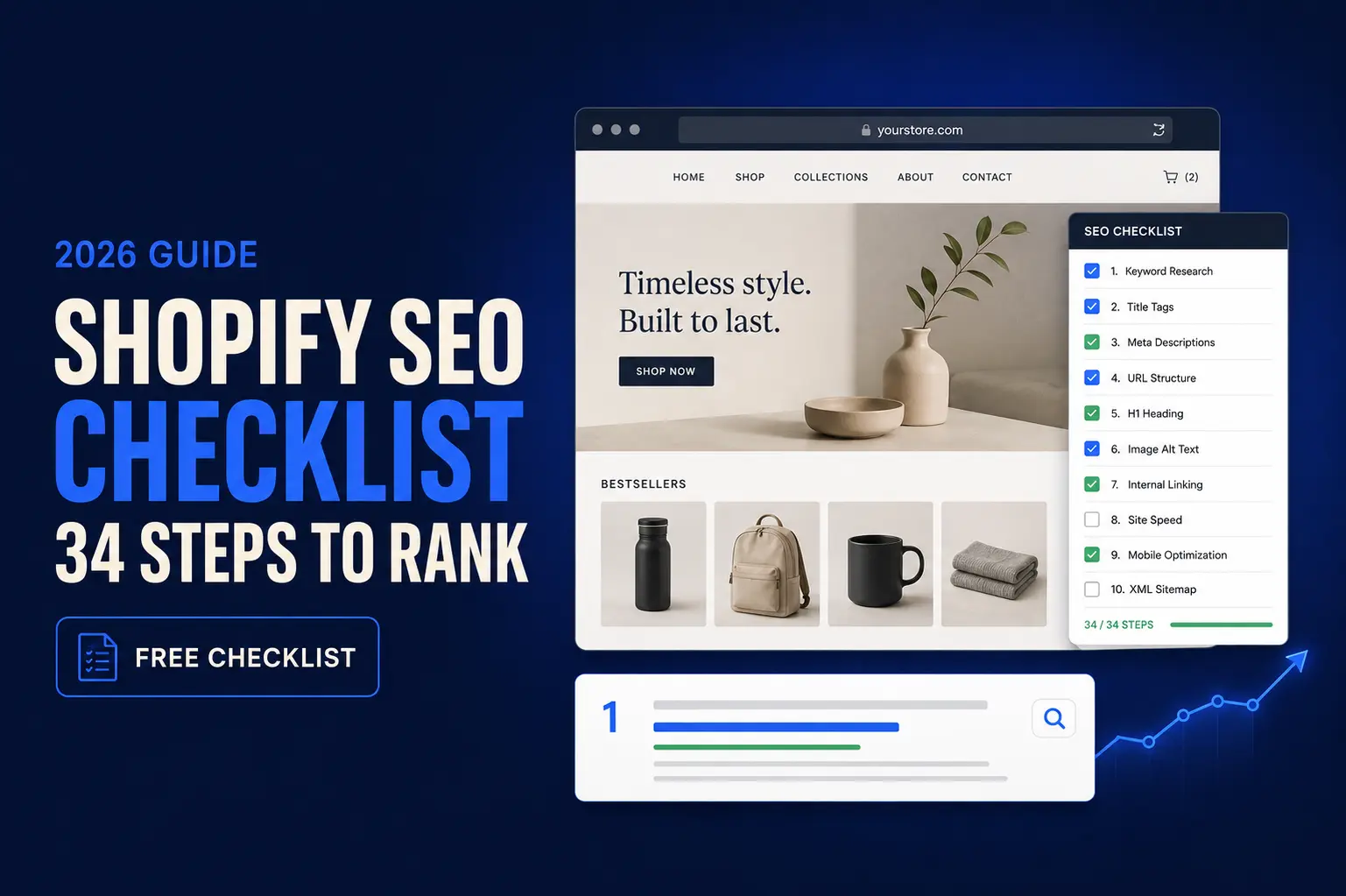
The complete Shopify SEO checklist for 2026: 34 steps across technical, on-page, content, and AI search. Free interactive checklist and PDF.
You've built your store. Your products are great. So why isn't Google sending you any traffic?
The answer is usually the same. Shopify handles a few SEO basics for you, but it leaves the parts that actually move rankings up to you, and most stores never touch them. They launch, cross their fingers, and wonder why the orders don't come.
This checklist fixes that. It's 34 steps, in the order that matters. You'll start with the technical foundations Google needs before it will rank anything, then move through on-page, content, and the AI search optimization most stores haven't heard of yet. Work through it top to bottom, or jump to the section you need.
|
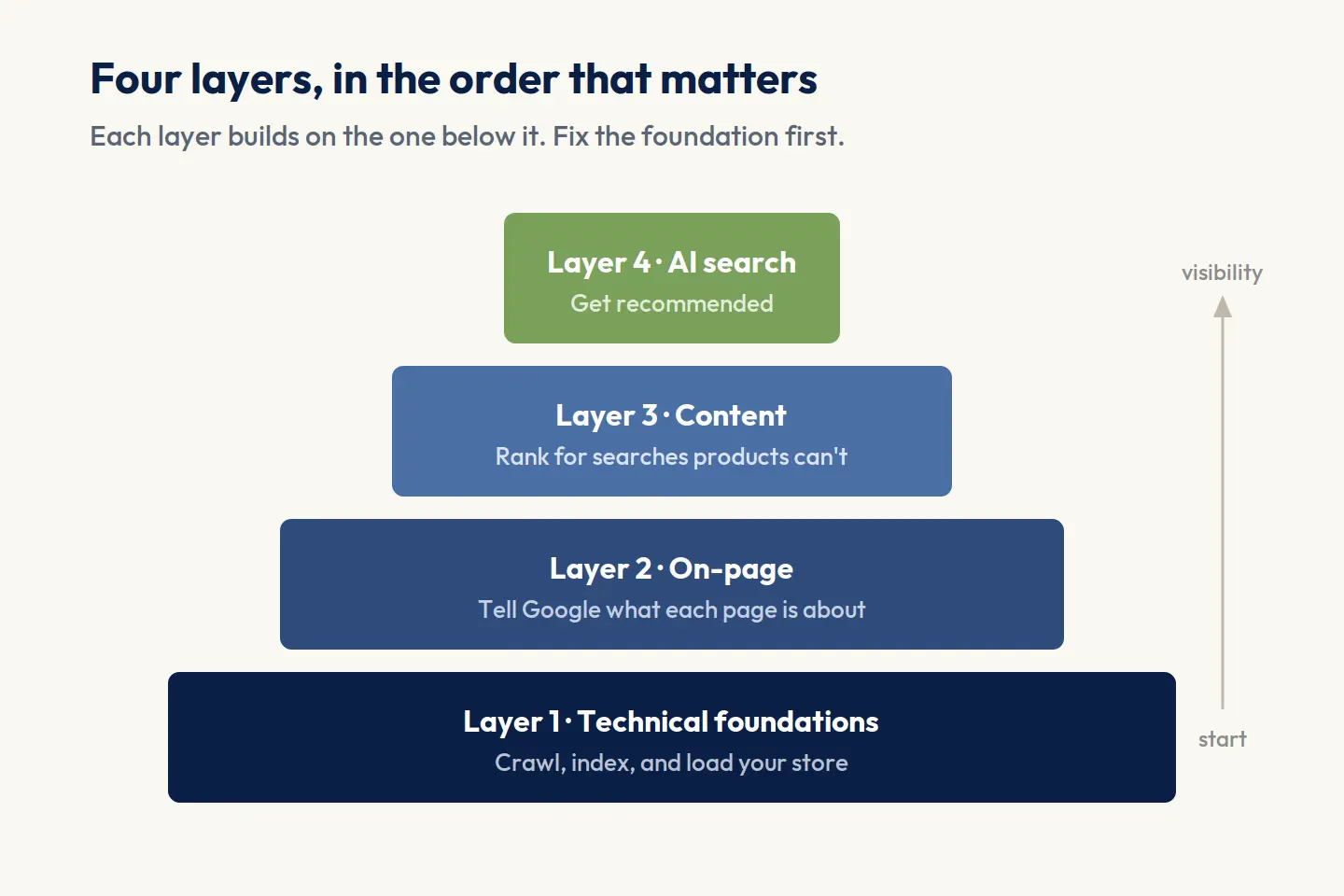
A Shopify SEO checklist works through four layers, in order. First, the technical foundations: a custom domain, HTTPS, your sitemap, and clean crawling. Then on-page: titles, meta descriptions, URLs, and headings. Then content and structure: unique product and collection copy, internal links, and schema. Finally, AI search (GEO): structuring your store so ChatGPT, Perplexity, and Google's AI Overviews actually recommend you. Get the order right and each layer builds on the last. |
Shopify SEO checklist at a glance (the 8 pillars)
Shopify SEO breaks down into eight pillars, grouped into four layers you tackle in order: technical foundations, on-page, content and structure, and AI search. The table below is the whole checklist in one view. Skim it to see where your store stands, then work through the detailed steps underneath.
| # | Pillar | What you're checking | The target |
|---|---|---|---|
| 1 | Technical foundations | Custom domain, HTTPS, sitemap, indexing | All live; sitemap submitted to Search Console |
| 2 | Core Web Vitals | Loading, responsiveness, stability on mobile | LCP ≤ 2.5s, INP ≤ 200ms, CLS ≤ 0.1 |
| 3 | On-page | Titles, meta descriptions, URLs, headings, alt text | Titles < 60 characters, one H1 per page |
| 4 | Content & structure | Product and collection copy, internal links | 300+ words per product, unique collection copy |
| 5 | Duplicate content | Collections → products URLs and canonicals | Canonical points to the clean /products/ URL |
| 6 | Structured data | Product, Organization, Breadcrumb, Review schema | Passes Google's Rich Results Test |
| 7 | AI search (GEO/AEO) | Answer-first content, FAQ schema, llms.txt | Cited by ChatGPT, Perplexity, AI Overviews |
| 8 | Off-page authority | Backlinks, digital PR, brand mentions | Quality links from sites in your niche |
How to use this checklist
Work top to bottom the first time through. The order is deliberate: each layer depends on the one before it, so fixing things out of sequence means redoing work.
If you're launching a new store, do every step once as you set up. If you have an established store, use the table above to find your weak spots and jump to those sections. Either way, keep the checklist for your monthly review (step 33), because SEO isn't something you finish once.
What Shopify handles for you, and what you own
Shopify gives you a solid SEO starting point, which is worth knowing so you can focus your effort where it actually counts.
Shopify handles automatically:
- A free SSL certificate (HTTPS)
- An auto-generated, auto-updating sitemap.xml
- A sensible default robots.txt
- Clean, mostly SEO-friendly URL structures
- Basic mobile responsiveness in most themes
You are responsible for:
- Keyword research and how you target each page
- All your titles, meta descriptions, and content
- Unique product and collection copy
- Internal linking and site structure
- Fixing duplicate content, and completing your schema
- Everything in AI search and off-page authority
The pattern is simple: Shopify handles the plumbing, but the work that actually moves rankings is yours. That's what the rest of this checklist walks you through.
Layer 1: Technical foundations (fix these first)
Before Google can rank your store, it has to find it, crawl it, and trust it. That's what this layer covers. None of it shows up on your storefront, but if you skip it everything you do later sits on sand. Start here.
1. Connect a custom domain and confirm HTTPS
Your store should live on your own domain (yourbrand.com), not the default yourbrand.myshopify.com address Shopify gives you at signup. A custom domain builds trust with shoppers and is what Google expects from a real business.
To set it up: go to Settings → Domains, connect or buy your domain, and set it as primary. Shopify redirects the old address automatically, so you lose nothing.
Then confirm the padlock. Every Shopify store gets a free SSL certificate, which turns http into https and encrypts shopper data. It's usually on by default. Check Settings → Domains for an "SSL certificate active" note. HTTPS is a confirmed Google ranking signal, and browsers actively warn shoppers away from stores without it.
2. Set up Google Search Console and submit your sitemap
Google Search Console is free, and it's the most useful SEO tool you'll set up. It shows the keywords you already rank for, which pages Google has indexed, and any errors holding you back.Where to find your Shopify sitemap.xml
Your sitemap always lives at yourbrand.com/sitemap.xml. Shopify generates and updates it for you, so you never edit it by hand. To submit it:
- Create a Search Console account and add your store as a property.
- Verify ownership (Shopify supports the meta-tag and DNS methods).
- Open the Sitemaps report, enter sitemap.xml, and submit.
Once it's processed, check back over the next couple of weeks to watch your pages get indexed.
Reading the Performance report for opportunities
Once data builds up, this report shows what you already rank for. Two quick wins: pages sitting on page two (positions 11–20) often need only a small on-page push to reach page one, and pages with lots of impressions but few clicks usually need a better title or meta description. Check it monthly.
3. Install Google Analytics 4
Search Console tells you how people find you. Google Analytics 4 tells you what they do next: where they land, how long they stay, and what leads to a sale.
Connect it through Shopify's Google & YouTube channel, or add your measurement ID under Settings → Customer events.
4. Confirm your store is indexed
Indexing means Google has added your pages to its database. If a page isn't indexed, it can't rank, no matter how good it is.
To check, search Google for site:yourbrand.com. The result count is roughly how many pages Google has indexed. Compare it to how many pages you actually have. If it's far lower, something is blocking Google.
The usual culprits on a new store:
- The storefront is still password-protected (remove it under Settings → Preferences when you're ready).
- Pages are set to hidden.
- The theme is adding no-index tags.
To diagnose a specific page, run it through Search Console's URL Inspection tool, which tells you exactly why it isn't indexed.
5. Check your robots.txt file
Your robots.txt file tells search engines which parts of your store they can and can't crawl. Shopify creates one for you, and the defaults are sensible: it blocks crawler traps like your cart and checkout while leaving products and collections open.
For most stores, you never need to touch it. You can view yours at yourbrand.com/robots.txt to confirm nothing important is blocked, especially after adding apps or custom pages.
Shopify does let you edit it through the robots.txt.liquid theme file, but treat that as advanced. A wrong rule here can hide your entire store from Google, so change it only if you know exactly what you're blocking and why.
6. Fix the collections → products duplicate content issue
This one gets talked about on almost every Shopify SEO checklist, though as our own audit found, it's less widespread than most of them claim. It's still worth checking, because when it does happen, it's an easy fix that clears up duplicate content across your catalog.
What's happening
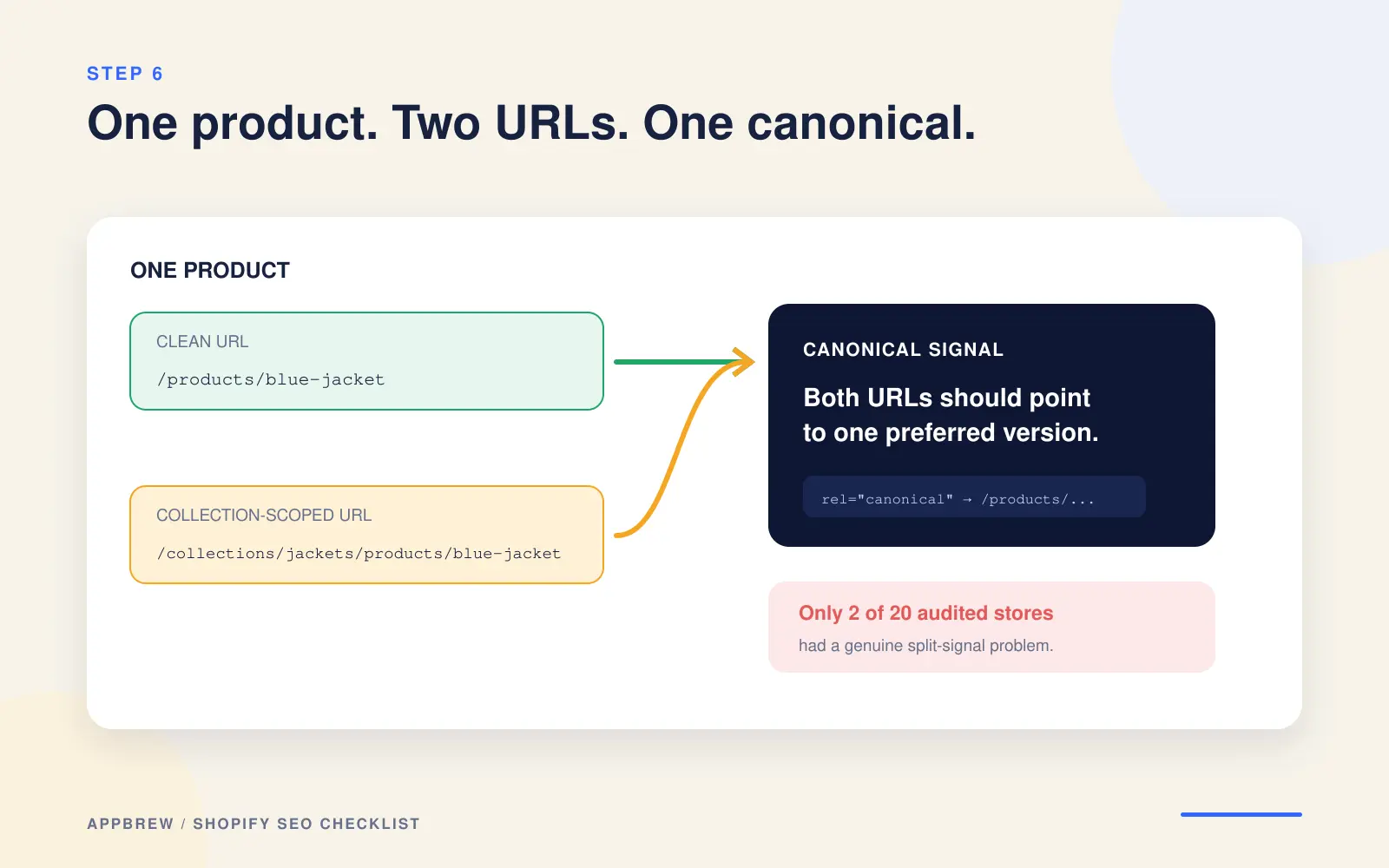
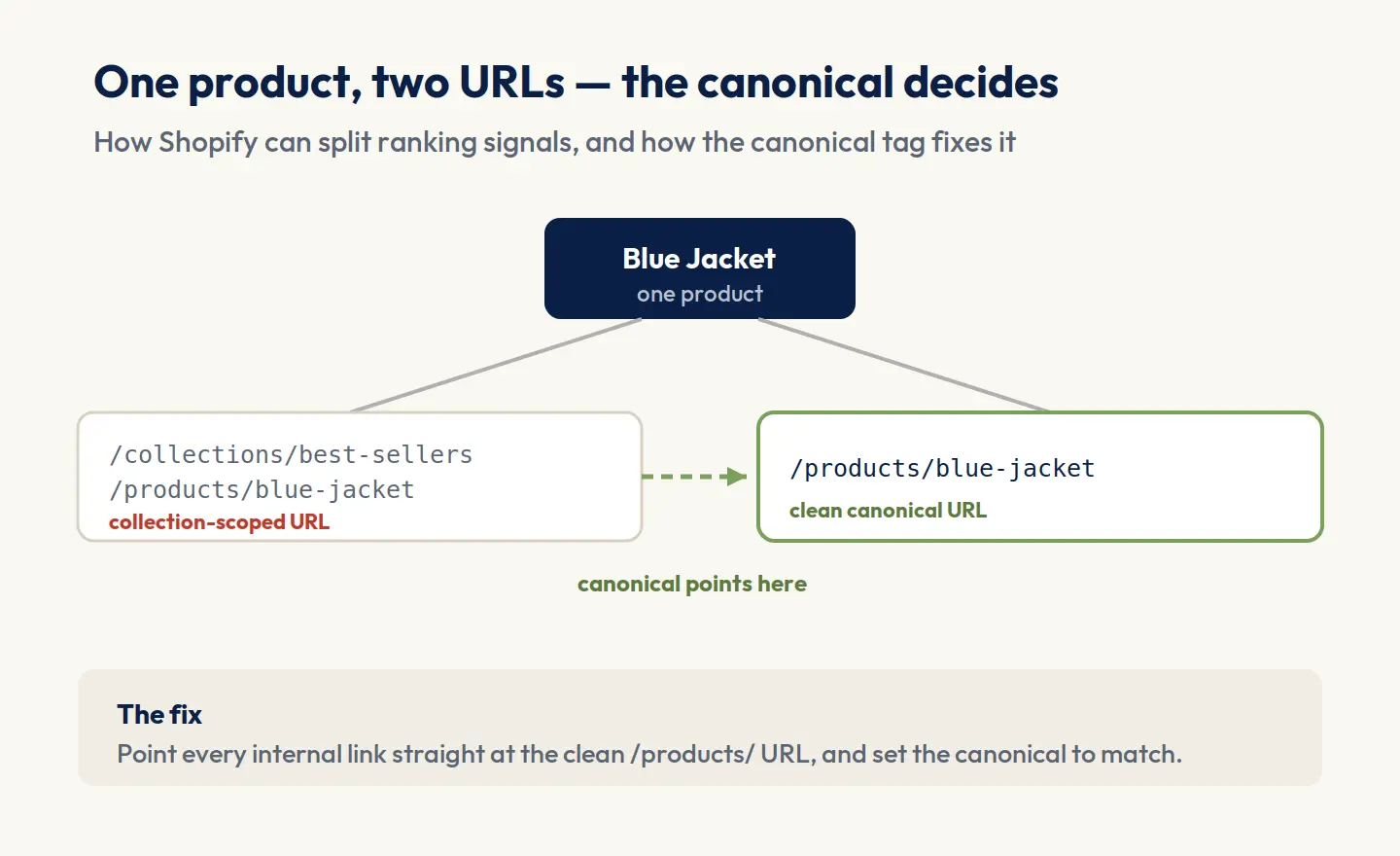
Shopify can show the same product at two different URLs. Reached through a collection, a product looks like this:
yourbrand.com/collections/best-sellers/products/blue-jacket
But the same product also lives here:
yourbrand.com/products/blue-jacket
Same product, two addresses. To Google, that can read as duplicate content, splitting your ranking signals between the versions instead of concentrating them on one.
How to check your store
- Open any collection and click into a product.
- Look at the URL. If it contains /collections/.../products/, you likely have this issue.
- Right-click → View Page Source, and search for rel="canonical". That tag tells Google which version is the "real" one.
How to fix it
The clean fix is to make product links point straight to the /products/ URL, and to make every product's canonical tag point to that same clean version.
Most modern themes now set the canonical correctly by default, so your first job is to confirm yours does. If it doesn't, correct it in your theme's product link code (often a snippet like product-card or product-grid-item) so links skip the collection path.
Not comfortable editing theme code? Hand this one to a developer. Getting it right once fixes it site-wide.
In our audit of 20 top US Shopify stores, only 2 (10%) actually had this problem, so check yours before spending time on it.
7. Improve your Core Web Vitals
Core Web Vitals measure how fast and stable your store feels to a real shopper. They're a ranking factor and matter most on mobile, where most Shopify traffic comes from.
LCP, INP, CLS: the 2026 thresholds
There are three, each with a target to beat:
| Metric | What it measures | Your target |
|---|---|---|
| LCP (Largest Contentful Paint) | Loading speed | 2.5 seconds or less |
| INP (Interaction to Next Paint) | Responsiveness to taps/clicks | 200 milliseconds or less |
| CLS (Cumulative Layout Shift) | Visual stability (no jumping) | 0.1 or less |
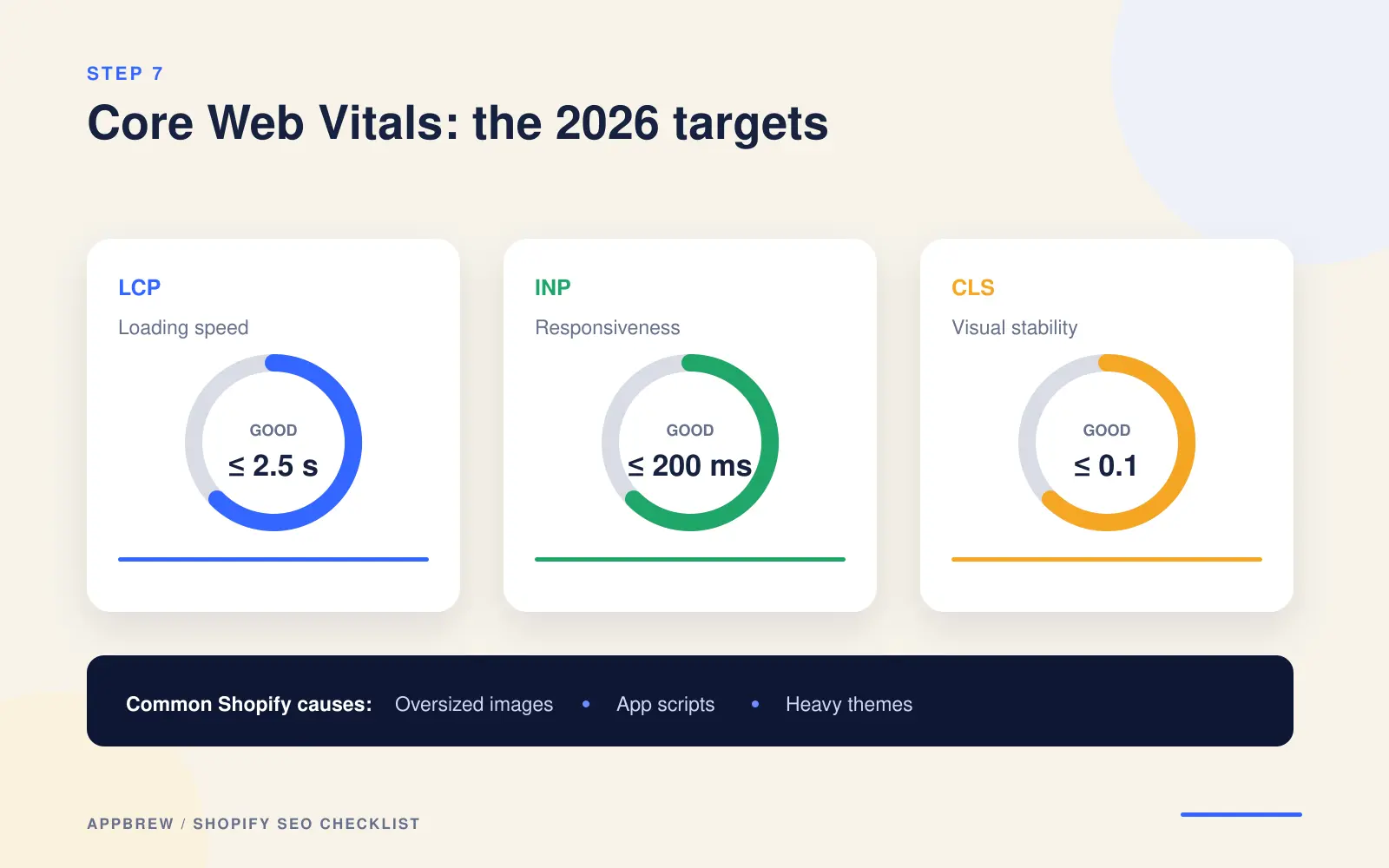
On Shopify, poor scores usually trace back to three things:
- oversized images
- too many apps loading scripts
- heavy themes
Test your store in Google's PageSpeed Insights, which reports all three, then work through the biggest offenders. The next two steps tackle the top two causes.
For a deeper walkthrough, see our guide to improving Core Web Vitals.
8. Audit your app bloat
Every app you install can add its own code to your store, and that code often loads on every page, whether the page uses the app or not. Ten apps you barely use can quietly slow your whole store down.
Go through your installed apps and be honest about which you actually need, then uninstall the rest.
One catch: uninstalling doesn't always remove the code an app added to your theme. After removing one, check your theme files (or ask the app's support) for leftover snippets and clear them out, so you're not carrying dead weight.
9. Enable lazy loading on collection images
Lazy loading loads images only as a shopper scrolls to them, which improves your LCP score on long collection pages. Most current themes do it automatically; confirm your image code uses loading="lazy", and if it doesn't, add it or update your theme.
10. Review the Index Coverage report
Once the Search Console has run for a week or two, open the Pages report (sometimes called Index Coverage). It splits your pages into indexed and not indexed, and tells you why anything was left out.
Look for pages that should rank but don't, and read the reason Google gives, such as:
- Crawled – currently not indexed
- Duplicate, Google chose different canonical
- Blocked by robots.txt
This report is your ongoing early-warning system. Check it monthly and you'll catch indexing problems before they cost you traffic.
Layer 2: On-page optimization
On-page SEO is how you tell Google what each page is about. Layer 1 makes your store crawlable; this layer makes each page rank for the right search. It's mostly small, fast edits, and it's where a lot of stores leave easy wins on the table.
11. Write title tags under 60 characters
Your title tag is the clickable headline that shows up in Google results, and it's one of the strongest on-page signals you have. Keep it under about 60 characters so it doesn't get cut off, and put your main keyword near the front.
Product vs. collection vs. homepage titles
Use a reliable format for each page type:
- Product: Product Name: Key Feature or Benefit | Brand
- Collection: Collection Name (the category term shoppers search) | Brand
- Homepage: Brand: What You Sell in a Few Words
In Shopify, edit these under each page's "Search engine listing" section, not just the product title. The two are separate, and the SEO title is the one Google reads. Write for a person deciding whether to click, not only for the keyword.
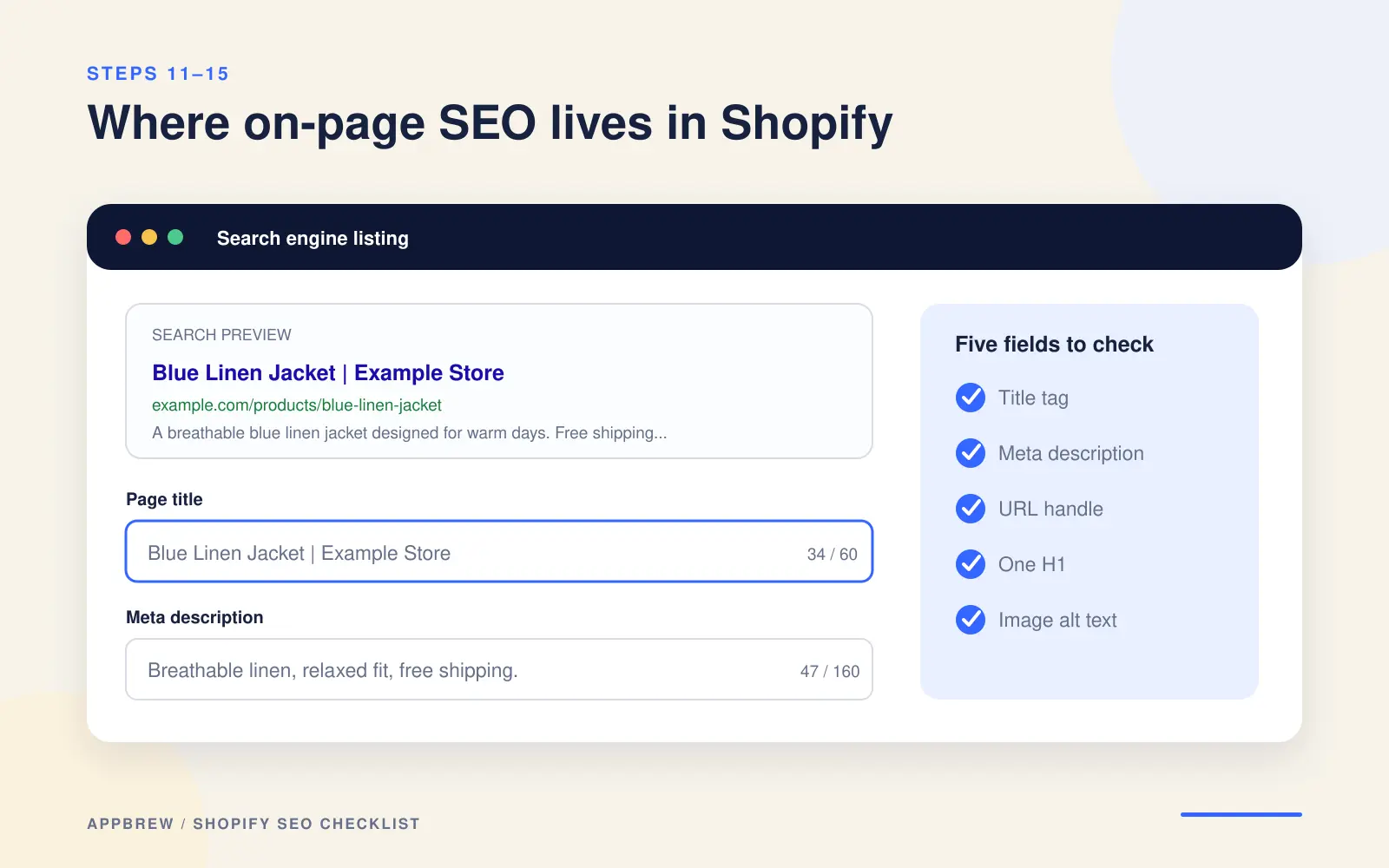
12. Write compelling meta descriptions under 160 characters
Your meta description is the short summary under the title in search results. It isn't a direct ranking factor, but it heavily influences whether people click, and clicks matter.
Keep it under about 160 characters, include your keyword naturally, and give a reason to choose your store: free shipping, a guarantee, a bestseller, whatever's true.
Write a unique one for every important page. If you leave it blank, Google pulls a random snippet from the page, which rarely sells as well as copy you wrote on purpose.
13. Clean up your URL handles
A URL handle is the last part of a page's web address (the blue-jacket in /products/blue-jacket). Clean, readable handles help both shoppers and Google understand the page.
Keep them:
- Short and descriptive, with your keyword in plain words
- Separated by hyphens, not underscores or spaces
- Free of filler like "the," "and," or random numbers
Setting 301 redirects when you change a handle
If you change a handle on a page that already gets traffic, Shopify can create a redirect for you. Always keep that redirect. Changing a URL without redirecting the old one breaks any links pointing to it and throws away the ranking it had earned.
14. Use a proper heading hierarchy
Headings give your page a structure Google can follow: the H1 is the page's main title, H2s are its main sections, H3s sit under those, and so on. Used properly, they make a page easier to read and easier to rank.
Two rules cover most of it:
- One H1 per page, holding the main keyword. On Shopify, your theme usually sets the product or collection name as the H1 automatically, so check it isn't doubling up.
- Use H2s and H3s in order to break up the rest, rather than picking headings for how big the text looks. Don't skip from H1 to H4 for styling.
15. Add descriptive alt text and image file names
Alt text is a short written description of an image. It helps shoppers using screen readers understand what an image shows and helps Google better understand your visuals, improving their chances of appearing in image search. For example, you can create logos for your brand that are clear and recognizable, making them easier to describe accurately with relevant alt text.
Three easy habits:
- Name the file before you upload it. blue-linen-jacket.jpg tells Google far more than IMG_4827.jpg.
- Write alt text that describes the image in plain language, working in the product keyword where it fits naturally. Add it in Shopify by clicking any image and filling the "Alt text" field.
- Don't forget your logo and brand images, they need alt text too. A clean, recognizable logo is much easier to describe accurately than a cluttered one.
Skip alt text on purely decorative images (borders, background shapes), so you're not adding noise.
16. Optimize your collection pages
This is the biggest missed opportunity in Shopify SEO, so it's worth real attention. Collection pages target category keywords, the broad, high-intent searches like "linen jackets" or "running shoes" that bring in serious buyers. Yet most stores leave them almost empty.
What to do with them
- Write a unique description of 100–300 words for each important collection. Cover what's in the category, who it's for, and what makes yours worth buying. Don't reuse the same paragraph across collections.
- Target the category keyword in the collection title, the SEO title, and naturally through the description.
- Place some text above the product grid and the rest below, so shoppers see products fast while Google still gets the context it needs.
- Handle filters and sorting carefully. Filtered views (by color, size, price) can spin up near-duplicate URLs. Make sure your theme keeps the main collection as the canonical version so those variations don't compete with it.
It also helps to understand how JavaScript rendering affects what Google sees on collection pages, since content that only loads after a script runs can be missed entirely.
What we found across top brands
This is the single biggest gap we found. In our audit of 20 top US Shopify stores, 65% had a completely blank collection description and 95% came in under 50 words, including names like Glossier and Liquid Death. The full finding, with examples, is in the research section below.
17. Optimize your product pages
Your product pages are where the sale happens, and where a lot of stores accidentally hand Google duplicate content. The fix is writing a copy that's genuinely yours.
Write 300+ word unique descriptions, always.
Never paste the manufacturer's text: dozens of other stores use the exact same words, and Google has no reason to rank yours over theirs. Aim for around 300 words or more per product, covering benefits, materials, sizing, and the details shoppers ask about.
Then make it easy to scan and easy to cite:
- Lead with a short paragraph on what the product is and who it's for.
- Put specs and features in bullets.
- Answer the common questions right on the page (fit, care, shipping), which helps shoppers and feeds AI search, something you'll build on in Layer 4.
For the full method, with before-and-after rewrites, see how to optimize your product descriptions for AI shopping assistants.
Layer 3: Content and site structure
Layers 1 and 2 got your existing pages in good shape. This layer is about the bigger picture: which pages you have, how they connect, and how you use content to rank for searches your product and collection pages can't reach on their own. This is where you go from a tidy store to one that pulls in traffic.
18. Map your keywords to the right page type
Different pages are built to rank for different kinds of searches. Here's the mapping that works for almost every store:
| Search type | What the shopper wants | Page that should rank |
|---|---|---|
| Transactional ("buy blue linen jacket") | To purchase a specific item | Product page |
| Commercial ("linen jackets") | To browse a category | Collection page |
| Informational ("how to style a linen jacket") | To learn something | Blog post |
Before you create or optimize a page, decide which bucket its keyword falls into, then point it at the matching page type. A blog post will never out-rank a category page for "linen jackets," and a product page won't rank for "how to style a jacket." Use the right tool for each search.
19. Build a strong internal linking structure
Internal links are links from one page on your store to another. They help shoppers find related products, and they help Google discover your pages and understand how they relate, passing ranking strength between them.
A few habits make the biggest difference:
- Link from blog posts to the products and collections they mention. An informational post that links to a "money" page passes it both visitors and ranking value.
- Link related products and collections to each other, so shoppers (and Google) can move through your catalog naturally.
- Use descriptive anchor text, the visible words of the link. "Our linen jackets" tells Google what's on the other end; "click here" tells it nothing.
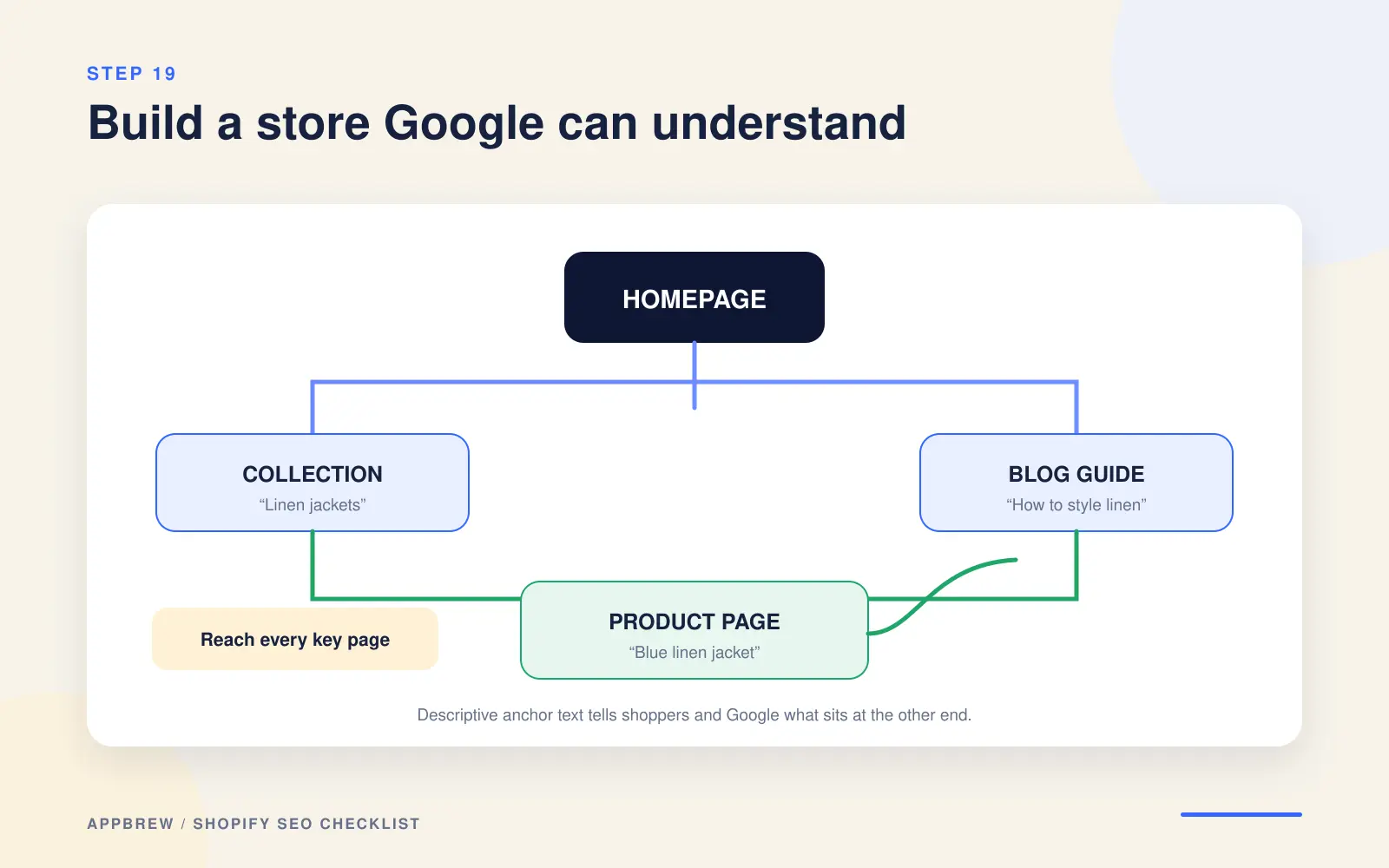
Aim for every important page to be reachable within a few clicks of your homepage. Pages buried deep, with nothing linking to them, are the ones Google is most likely to ignore.
20. Handle out-of-stock and discontinued products
What you do with a product you no longer sell has real SEO consequences, because those pages have often earned rankings and links you don't want to throw away. The right move depends on whether the item is coming back.
Keep sold-out URLs live
If a product is temporarily out of stock, keep the page live. Removing it loses the ranking it built. Show an "email me when it's back" option instead, which keeps the page useful and captures demand.
301-redirect discontinued products to alternatives
Set a 301 redirect from the old product to the closest alternative. The redirect passes most of the old page's ranking value to the new one.
Redirect to a collection when there's no replacement
If a discontinued product has no clear alternative, redirect to the parent collection so the link equity and the shopper both land somewhere relevant, instead of on a dead 404.
21. Collect customer reviews and add review schema
Reviews do double duty for SEO. They add fresh, keyword-rich content to your product pages written by your customers, and when marked up correctly, they can put star ratings directly in your Google results, which lifts clicks.
Collect them with a reviews app (Shopify has several) that emails buyers after delivery. Make sure the review text is readable by Google as text on the page, not trapped inside an image or a script it can't parse. The star-rating markup that earns those result stars is review schema, which you'll set up in step 24.
22. Create SEO-driven blog content
Your product and collection pages can only rank for shopping searches. A blog lets you rank for the much larger world of informational searches your future customers are typing long before they're ready to buy, then guide them toward your products.
Target the questions your shoppers actually ask
- "How to" guides ("how to clean a linen jacket")
- "Best" and comparison posts ("best fabrics for summer")
- Buying guides and problem-solving pieces tied to your products
- Building topic clusters that link to collections
Don't publish posts in isolation. Every post should link to the relevant collections and products (step 19), turning readers into shoppers. A blog that never links to what you sell brings traffic but few sales.
23. Add breadcrumb navigation
Breadcrumbs are the small trail near the top of a page that shows where it sits, like Home › Jackets › Linen Jackets. They help shoppers move back up to a category, and they help Google understand your store's structure.
Most Shopify themes include breadcrumbs or offer them as a setting; some need a small snippet added to the product and collection templates. When you add them, pair them with breadcrumb schema (next step) so Google can show that trail directly in your search result.
24. Add structured data for every page type
Structured data, also called schema, is code that spells out what a page is in a language search engines read directly. It's what makes rich results possible: star ratings, prices, and breadcrumbs showing right in Google. It's also increasingly how AI search engines understand and quote your store.
The ideal schema map
Each page type should carry specific schema:
| Page | Schema it should include |
|---|---|
| Homepage | Organization (your brand, logo, social profiles) |
| Product pages | Product (with price and availability) + Review/AggregateRating |
| Collection pages | CollectionPage + BreadcrumbList |
| Blog posts | Article (with author and dates) |
Many Shopify themes add some of this automatically, and review or SEO apps can fill gaps, but coverage is often patchy. Check what you actually have by running key pages through Google's Rich Results Test, which shows exactly which schema Google detects and flags errors. Fix anything missing, especially Product schema, which drives the price and rating features shoppers see before they even click.
What we found across top brands
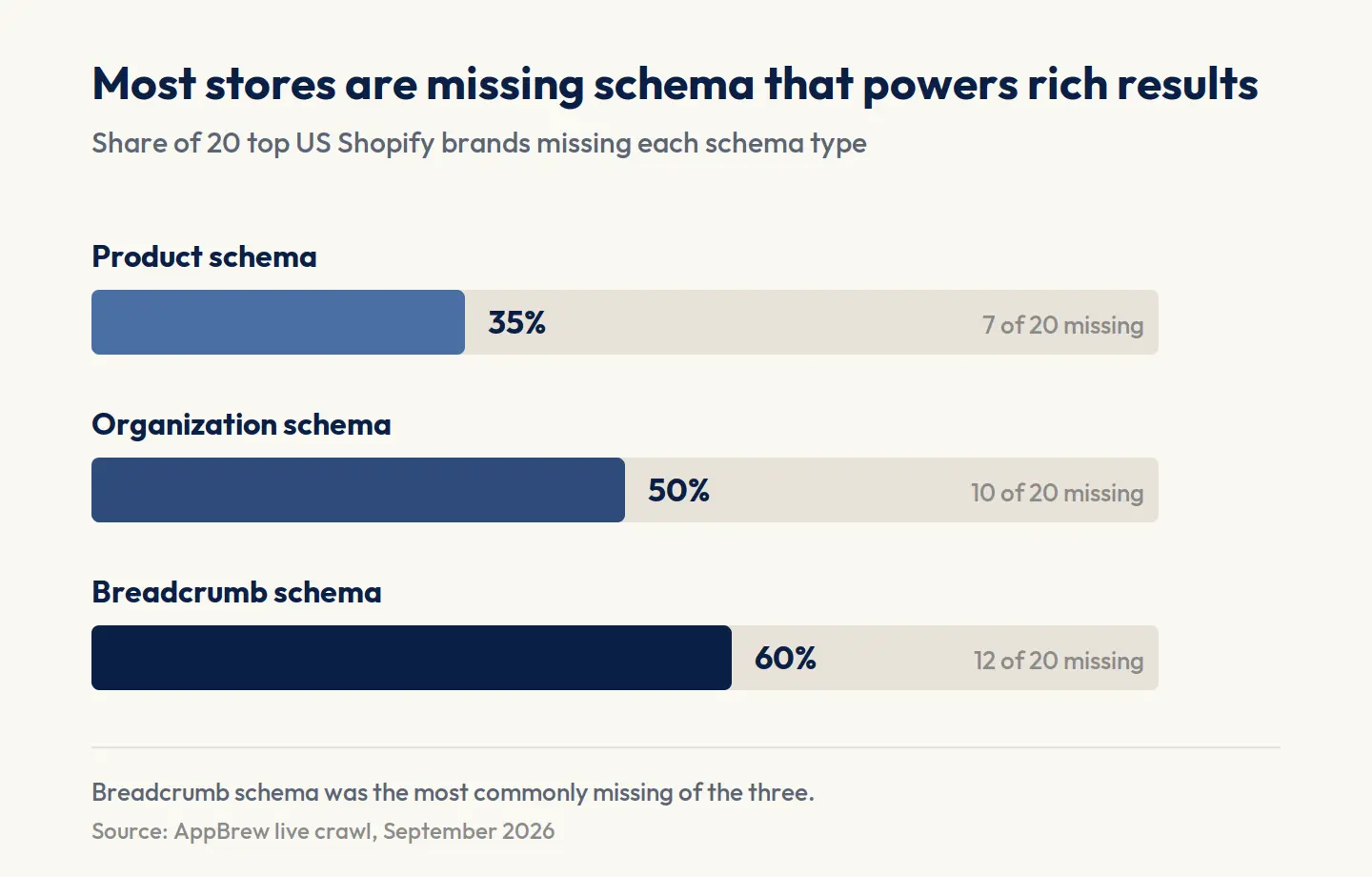
In our audit of 20 top US Shopify stores, 35% were missing Product schema, 50% were missing Organization, and 60% were missing Breadcrumb schema, on pages that otherwise look finished. The full per-store breakdown is in the research section below.
Layer 4: AI Search (GEO/AEO), authority, and maintenance
Search isn't just Google's ten blue links anymore. A growing share of shoppers ask ChatGPT, Perplexity, or Google's own AI Overviews for recommendations, and those tools answer by quoting a handful of sources.
For the mechanics, see how AI shopping assistants choose what to recommend.
- AEO (Answer Engine Optimization): getting your store quoted as the answer in AI tools and featured snippets.
- GEO (Generative Engine Optimization): the broader practice of making your content easy for generative AI to understand, trust, and cite.
They overlap heavily, and everything below serves both. You don't need to treat them as separate projects.
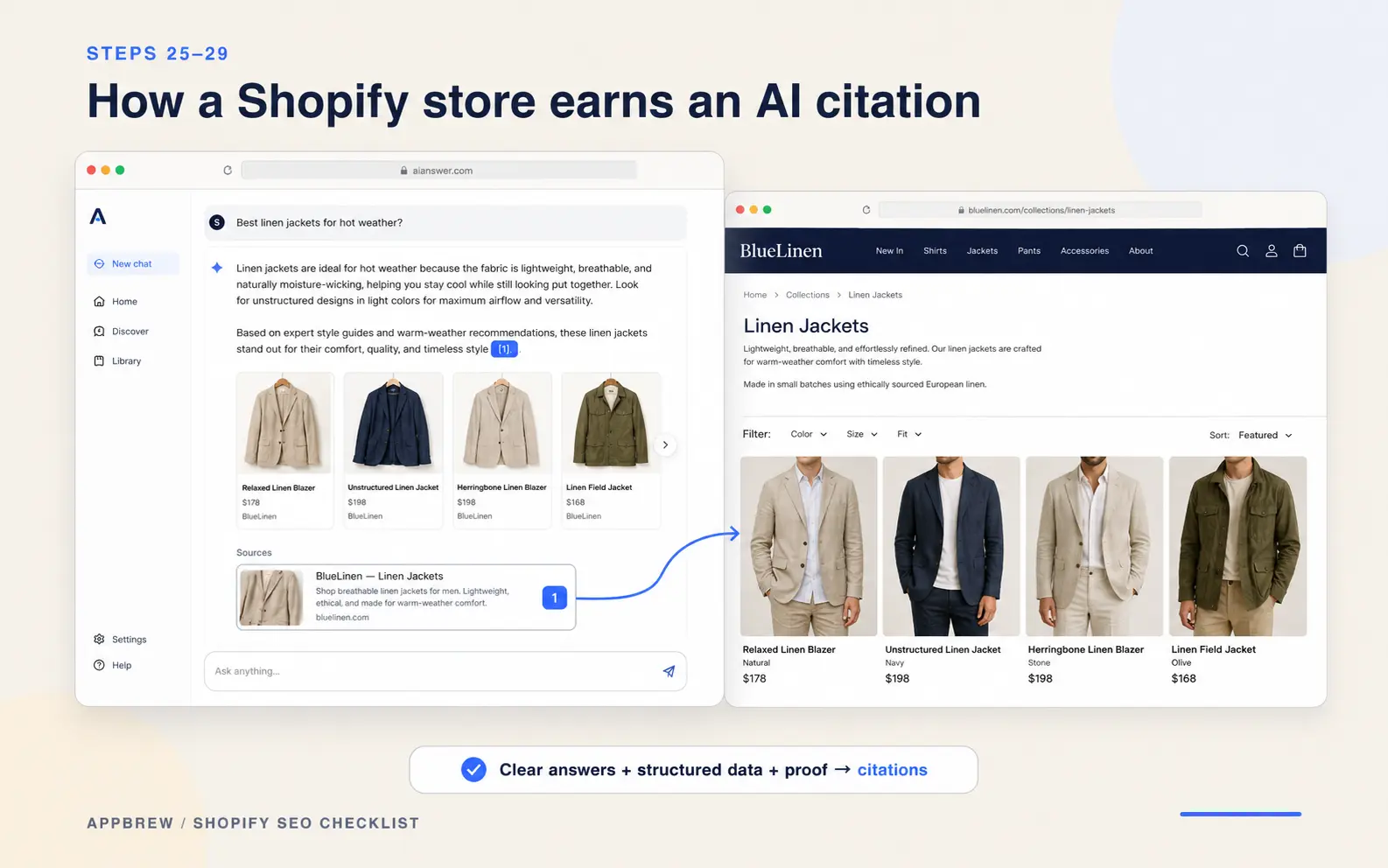
25. Structure your content so AI can quote it
AI search engines pull short, self-contained passages to build their answers. The easier your content is to lift and quote, the more often you get cited. This comes down to how you structure what you write.
Three habits make your pages quotable:
- Answer first, then explain. Open each section with a direct, complete answer in a sentence or two, before you add detail. AI tools tend to lift that opening line.
- Write self-contained sentences. A sentence that only makes sense after the two before it is hard to quote. One that stands on its own can be pulled straight into an answer.
- Put the key fact in plain text. Not inside an image, not buried in a video, not implied. If it matters, state it clearly where a crawler can read it.
26. Add FAQ sections and FAQ schema
A short FAQ is one of the most efficient AI-search assets you can build, because its format, a question followed by a direct answer, is exactly what AI tools are looking for to quote.
On your key product, collection, and blog pages, add a few real questions your shoppers ask, each with a clear, standalone answer of a sentence or two. Then mark them up with FAQPage schema so Google and AI engines can read the question-and-answer structure directly. That structure is what can earn you an expandable FAQ result in Google and a citation in an AI answer.
Keep the answers genuinely useful and specific to your store. Generic filler questions don't get quoted, and they don't help shoppers decide.
27. Control how AI crawlers access your store
AI engines send their own crawlers to read your site, and you get some say over what they can access. Managing this deliberately, rather than ignoring it, is part of showing up in AI results.
The main AI crawlers to know:
- GPTBot (OpenAI / ChatGPT)
- ClaudeBot (Anthropic / Claude)
- PerplexityBot (Perplexity)
- Google-Extended (Google's AI training and AI features)
If you want to appear in AI answers, let the crawlers that power AI search reach your store. For most stores that want visibility, that means allowing them. Shopify now also generates an llms.txt file for your store. You can check for yours at yourbrand.com/llms.txt.
This is also worth watching because it's part of a bigger shift: see how agentic commerce is changing discovery, where AI agents increasingly browse and buy on a shopper's behalf.
28. Test whether AI actually recommends you
You can't improve what you don't measure. The simplest way to know where you stand in AI search is to ask the same questions your shoppers would, and see whether you come up.
A quick, repeatable check:
- Build a short list of prompts a shopper in your category might use, like "best linen jackets for summer" or "affordable sustainable activewear brands."
- Run them in ChatGPT and Perplexity and note whether your store appears, which competitors do, and what sources the AI is citing.
- Look at what the cited pages do well, then close the gaps on your own pages using the habits in steps 25 and 26.
- Re-run the same prompts every month or two to track whether your changes are moving the needle.
This is one of the highest-value new habits in SEO, and almost no small store is doing it yet. That's your opening.
29. Use comparison tables instead of dense prose
When you're helping shoppers weigh options, a clear comparison table beats a wall of text, for readers and for AI. AI tools pull structured data like tables especially readily, because the relationships are already laid out.
Wherever you'd naturally compare things, materials, plans, product tiers, use cases, build a simple table with consistent columns. It's easier for a shopper to scan and easier for an AI to quote accurately, which makes it more likely your version becomes the cited one.
30. Analyze your competitors' backlinks
Backlinks (links from other sites to yours) remain one of the strongest authority signals, and authority is often the real reason a competitor outranks you. Using a backlink tool like Ahrefs or Semrush, look at who links to the stores above you, then go after the same sources: category publications, roundups, and partners.
31. Earn links with assets worth linking to
You rarely earn quality backlinks by asking for them. You earn them by publishing something genuinely worth citing, then making sure the right people see it.
The formats that reliably attract links:
- Original data and research (a survey, or an audit of your industry)
- Genuinely useful guides that become the reference on a topic
- Free tools, calculators, or templates people bookmark and share
This is worth pausing on, because it's exactly what this page is. A checklist backed by original research into real stores is a linkable asset by design. Publish that kind of thing, and the links, and the authority that lifts everything else, start to follow.
32. Reclaim brand mentions and pursue digital PR
Often the hardest part is done: people mention your brand without linking to it. Find those unlinked mentions with a backlink tool or a Google Alert and ask the author to add a link. Then go further with digital PR, offering journalists something worth covering: your data, your founder's expertise, or a genuinely new angle.
33. Set up a monthly SEO routine
SEO isn't a one-time project. Search results shift, your store changes with every new product and app, and small problems compound if no one's watching. A light monthly routine keeps your rankings from quietly slipping.
A workable monthly check:
- Review Search Console for new errors, lost rankings, and pages that dropped out of the index.
- Check Core Web Vitals, especially after installing apps or changing your theme.
- Audit new products and collections against this checklist before you consider them done.
- Re-run your AI search prompts (step 28) to track your visibility there.
Build the check into your release process too. Every time you push a store change, run the affected pages against the basics here. Catching a problem the day you create it is far cheaper than finding it three months later in a traffic report.
34. Watch how AI Overviews affect your traffic
Google's AI Overviews, the AI-written answers at the top of many results, are changing how clicks flow. Sometimes they cite you and send qualified traffic; sometimes they answer the question outright and fewer people click through. Either way, you want to know which is happening to you.
In Search Console, watch for queries where your impressions stay steady but clicks fall: a sign an AI Overview may be answering for you. Where that happens, the response is to target searches with real buying intent (where shoppers still click through to purchase) and to structure your content (steps 25 and 26) so that when an AI Overview does appear, your store is the source it names.
What we found when we audited 20 top US Shopify brands
We crawled the collection pages of some of the internet's best-known Shopify DTC brands to see whether the biggest names actually do the basics. Two out of three shipped their main collection page with zero words of description. If brands this size are leaving that page blank, it's the clearest sign yet of how overlooked it is, and how open the opportunity is for you.
Here's how the audit worked and what it turned up.
How we ran the audit
We audited the 20 confirmed standard-Shopify stores on three things we could measure directly from their live pages:
- whether their primary collection page has a written description
- whether their collection-to-product links create duplicate-content risk
- whether their pages carry structured data
Every number below comes from a real page we audited.
Finding 1: 65% of collection pages had zero words
This is the one that should worry a merchant. For each store we pulled the written description from its primary collection page (the first one in its own sitemap) and counted the words.
- 13 of 20 stores (65%) had a completely blank description: zero words.
- 6 more (30%) had thin descriptions of 1 to 49 words.
- Just 1 store (5%) wrote 50 words or more.
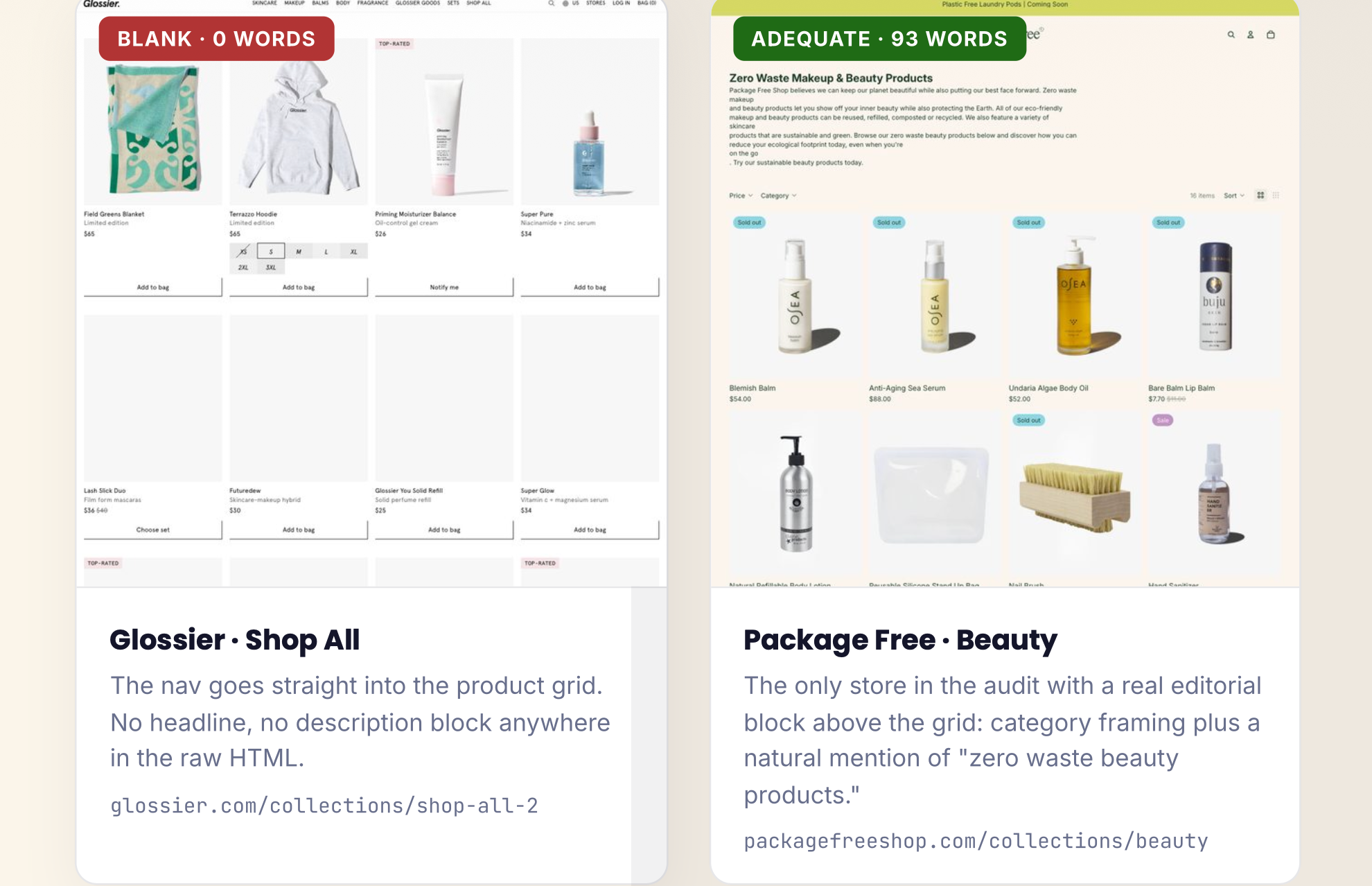
Put another way, 19 of 20 stores (95%) had a collection page under 50 words, and two-thirds had nothing at all.
Finding 2: Only 10% had a real canonical duplication problem
Shopify can serve the same product at two URLs, a clean /products/handle and a collection-scoped /collections/x/products/handle. That's fine as long as the canonical tag consistently points to one. We checked whether each store linked the collection-scoped URL, then read the canonical on that exact page.
Only 2 of 20 stores (10%) had a genuine split-signal problem, where they link the collection-scoped URL throughout their product grid but then canonicalize away from it. The other 18 either don't link that URL or point its canonical back to itself correctly.
Google usually resolves this correctly on its own. But for the stores affected, it's a free fix: point every internal link straight at the canonical URL and the ambiguity disappears.
Finding 3: Most stores are missing schema that powers rich results
We parsed the structured data on one product page and one collection page per store, checking the schema types that drive rich results in Google.
| Schema type | Missing on | What that costs |
|---|---|---|
| Product | 35% (7 of 20) | No price or rating in search results |
| Organization | 50% (10 of 20) | No machine-readable brand entity |
| Breadcrumb | 60% (12 of 20) | No category trail in results |
Review schema showed up more often (on 55%), but that's almost always injected automatically by a reviews app like Judge.me or Yotpo, not written by the merchant, so it isn't evidence of deliberate SEO the way the other three are.
Even top brands get the basics wrong, so what does it mean for you
Three things stand out.
- Famous doesn't mean optimized. The biggest names scored the same zeros as much smaller stores. Being well-funded didn't help these pages.
- Nearly half have gone headless. That quietly changes what a standard Shopify SEO checklist even applies to, and it's a signal worth understanding before you replatform for the same reasons.
- The fixes are cheap. Write the description, fix the canonical, add the schema. None of it needs a replatform. The gap isn't difficulty; it's that nothing in Shopify's default flow ever asks a merchant to close it.
That's the whole opportunity. The steps in this checklist are the same fixes the biggest brands are skipping, which means doing them well can put a small store ahead of famous ones on the searches that matter.





FAQs
What are the basic SEO steps for Shopify?
Start with the technical foundations: connect a custom domain, confirm HTTPS, and submit your sitemap to Google Search Console. Then optimize each page's title, meta description, and content, write unique product and collection copy, add structured data, and build internal links. Work through them in that order, since each step builds on the last.
How do I rank my Shopify store on Google?
Make your store easy to crawl, then give Google clear reasons to rank each page. That means unique titles and descriptions, genuinely written product and collection pages, fast mobile load times, structured data, and links from other sites. Rankings follow when your pages answer a search better than the ones above you.
Is Shopify good for SEO in 2026?
Yes. Shopify handles the technical basics well: HTTPS, a clean URL structure, an automatic sitemap, and mobile-ready themes. Its main limitation is the rigid URL structure for collections and products, which can create duplicate paths. That's manageable once you know about it, and it's covered in this checklist.
How long does Shopify SEO take to work?
Usually three to six months to see meaningful movement, sometimes longer for competitive categories. Technical fixes can be picked up within weeks, but content and authority take time to build. SEO is a compounding investment, not a switch, so the stores that win are the ones that keep at it consistently.
Do I need an SEO app for Shopify?
Not necessarily. Most of this checklist can be done with Shopify's built-in settings plus free tools like Google Search Console. An SEO app helps automate bulk edits, schema, and redirects as you grow, but it won't do the thinking for you. Start with the fundamentals, then add an app if it saves you real time.
What is the 80/20 rule for Shopify SEO?
It's the idea that roughly 20% of the work drives 80% of the results. For most Shopify stores, that 20% is writing unique collection and product descriptions, fixing technical basics like indexing and canonicals, and earning a few quality links. Do those well before chasing more advanced tactics.









